The Complete Guide to WhatsApp Warmers and Account Warming in 2026
A WhatsApp warmer builds a new number's history before you use it for outreach: the number sends and receives ordinary, varied messages on an irregular schedule, so its first campaign doesn't come from a blank account. Warm a brand-new number for at least 15 days before cold outreach, and 30 if you can.
- What it is: warming (or warm-up) means giving a new WhatsApp number weeks of normal, two-way activity before it sends bulk or cold messages.
- How long: at least 15 days before the first campaign, 30 recommended; very new SIMs and numbers with past bans need longer.
- How much: start with a handful of messages a day and add slowly. Hundreds a day in the first two weeks is not warming, it is a spike.
- Manual or automated: manual works for one or two numbers. Past that, a WhatsApp warmer like Wassuply runs it on autopilot.
- No guarantees: no tool can honestly promise you'll never be banned. Warming removes the most common trigger.
If you've ever had a WhatsApp number banned after your first bulk campaign, this guide is for you. Account warming is the most important step between getting a new number and running it at scale, and it is the step most senders skip. We'll cover what warming is, why it works, how to do it by hand, and how a warmer like Wassuply, a Windows and Mac app for warming up WhatsApp numbers, puts the daily work on autopilot.
What Is WhatsApp Account Warming?
WhatsApp account warming (also called WhatsApp warmup) is the process of gradually building a new phone number's activity history on WhatsApp before using it to send bulk messages. The goal is to make the account look like a genuine user, with normal usage patterns, before any automated or high-volume sending begins.
A WhatsApp warmer is the software that does this for you. It has your numbers chat with each other (and, in some tools, with other people's numbers) using varied lines, irregular gaps and a modest daily volume, for as long as each number needs.
WhatsApp's anti-spam systems look at how every account behaves. A brand-new number that immediately sends hundreds of messages to strangers looks like a bot. An account that has spent 15 to 30 days sending and receiving normal-looking messages, with varied recipients, varied wording and varied times of day, looks like a person.
The warmup process bridges that gap. It's often the difference between a campaign that runs for days and a number that is banned in its first hour.
Why Does WhatsApp Ban New Accounts That Skip Warming?
WhatsApp is open about where most of its bans come from. In its first India compliance report, WhatsApp said more than 95% of the accounts it bans are banned for unauthorised automated or bulk messaging (Outlook India, July 2021). The signals that point to that kind of sending are well known:
- Account age and history: new accounts with no prior messages are suspect the moment they start sending in bulk.
- Message volume velocity: 200 messages in the first 10 minutes of a campaign is a pattern no person produces.
- Strangers at volume: messaging many numbers that don't have you saved (cold outreach) is a strong spam signal on its own.
- Repeat message content: the same text to hundreds of recipients in a short window triggers content-based filters.
- User reports: when recipients block and report, WhatsApp looks harder. Many reports in a short period can bring a fast ban.
A new account that hits all of these at once is at high risk of being banned during its first campaign, often mid-send, leaving half your list unreached. We go through the full list of triggers on how to avoid a WhatsApp ban.
How Does WhatsApp Warming Work?
Warming works by building a behavioural baseline before you ever send a bulk message: weeks of two-way conversations, irregular timing and a slowly rising daily volume. Here's what each phase is for.
Phase 1: Baseline Activity (Days 1-3)
In the first three days, the account should behave like a new user discovering WhatsApp. That means:
- A complete profile: name and photo
- About 5 to 10 short, varied messages a day, mostly to people who reply
- Replies coming back (warming works best when it is two-way)
- Irregular gaps between messages, not every 5 minutes on the dot
- Different wording every time, no repeats
Phase 2: Gradual Ramp-Up (Days 4-7)
Once the number has a little history, you can increase volume, slowly. Days 4-7 typically involve:
- About 10 to 20 messages a day
- Slightly longer messages and more back-and-forth
- Some media: an image, a voice note, a document
- Messages spread across mornings, afternoons and evenings
Phase 3: Building Steady History (Days 8-14)
By week two, the account is building real history, but it is not ready for campaigns yet. Days 8-14:
- About 20 to 30 messages a day across several conversations
- A steady daily rhythm that looks like a person's
- Watching for warning signs such as "temporarily blocked" or "too many messages" notices
- Preparing your campaign (list, messages, spintax) without sending it
| Phase | Days | Messages/Day | Key Actions |
|---|---|---|---|
| Baseline | 1-3 | About 5-10 | Profile done, short varied messages, people who reply |
| Ramp-Up | 4-7 | About 10-20 | Add media, more back-and-forth, varied times |
| Steady History | 8-14 | About 20-30 | Hold a rhythm, watch for warnings, prepare the campaign |
| First Campaign | 15+ (30 recommended) | Under the number's safe daily limit | Start small, random gaps on, warm-up keeps running |
These are deliberately modest. They're close to the week-by-week volumes Wassuply's Health & Risk suggests for a brand-new SIM: roughly 8 warm-up messages a day in week one, adding about 10 a day each week, capped at around 30 a day for numbers under six months old. Older numbers start higher and can go further.
Manual WhatsApp Warming vs an Automated WhatsApp Warmer: What's the Difference?
There are two ways to warm up a WhatsApp account: manually (doing it yourself, or paying someone to do it) or with a WhatsApp warmer tool that automates the daily work.
Manual WhatsApp Warming
Manual warming means someone opens WhatsApp and chats by hand every day for 15 to 30 days. For one number this is manageable but tedious. For five numbers it's a part-time job. For 20 numbers, which is normal for an agency running campaigns, it is impractical.
Problems with manual warming:
- Time: someone has to chat on every number, every day, for weeks
- Human error: people repeat messages, fall into regular timing or forget days
- It doesn't scale: warming 10 or more numbers at once by hand is not realistic
- No pair tracking: it's easy to send the same lines back and forth between the same two numbers
Automated WhatsApp Warmer Tools (Including "AI WhatsApp Warmers")
A WhatsApp warmer automates the daily warm-up work. The software runs every number at once, sends varied lines that don't repeat, uses random gaps and keeps track of which lines each pair has already exchanged, without anyone typing.
Many are sold as "AI WhatsApp warmers". Be specific about what that means: in some tools AI writes the warm-up lines; in Wassuply, warm-up chats come from chat packs and Warm-up Pods, and AI writes your outreach messages instead. We explain the difference on the AI WhatsApp warmer page.
Advantages of an automated WhatsApp warmer:
- Warm 1, 5 or 50 numbers at the same time
- No line repeated by the same sender across the warm-up period
- Pair tracking, so two numbers don't trade the same lines again
- Random gaps inside a human-looking range, only inside the hours you choose
- Saved progress, so warm-up picks up where it left off after a restart
- Runs unattended, so nobody has to babysit it
What Is the Day-by-Day WhatsApp Warmup Protocol?
Here is the warm-up protocol we recommend for a brand-new number used for cold outreach. Days 1 to 14 build the account up; the first campaign comes on Day 15 at the earliest, and Day 30 is the safer start. The day-by-day schedule also lives in our WhatsApp warm-up timeline.
Days 1-3: Establish Existence
- Finish the profile: name, photo, about line
- Send about 5 to 10 messages a day, spread across at least 8 hours
- Use 3 to 5 contacts who reply (back-and-forth conversation is ideal)
- Message content: short greetings, simple questions, casual chat
- No links, no images, no sales content yet
Days 4-5: Add Variety
- Move to about 10 to 15 messages a day
- Add an image or a short voice note
- Keep the conversations two-way, with more than one contact
- Vary the times: mornings, afternoons, evenings
Days 6-7: Mid-Ramp
- About 15 to 20 messages a day
- Save a few more real contacts and talk to them
- Join a small group or make a call if you're warming by hand
- Gaps of several minutes between messages, never a fixed interval
Days 8-10: Steady Rhythm
- About 20 messages a day
- A document or product image here and there
- Watch the account: if you see "temporarily blocked" or similar warnings, slow down for a day or two
Days 11-14: Final Conditioning
- About 20 to 30 messages a day, still conversation-like
- Write your campaign messages and spintax now, but don't send them yet
- Clean your contact list and remove anyone without a reason to hear from you
- If the account clears Day 14 without warnings, it has reached the minimum, not the finish line
Days 15-30: First Campaign Window
- Day 15 is the earliest first campaign; 30 days is recommended, and the newest SIMs benefit from up to 60
- Start small and stay under the daily limit Health & Risk sets for each number
- Keep warm-up running alongside campaigns, so the number's activity isn't only outreach
What Makes a Good WhatsApp Warmer Tool?
Not all WhatsApp warmup tools are equal. When evaluating a WhatsApp warmer, look for:
- No message repetition: the same sender should never send the same line twice during warm-up. Good tools track every send.
- Pair tracking: if Number A sends a line to Number B, B shouldn't send the same line back. Duplicate pair patterns are a signal.
- Unordered pairs: A to B and B to A should count as one conversation pair, not two.
- Randomised delays: gaps should be random within a sensible range, not every 5 minutes, not every 30 seconds.
- Contacts beyond your own loop: numbers that only ever talk to each other form a closed loop. Look for a way to warm with other owners' numbers, like Wassuply's Warm-up Pods.
- Persistent state: if the computer restarts, the tool should resume where it left off without resetting progress or repeating lines.
- Many numbers at once: warming one number at a time is slow. Look for parallel warm-up from one app, with a separate session, fingerprint and proxy per number.
- A plan per number: a two-year-old number and a SIM bought yesterday shouldn't get the same schedule.
- A large, varied message library: enough natural lines to last the whole warm-up without sounding canned.
Wassuply's warm-up engine covers each of these. Warm-up is built in and runs on autopilot, with no manual chatting and no separate warm-up service. If you want to compare it with other tools, we put eight options side by side, with prices from each vendor's site, in the best WhatsApp warmer software in 2026.
What Are the Most Common WhatsApp Warming Mistakes?
1. Skipping Warmup Entirely
The most common mistake. "I'll just send slowly and see what happens" rarely ends well. Without warm-up, new numbers often don't survive their first campaign, especially for cold outreach.
2. Warming Too Fast
Sending 200 messages on Day 1 because you're impatient defeats the purpose. What looks suspicious is the jump, not only the total: going from 0 to 200 messages a day is as odd as going from nothing to 1,000.
3. Repeating the Same Messages
If your warm-up tool sends "Hi! How are you?" to 50 different contacts from the same number, that repetition is a spam signal. Every warm-up message should be unique or clearly varied.
4. Using Contacts Who Don't Reply
One-way messages during warm-up do much less than two-way conversations. If you're warming by hand, have people actually reply. If you're using Wassuply, your own numbers reply to each other, and Warm-up Pod partners add real two-way chats from outside your setup.
5. Stopping Warmup and Immediately Sending 10,000 Messages
Finishing warm-up and then launching a maximum-volume campaign spikes your sending profile in a way that looks automated even on a warmed number. Ramp campaign volume gradually: start near your warm-up volume and grow 20-30% per week.
6. Sharing One Device and IP Across Every Number
Ten numbers on one phone or one browser, all on the same connection, are easy to link together. If one gets flagged, the rest can follow. Give each number its own session and, ideally, its own proxy. Our guide to running multiple WhatsApp accounts covers the setup.
How Does Wassuply Run Warmup on Autopilot?
Wassuply's warm-up engine takes the daily work in this guide off your hands. Here's how it works:
- You connect your WhatsApp numbers by scanning QR codes, just like WhatsApp Web. Each one gets its own isolated session, browser fingerprint and optional proxy.
- You start a warm-up session: choose the numbers, a chat pack (10 built in) or your own lines, your hours and a daily cap.
- Your numbers, and Warm-up Pod partners from other Wassuply users, chat with each other on autopilot with random 30-120 second gaps, only inside your hours.
- Health & Risk tracks each number's warm-up days and gives you the plan: days to warm, safe daily limit and first campaign size. No campaign before Day 15; 30 days is recommended.
- When you start your real campaign, random 30-90 second gaps, batches of 10 and 1-5 minute breaks pace the send, and every number keeps a live 0-100 ban-risk score. Turn on Smart Send and it slows sending at 60 and pauses at 80.
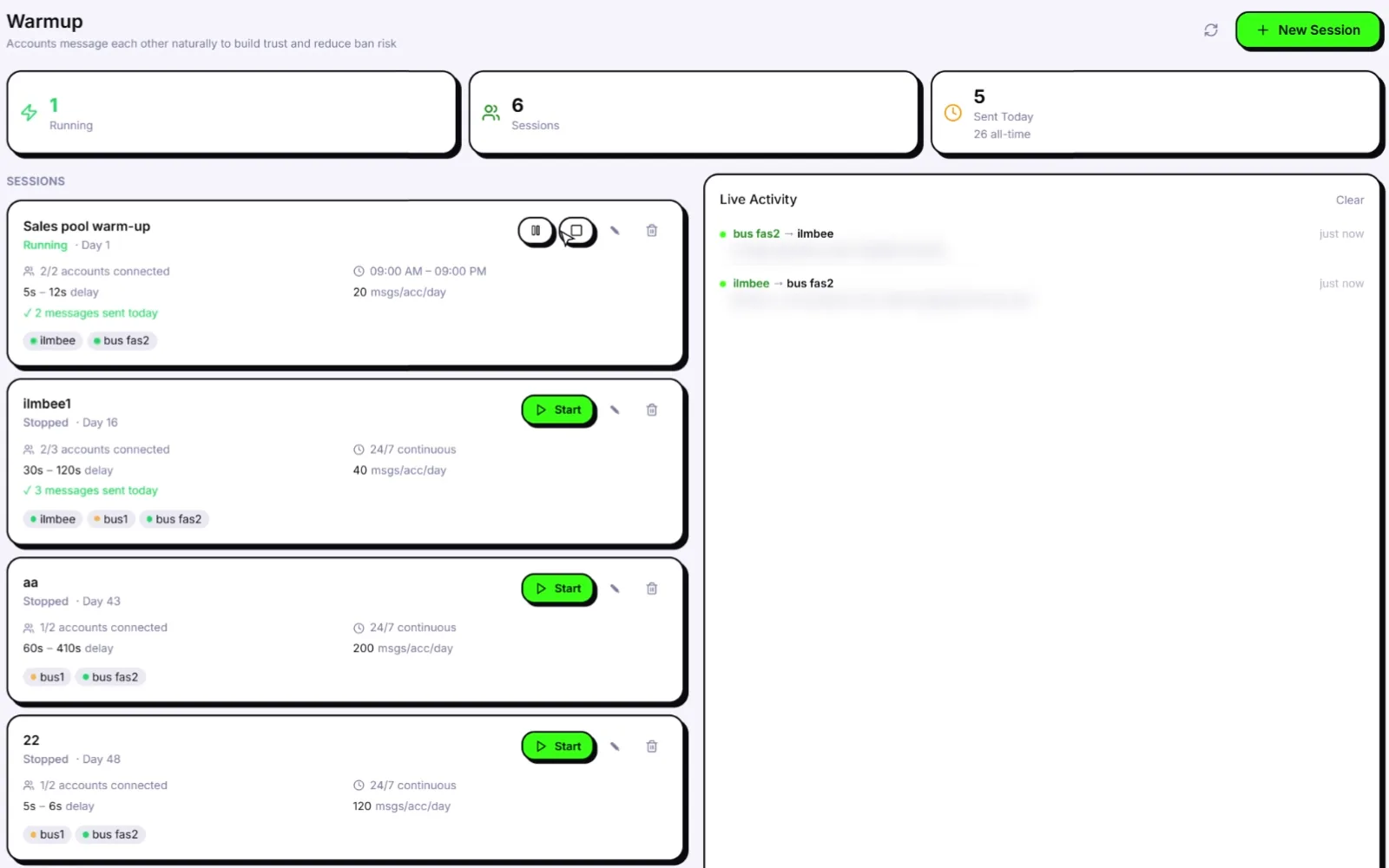
Wassuply includes the warm-up engine and the sender in one app, with no per-number fees: it's all in the $397 lifetime licence (early-bird price). The app itself is free to download; warming and sending need a licence. The full product tour is on the Wassuply WhatsApp warmer page.
Ready to warm your numbers the right way?
Wassuply's warm-up runs on autopilot, and Health & Risk tells you when each number is ready. Free download for Windows 10/11 and macOS 12+.
Frequently Asked Questions About WhatsApp Warming
What is the best AI WhatsApp warmer in 2026?
It depends on your setup. Wassuply, a Windows and Mac app, combines warm-up (chat packs plus Warm-up Pods with other owners), a Health & Risk plan per number and AI-written outreach for unlimited numbers at $397 lifetime. If you only need warm-up, WAWarmer is an option. Our best WhatsApp warmer comparison covers eight options with prices from each vendor's site.
How long does WhatsApp warmup take?
Plan on at least 15 days of warm-up before a brand-new number's first campaign, and 30 days is recommended. Very new SIMs and numbers with past bans need longer. In Wassuply, warm-up runs on autopilot and Health & Risk tracks each number's days and gives it a plan.
Can I warm multiple WhatsApp accounts at the same time?
Yes, with the right tool. Wassuply warms unlimited numbers at the same time from one app, each with its own session, browser fingerprint and optional proxy. Manually warming more than two or three numbers at once is impractical: it takes constant attention.
Does warming a WhatsApp account guarantee no bans?
No. Warming lowers ban risk but no tool can honestly promise you will never be banned. After warming, you still need random gaps between sends, varied content, a clean list and daily caps. Wassuply's random gaps, batches and live ban-risk score help with the pacing and monitoring.
Is Wassuply better than manually warming WhatsApp accounts?
For more than two or three numbers, usually yes. Manual warming is slow and easy to get wrong at scale. Wassuply runs warm-up on autopilot inside the hours you set, across all your numbers at once, never repeats a line from the same sender and tracks which lines each pair has exchanged. For one or two numbers, manual warming done carefully still works.
Are warm-up messages written by AI?
It depends on the tool. Some warmers generate warm-up lines with AI. In Wassuply, warm-up chats use 10 built-in chat packs or your own lines, plus real chats with Warm-up Pod partners, and AI writes your outreach messages instead.
Can I warm up a WhatsApp number for free?
Yes, by hand: use the number on a real phone, chat with people who reply and build up slowly over two to four weeks. It costs time rather than money and works best for one or two numbers.