My WhatsApp Account Got Banned: Why It Happened and What to Do Now
If your WhatsApp account got banned, stop sending from every related number, read the exact ban screen, and tap Request review once with a short, honest explanation. WhatsApp says most reviews finish within 24 hours, and that no review button means the ban is final. Then fix the cause before any number sends again.
- The ban screen reads "This phone number can't use WhatsApp". If it shows Request review, you can appeal once. If not, WhatsApp treats the ban as final.
- Appeal from the app, not by emailing around. Extra contact does not speed up the review, and paid "unban services" can't remove a ban.
- Outreach bans almost always come from the same few things: new numbers sending volume, cold lists that report you, identical texts, robotic speed and numbers that share a device or IP.
- Next time: warm up 15 to 30 days, isolate each number, send in small batches with breaks, and honour opt-outs at once. Full system in how to avoid a WhatsApp ban.
Can you recover a banned WhatsApp account?
Sometimes. If the ban screen shows a Request review button, you can ask WhatsApp to look again, and it removes the ban when the review shows it was applied in error. If the number really did send unwanted bulk or automated messages, there is no error to find, so expect the ban to stand. If there is no review button at all, WhatsApp says the ban is final and can't be appealed.
Match your screen first:
| What you see | What it means |
|---|---|
| "This phone number can't use WhatsApp" with Request review | A ban you can appeal. Most reviews are completed within 24 hours, according to the screen itself. |
| The same screen without a review option | A final ban. WhatsApp's Terms say you agree not to create another account without its permission. |
| "Temporarily banned" | Usually an unofficial app (GB WhatsApp, WhatsApp Plus) or scraping. Switch to the official app or it can become permanent. |
| A countdown, and you can't start new chats | A temporary restriction, not a ban. Stop messaging new people and wait. See WhatsApp account restricted. |
Sources: WhatsApp Help Center, About account bans and About temporarily banned accounts, checked October 24, 2026.
What to do in the first hour after a WhatsApp ban
- Stop every campaign on every number, not just the banned one. Numbers that shared the list, the message or the network are at risk too.
- Screenshot the ban screen and match it to the table above.
- Don't reinstall or keep re-registering. The ban is on the number, and fiddling with the app changes nothing.
- Request a review once, honestly. Our free WhatsApp ban appeal generator writes the explanation with your number filled in.
- Write down the last 48 hours: volume, list source, message text, timing, and which numbers shared a device or IP.
- Keep the sibling numbers off cold conversations for a few days and watch them for warnings.
- Fix the cause before anything sends again. The full nine-step version is in our first-hour checklist.
Why did my WhatsApp account get banned? The real reasons
WhatsApp's responsible use guide is direct: don't bulk message, auto-message or auto-dial, don't message people who asked you to stop, and don't use contact lists that aren't yours. It says it uses machine learning and user reports to find accounts that send unwanted automated messages. Its 2019 anti-abuse white paper adds that detection runs at registration, while messaging and in response to reports and blocks. For outreach numbers, that usually means one or more of these:
1. A new number sending volume
No history, lots of messages to strangers. New accounts get the most scrutiny, and this is the most common way outreach numbers die.
2. A cold list that reported you
People who did not expect your message tap Block or Report. WhatsApp weighs a report on the first message from an unknown number heavily.
3. Identical messages
The same text to hundreds of people reads as a broadcast and gets reported as spam.
4. Machine-like speed
Fixed gaps, no breaks, sending all night. WhatsApp lists the rate of messaging among its signals.
5. Numbers sharing a device or IP
Several numbers on one browser profile and one connection look like one operation, so one flag can expose the rest.
6. Unofficial apps
GB WhatsApp, WhatsApp Plus and similar clients break the Terms and lead to "Temporarily banned", then permanent bans.
More on the detection side in does WhatsApp detect automation.
How to request a WhatsApp review (and what to write)
The review starts from the ban screen, not from the settings menu. WhatsApp's steps are short:
- Open WhatsApp on the banned phone and tap Request review.
- If the app asks for details, paste a short, honest explanation with your number and country code.
- Wait for the notification. You can check the status by opening WhatsApp.
WhatsApp reviews one phone number per appeal, and says contacting it outside the review process won't speed anything up. Keep the letter polite and factual, and do not invent a story: the review looks at what the account actually did. If you used automation or messaged people who did not know you, say so and say what you have changed. The appeal generator has 50 scripts (10 reasons, 5 tones), including an honest one for automation and marketing tools.
How to stop it happening to your next number
An appeal saves one number at best. These six habits remove the reasons numbers get banned. You can run them by hand or in Wassuply, a Windows and Mac app for warming up and running WhatsApp numbers for outreach.
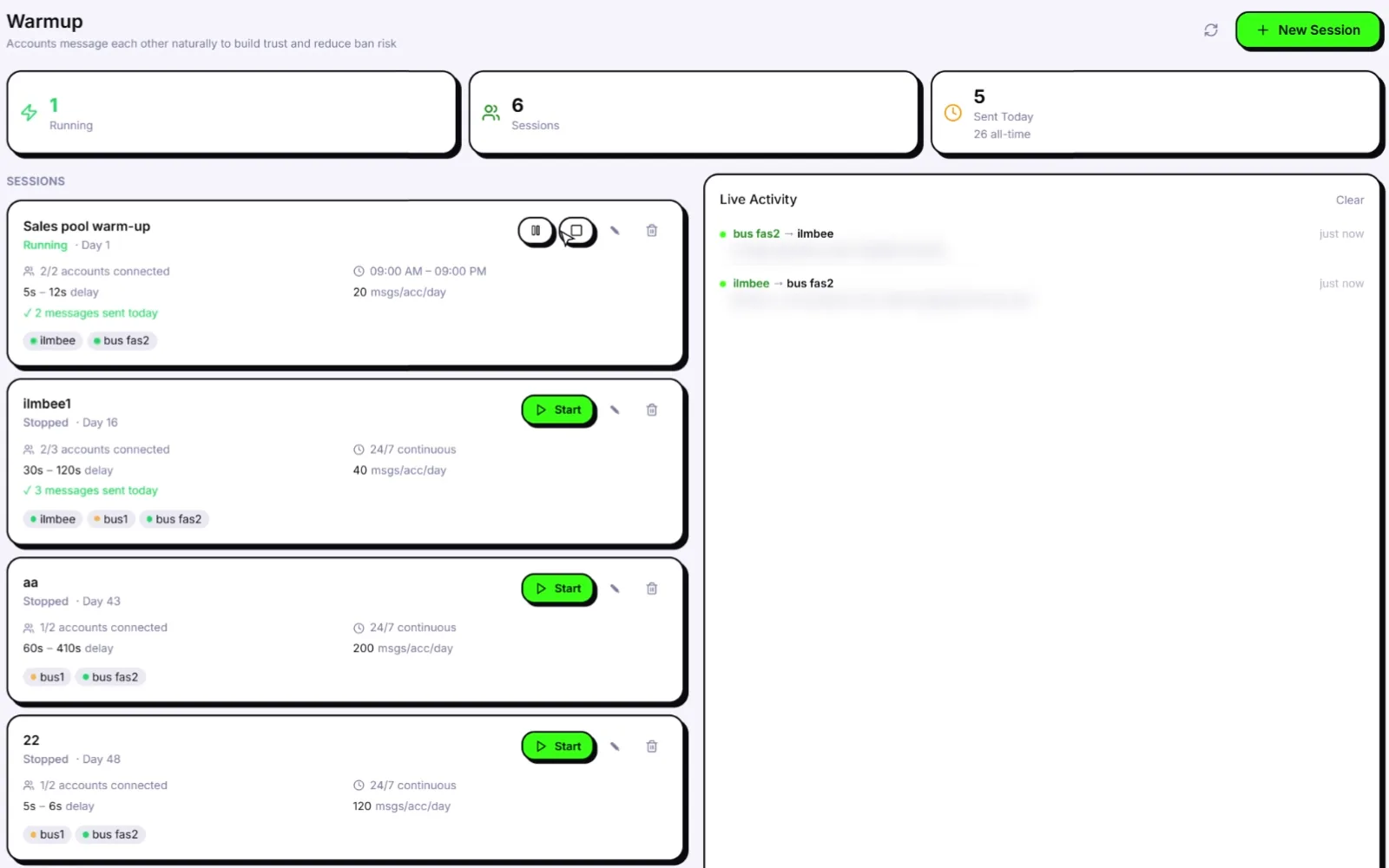
Warm the next number before it sends.
Warm-up, isolated sessions, sending gaps and a live risk score for every number. Free account. Windows 10/11 and macOS 12+.
Frequently asked questions: WhatsApp account banned
How long does a WhatsApp ban last?
A ban stays until WhatsApp removes it after a review. The ban screen says most reviews are completed within 24 hours. A temporary restriction is different: it shows a countdown and lifts on its own when the timer ends.
Can I use the same number again after a ban?
Only if WhatsApp unbans it. If the review succeeds you will see "This account can now use WhatsApp" and can verify the number again. If the ban is final, the number can't be used on WhatsApp.
Can WhatsApp detect that I'm using a bulk sender?
WhatsApp says it uses machine learning and user reports to find accounts sending unwanted automated messages, and that it watches behaviour such as how fast an account sends. It judges the behaviour, so a tool that sends in fast, identical bursts is easy to spot.
How many messages can I send per day without getting banned?
WhatsApp does not publish a safe number. After a proper warm-up of at least 15 days (30 recommended), start small and stay under the daily limit Health & Risk sets for each number, then grow by adding warmed numbers rather than pushing one number harder.
Will my other WhatsApp numbers be banned too?
They can be if they shared the same device, IP, contact list or message with the banned number. Pause them, keep them off cold conversations for a few days and give every number its own session, fingerprint and proxy from now on.
I got banned on WADesk. Will Wassuply be different?
Not automatically. WADesk also offers account warming, so a ban there usually comes down to behaviour: new numbers, cold lists, identical messages and speed. Wassuply applies warm-up, isolation, sending gaps and a risk score to every number by default. The clearest difference is price: WADesk bills per port each year, about $1,100 for 10 ports on its Max plan, while Wassuply is $397 once for unlimited numbers. See our WADesk alternative comparison.
Compare the two in detail on our WADesk alternative page, or read WhatsApp Business account banned if you run several business numbers.