Home › Anti-ban › How it works
Anti-ban, explained

How Wassuply's anti-ban protection works.

WhatsApp bans numbers for patterns, not words. New numbers. Shared devices. Robotic timing. Copy-paste messages. Wassuply breaks every one of those patterns. Here is each layer, in plain English.

Download the app freeWatch it live: book a 20-min demo

Free account. Windows 10 and 11. Warming and sending need a licence.

Quick answer: Wassuply's anti-ban protection is a stack of layers, one for each thing WhatsApp watches. It warms new numbers for 15 to 30 days with conversations that don't repeat, gives every number its own browser fingerprint and proxy, sends with random gaps, small batches and breaks, makes every message different with spintax, merge fields and AI, skips anyone who opted out, and scores each number's ban risk from 0 to 100. It cuts the risk a lot. No honest tool can cut it to zero.
Built from WhatsApp's own rulebook

We studied how WhatsApp says it catches spam: new numbers, sending rate, reports and blocks, shared networks. Then we built a layer against each one.

30+protections working together in one app
15–30days of warm-up before a number sends cold
0–100live ban-risk score for every number
1 : 1one number, one fingerprint, one session, one IP with a proxy
Start here

Why does WhatsApp ban numbers?

2M+accounts removed every month for bulk or automated behaviour (WhatsApp, 2019)
75%+of those removed with no recent user report. Nobody had to complain.
6.2MIndian accounts banned in August 2026 alone, 1.69M of them before any report
SIGNAL 01

Bulk and automated messaging

  • WhatsApp's rules: no bulk or auto-messaging.
  • Machine learning plus user reports find it.
Source: WhatsApp Help Center, using WhatsApp responsibly
SIGNAL 02

Brand-new numbers sending fast

  • WhatsApp's own example: a number registered 5 minutes ago…
  • …sending 100 messages in 15 seconds.
  • That's almost certainly abuse.
Source: WhatsApp white paper, Stopping Abuse (2019)
SIGNAL 03

Messaging people who don't have you saved

  • A new number messaging dozens of strangers.
  • One of the patterns WhatsApp says it looks for.
Source: WhatsApp white paper, Stopping Abuse (2019)
SIGNAL 04

Reports and blocks

  • Mass messages get you reported and blocked.
  • Reported multiple times = banned.
  • Blocks count against you too.
Source: WhatsApp Help Center, using WhatsApp responsibly
SIGNAL 05

Shared networks and devices

  • WhatsApp weighs the IP and carrier a number signs up from.
  • And the reputation of other accounts on that network.
Source: WhatsApp white paper, Stopping Abuse (2019)
SIGNAL 06

Bought or scraped lists

  • Numbers collected without consent, or from shady sources.
  • On WhatsApp's list of things that get accounts banned.
Source: WhatsApp Help Center, using WhatsApp responsibly

WhatsApp checks at 3 moments:

  • When a number registers
  • While it's messaging
  • When people report or block it
  • Before a full ban, it may restrict a number: no new chats for a while. WhatsApp: restricted accounts

The 2019 figures are from WhatsApp's white paper, linked from its responsible-use page. The India figures are from WhatsApp's India monthly report for August 2026.

The copy-paste trap

WhatsApp can't read your messages. It still catches copy-paste outreach.

  1. One pitch, 200 strangers

    Same text, same hour, sent to people who don't have your number saved.

  2. Some block or report you

    Strangers do. WhatsApp trusts a report on the first message from an unknown number more than most.

  3. Every report carries your words

    When someone reports you, WhatsApp receives up to five of your last messages to them.

  4. The pattern is obvious

    The same text in report after report, plus a spike in sending and blocks. Restricted, then banned.

↪️

"Forwarded" labels

  • Forward a message and it's labelled "Forwarded".
  • Through 5+ chats: "Forwarded many times".
  • People can see it wasn't written for them.
📈

Rate and timing

  • WhatsApp can't read content.
  • It does watch how often an account sends.
  • One message to many people is a burst.
🧠

Hundreds of factors

  • Machine learning weighs hundreds of factors.
  • It runs around the clock.
  • It gets faster at catching repeat patterns.

Does WhatsApp match identical messages by ID or hash?

  • WhatsApp has never said it does.
  • Its security paper says message content is end-to-end encrypted.
  • So we won't claim it. We build as if it could.
  • With spintax, merge fields and AI, no two people have to get the same message.
✓ Wassuply's fixNo two people get the same message.See Layer 5 →

Sources: WhatsApp Help Center on blocking and reporting and forwarding limits; WhatsApp's 2019 white paper Stopping Abuse, linked from its responsible-use page.

The real problem

A new number has no history. That's what gets it banned.

A 2-year-old number Trusted

Years of real chats. Saved contacts. People who reply.

  • Can send more before anything looks odd
  • A slow day of outreach blends in
  • Still not bulletproof: blast strangers every day and it gets flagged too

A number bought yesterday Zero trust

No chats. No contacts. No replies. Then 15 cold DMs on day one.

  • Nothing to compare the outreach against
  • Strangers block or report it, fast
  • This is the pattern behind most bans

You already know this from cold email.

A new inbox that blasts 200 emails lands in spam.A new number that blasts cold DMs gets banned.Same problem, same fix: warm it up first.

✉️

Cold email

New domain + new inbox + 200 cold emails = spam folder

  • The fix: inbox warm-up
  • Inboxes email each other for a few weeks
  • Then you send
💬

Cold WhatsApp

New number + 15 cold DMs on day one = banned number

  • The fix: number warm-up
  • Your numbers chat for 15 to 30 days
  • Then you send

Running outreach at scale?

  • Most teams buy 5, 10 or 20 virtual numbers, often around $1 a month each.
  • Every one of them starts at zero trust.
  • Every one of them needs warming. Old numbers too, before outreach.
✓ Wassuply's fixWarm every number up before it sends a cold message.See Layer 1 →
Layer 1 · The core

Warm-up: trust first, outreach second.

✕ The problem

A new number has zero trust.

  • No chat history. No saved contacts.
  • Then cold DMs on day one.
  • Exactly what WhatsApp says it looks for.
✓ Wassuply's fix

Your numbers chat with each other first.

  • Real two-way chats, on autopilot
  • At least 15 days. 30 is better.
  • Only inside the hours you pick
★ Why it works

History makes a number look normal.

  • Weeks of ordinary chats behind it
  • Replies, not just sends
  • Then a small first campaign
1 2 3 4 5
5 WhatsApp accounts = 10 conversations. 10 accounts = 45. Each line is its own two-way chat with its own memory.

How Wassuply does it

  • Every pair gets its own chatA real back-and-forth per pair. Not one script blasted around.
  • They take turnsAccount 1 writes, account 2 answers, then account 1 again.
  • A fresh random wait30–120 seconds by default, rolled again every turn.
  • Real chat lines, not AI10 packs in English and Hinglish, ~50 to 20,000 lines. Or your own.
  • One message at a timeChats run side by side. Each number types one message at a time.
  • Your hours, your cap9am–9pm on weekdays by default. A daily cap shared with campaigns.
  • Backs off on failureWaits 30s, then 2, 5, 15 and 30 minutes. Doesn't hammer a number.
  • Picks up after a restartWith auto-start on, each pair carries on where it stopped.

The part most people miss: the same message, sent around your accounts.

Picture Account 1 warming up with Account 2 and Account 3.Same three accounts, two tools. Look at what each one sends.

Many other warmers

One script, copied into every chat Easy to spot

The same script plays from the top in every chat. Same lines, same order, same replies.

1WhatsApp account 1Account 1↔2WhatsApp account 2Account 2
Account 1Hi, how are you?
Account 2I'm good, you?
Account 1What are you up to today?
1WhatsApp account 1Account 1↔3WhatsApp account 3Account 3Same script again
copyAccount 1Hi, how are you?
copyAccount 3I'm good, you?
copyAccount 1What are you up to today?

What's wrong here?

  • Account 1 sends the exact same messages to Account 2 and Account 3.
  • Account 2 and Account 3 reply with the exact same words.
  • Real people don't talk like this. It's copy-paste traffic: the opposite of warming up.

6 messages · only 3 different lines

Wassuply

A fresh line, every turn No copies

Every turn picks a random line from the pack that this account hasn't sent and this pair hasn't seen.

1WhatsApp account 1Account 1↔2WhatsApp account 2Account 2
Account 1Morning! Did you catch the match last night?
Account 2Busy day here. How's yours going?
Account 1Coffee or tea today? I'm on my third ☕
1WhatsApp account 1Account 1↔3WhatsApp account 3Account 3Different chat
Account 1Any plans for the weekend?
Account 3Just got back from a long walk.
Account 1The weather has been wild this week.

What's different?

  • Account 1 says something different to Account 2 and to Account 3.
  • Replies are fresh random lines too, not a copied script.
  • Each chat reads like its own conversation, not a copy of another one.

6 messages · 6 different lines

The fine print, because we'd rather tell you: lines only come back once a pair has used up the whole pack, then it starts a fresh cycle. A 20,000-line pack pushes that point years away.
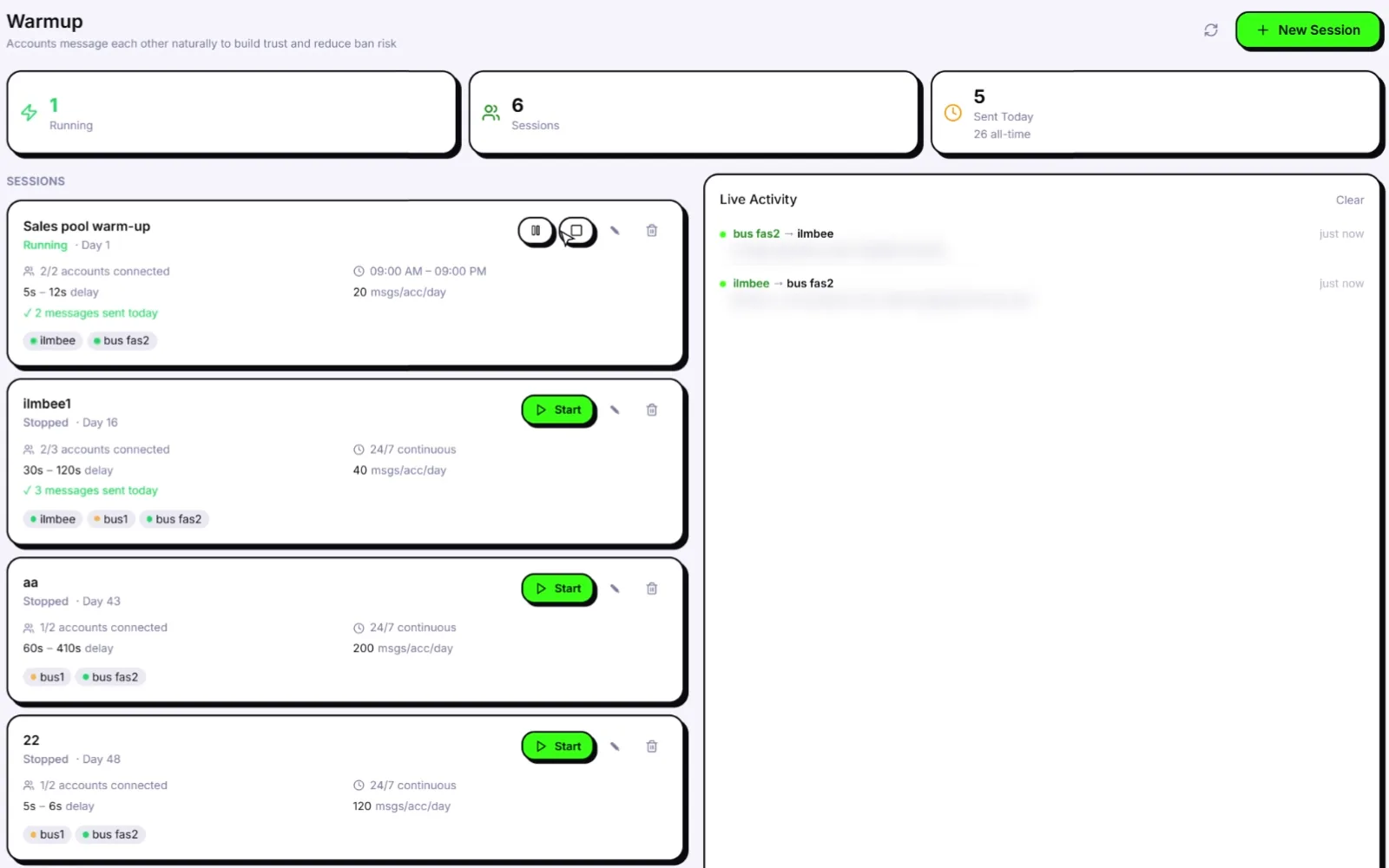
Wassuply · Warmup
The Wassuply Warmup page: warm-up sessions with connected accounts, random delay ranges, sending hours, a daily cap per account and a live activity feed
The Warmup page: each session shows its delay range, sending hours and daily cap per number, with live activity on the right.
✓ The Wassuply benefit

Your numbers have real history before they send a single cold message.

  • Trust built before outreach
  • Runs on autopilot
  • No script replayed between accounts
Layer 2 · Who your numbers talk to

Pods & Warmup Network: don't just talk to yourself.

✕ The problem

Your numbers only talk to each other.

  • The same handful of numbers, every day
  • Same owner, same network
  • A closed loop is a pattern too
✓ Wassuply's fix

Warm up with other people's real numbers.

  • My Pod: your team's numbers
  • Warmup Network: other customers' numbers
  • Different companies, IPs and countries
★ Why it works

Real WhatsApp users talk to lots of people.

  • Varied partners look like normal use
  • Not 10 numbers in a bubble
  • Real, separate numbers on the other end
Many other warmers

Closed loop A pattern

  • Your numbers only ever chat with each other
  • Same owner, same network, same handful of partners
Wassuply

With Pods Real partners

GBINUSAEBRDEZA
  • Your numbers chat with other people's real numbers
  • Different companies, different IPs, different countries

How Wassuply does it

Good to know

  • Partners in a pod can see your number. You agree to this once, before joining.
  • Pods are the one part of warm-up that runs through our cloud.
  • Your campaigns, contacts and messages stay on your computer.
Wassuply · Warmup Network
Warmup Network

Pick a pod, see its members, countries and reply gaps, then add a number.

Warmup Network: join a pod of other customers' real numbers, or invite your own team through My Pod.
✓ The Wassuply benefit

Your numbers chat with real people's numbers, not just each other.

  • No closed loop
  • Partners in other countries
  • Bad partners removed for you
Layer 3 · Isolation

Fingerprint & proxy: every number gets its own identity.

✕ The problem

10 numbers on one PC look like one machine.

  • One fingerprint, shared by all
  • One IP address, shared by all
  • One flagged number puts the rest at risk
✓ Wassuply's fix

Every number gets its own identity.

  • Its own browser fingerprint (on by default)
  • Its own session and storage
  • Its own proxy, so its own IP
★ Why it works

Your numbers stop sharing obvious links.

  • Different device details per number
  • A different internet address per number
  • Fewer ways to tie them together
🧬

What is a browser fingerprint?

  • Your browser describes your computer to every site it opens.
  • Browser version, processor, memory, graphics card.
  • Plus tiny quirks in how it draws images and plays sound.
  • Put together, that's a fingerprint. Close to unique.

✕ The problem: 10 numbers on 1 PC = 1 fingerprint. They look like one machine.

🌐

What is a proxy?

  • Your IP address is your connection's home address.
  • Every number on one connection shares one address.
  • A proxy gives each number its own address.

✕ The problem: 10 numbers on 1 IP are linked. One flagged number puts the rest at risk.

Basic tools

10 numbers, one PC Linked

#1Chrome 131 · 8 cores · GTX 1060 · same
IP 81.2.69.•• · same
#2Chrome 131 · 8 cores · GTX 1060 · same
IP 81.2.69.•• · same
#3Chrome 131 · 8 cores · GTX 1060 · same
IP 81.2.69.•• · same
  • One flagged number exposes the rest
Wassuply

10 numbers in Wassuply Separate

#1Chrome 131 · 8 cores · GTX 1060 · own
IP 81.2.69.•• · London · own
#2Chrome 128 · 4 cores · RX 580 · own
IP 92.40.17.•• · Leeds · own
#3Chrome 129 · 12 cores · Intel UHD · own
IP 176.24.9.•• · Bristol · own
  • Each number looks like its own device on its own connection

Fingerprints in Wassuply

Connecting proxies takes 4 steps.

No technical setup. Paste, click, done.A proxy costs a few dollars a month per number.

  1. Buy proxies

    Residential or 4G. One per number.

  2. Paste them in

    Proxy Manager: one per line, or import a CSV.

  3. Click Auto-Assign

    Every number gets its own proxy.

  4. Click Verify

    See each number's real exit IP. Leaks get flagged.

Also built in

Which proxies?

  • Use residential or 4G (mobile) proxies.
  • Skip datacenter IPs. They're often blocked.
  • A dedicated IP costs a few dollars a month. Cheap insurance per number.
Wassuply · Proxy Manager
Proxy Manager

Paste or import proxies, auto-assign them, then Test and Verify each one.

Proxy Manager: one proxy per number, with a leak check.
Wassuply · Accounts · Fingerprint
Fingerprint tab

Each number's own browser version, processor, memory, graphics card and drawing quirks.

Every number's fingerprint, on by default, with one-click Regenerate.
✓ The Wassuply benefit

Each number looks like its own device on its own connection.

  • Own fingerprint and IP per number
  • On by default
  • Leak check built in
Layer 4 · Sending

Campaigns with no rhythm to catch.

✕ The problem

Scripts send like a metronome.

  • The exact same gap, every time
  • One number sends the whole list
  • Nights and weekends too
✓ Wassuply's fix

Random, spaced-out sends across many numbers.

  • A fresh random wait before every message
  • Batches of 10, then a 1–5 minute break
  • Your list rotated across your numbers
★ Why it works

There's no rhythm to lock onto.

  • No fixed beat
  • No single number doing all the work
  • No 3am sends, with quiet hours set
Basic senders

Fixed delay A pattern

A basic sender lets you set one delay, say 10 seconds. Every message lands exactly on the beat.

  • Same gap every time: a machine signature
  • No breaks, no quiet hours
  • One number does all the work
Wassuply

Random range Random

You set a range, say 30 to 90 seconds. Every wait is a fresh random pick inside it. Batches get real breaks.

  • A new random wait before every message
  • Batches of 10, then a 1 to 5 minute break
  • Don't like the schedule? Re-roll waits with one click

Your list is shared across every number. Automatically.

Upload one list and tick the numbers you want to use.Wassuply hands out contacts in turn, so no single number sends them all.

Basic senders

One number does it all Overloaded

A basic sender works from one WhatsApp account. 300 contacts means 300 cold messages from one number.

300contacts
Number 1300
Number 20
Number 30
Number 40
Number 50
  • Splitting lists by hand, or not at all
Wassuply

The load is shared Shared

Tick the numbers you want to use. Wassuply rotates through them, one contact each in turn. No spreadsheets, no manual splitting.

300contacts
Number 160
Number 260
Number 360
Number 460
Number 560
  • Numbers that hit their cap, go offline or get paused are skipped automatically

No robotic tells. Every action is paced and spaced.

Wassuply doesn't fake typing. It removes the machine patterns instead.Random waits, small pauses, breaks, quiet hours and caps.

Cold campaign · Accounts
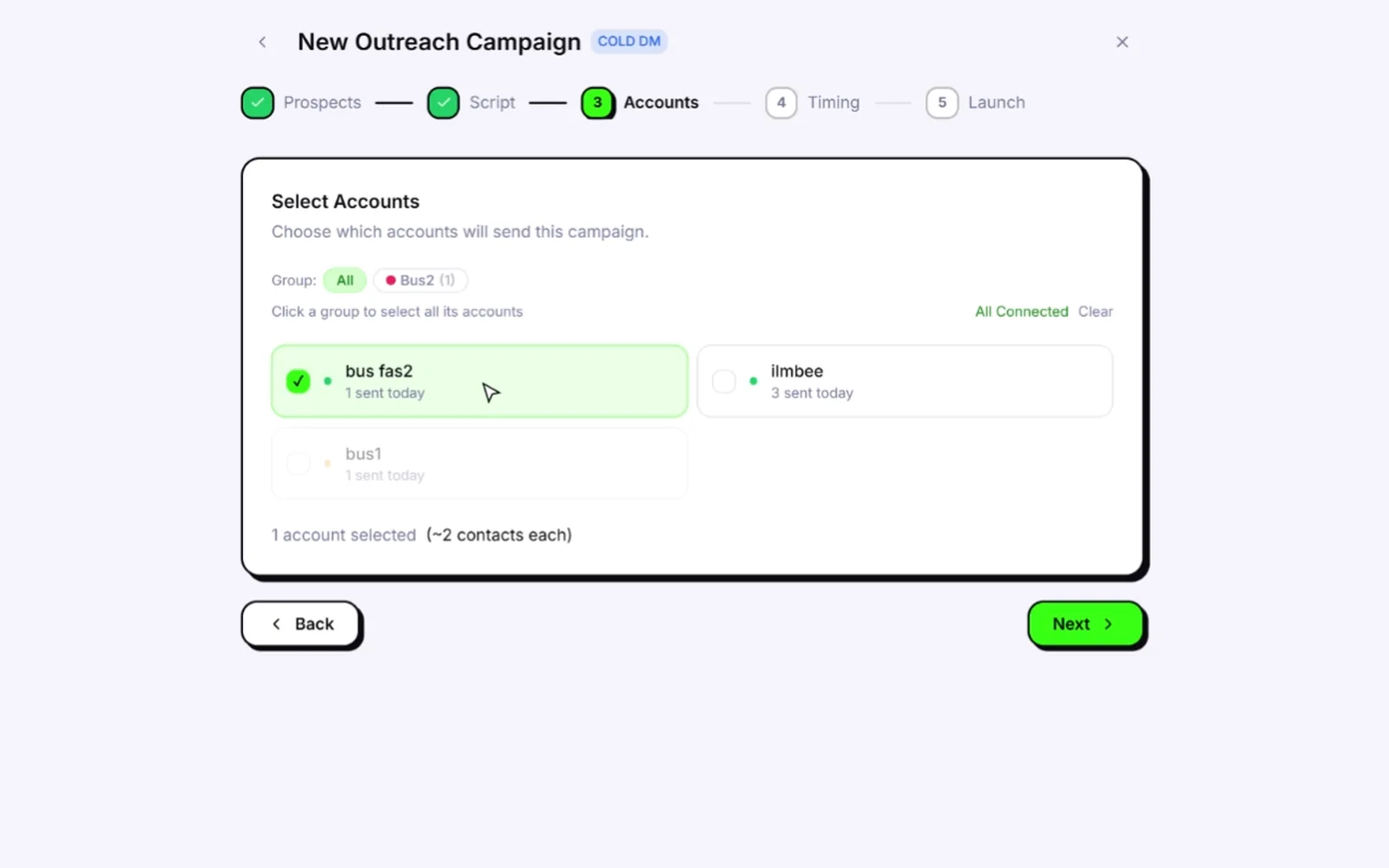
Choosing which WhatsApp accounts send a cold campaign in Wassuply, with the list split between them
Pick the numbers. Wassuply shows roughly how many contacts each one will send to.
Cold campaign · Sending
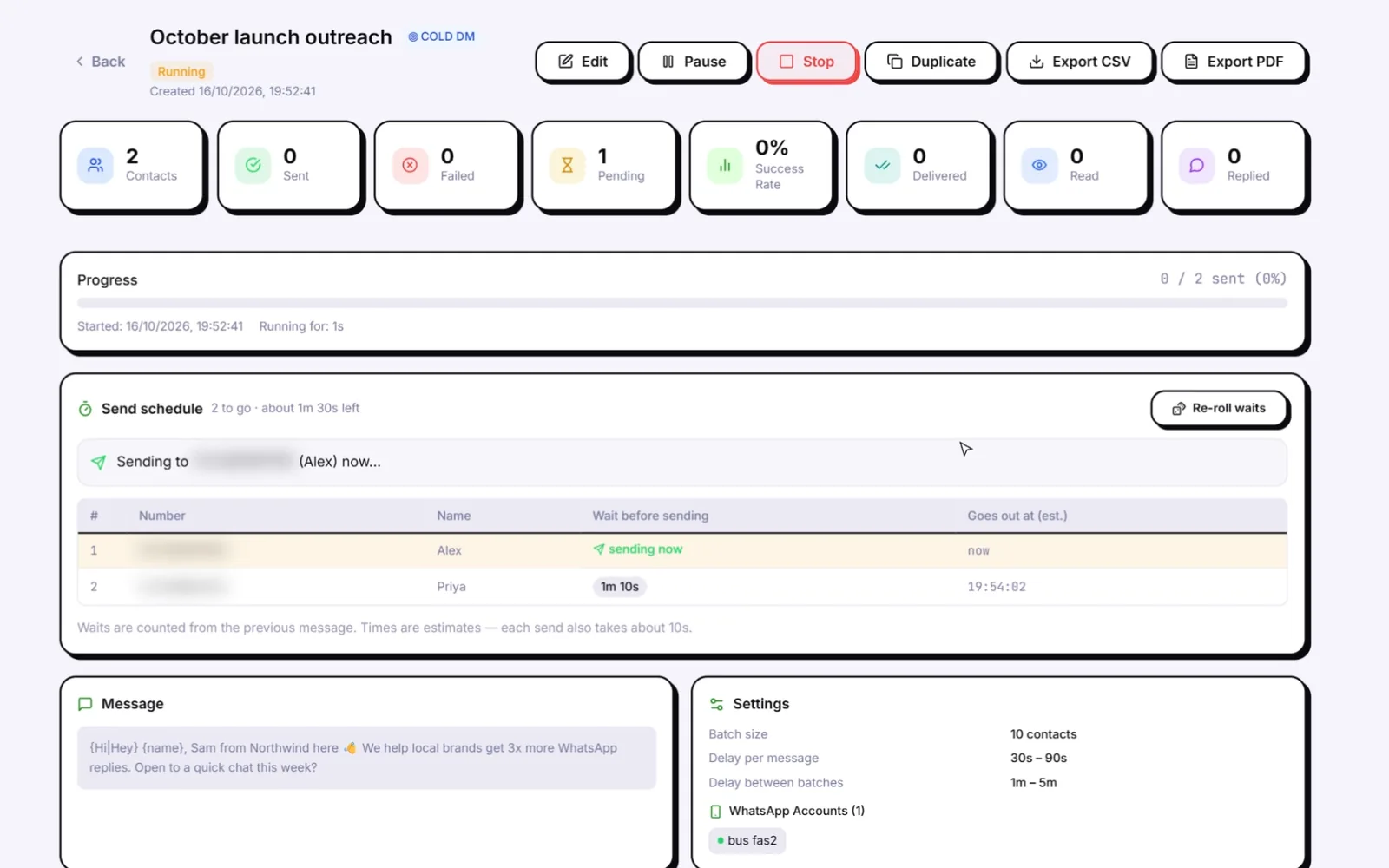
A running Wassuply campaign: the send schedule with a random wait before each message, batch size 10, 30 to 90 second delays and 1 to 5 minute batch breaks
The send schedule: a random wait before each message, 30–90s per message, 1–5 min between batches of 10.

Follow-ups (sequences) that know when to stop.

A sequence sends your follow-ups for you, hours or days apart.Every step follows the same safety rules as your campaigns.

Basic tools

Follow-ups on a timer. They keep firing after a reply, or after a "stop".

Wassuply

Every step checks replies, opt-outs, caps and the number before it sends.

✓ The Wassuply benefit

Your campaigns look like a person sending, not a script.

  • No machine rhythm
  • Load shared across numbers
  • Quiet hours and daily caps
Layer 5 · Content

Every message different. Safer, and it gets more replies.

✕ The problem

The same text to hundreds of people.

  • Reports carry your last few messages
  • The same words, report after report
  • Generic pitches get blocked
✓ Wassuply's fix

No two people get the same message.

  • Spintax and merge fields
  • AI writes a first message per contact
  • AI voice notes that say their name
★ Why it works

Nothing repeats, so nothing stacks up.

  • No identical text piling up in reports
  • Each message addressed to one person
  • People reply to messages written for them
Basic senders

One template to everyone. Maybe {name} swapped in.

Wassuply

4 kinds of variation that stack: spintax, merge fields, AI messages, AI voice notes.

Four ways that stack. Two are powered by AI.

Spintax and merge fields change the words for every person.AI writes a whole new message, or a voice note, for each contact.

1. Spintax

Write options in curly brackets. Each send picks one at random.

{Hi|Hey|Hello} {name}, {quick question|got a sec}?
Hey Priya, got a sec?
Hi Alex, quick question?
Hello Sam, got a sec?

3 × 2 options = 6 versions. Six spun phrases with 3 options each = 729 versions. The AI Add spintax button does the spinning for you.

2. Merge fields

Drop in details from your list so every message is addressed to one person.

Hi {name}, saw {custom1} is hiring in {custom2}…
Hi Priya, saw Northwind is hiring in Leeds…
Hi Alex, saw Brightside is hiring in Austin…

Fields: {name}, {phone}, {custom1} and {custom2}, from any CSV.

3. AI-written first messages AI

  • Connect your own Claude, ChatGPT or DeepSeek key.
  • The AI reads each lead: name, company, notes.
  • It writes a different first message for every contact, from your brief.
  • You review every message before anything sends
  • Improve rewrites a draft shorter, warmer or less salesy
  • Your key stays on your computer and goes straight to the AI provider

4. AI voice notes AI

  • Connect your ElevenLabs key.
  • Every contact gets their own voice note that says their name.
  • Clone your own voice from 1 to 3 minutes of audio.
  • Sent as a real WhatsApp voice note with a waveform, not a file attachment
  • One clip per person, so no two are the same
  • Key and credits checked before the campaign starts
+32.7%more replies when the message body is personalised. Backlinko, 12 million outreach emails (2019)
17% vs 8%roughly: 17–18% average reply rate with advanced personalisation vs 7–9% with little or none, as reported by Woodpecker (2026, vendor data)

Cold email numbers, not WhatsApp. The lesson carries over: people answer messages written for them. And a message written for one person is one nobody else got.

🛡️

Plus a spam check before you launch

Scores your message 0 to 100 as you write, and tells you why:

Spammy wordsLinksToo longToo many capitalsToo many emojisPushy urgencyNo {name}No spintax

Aim for the green Looks safe badge before you send.

Cold campaign · Script
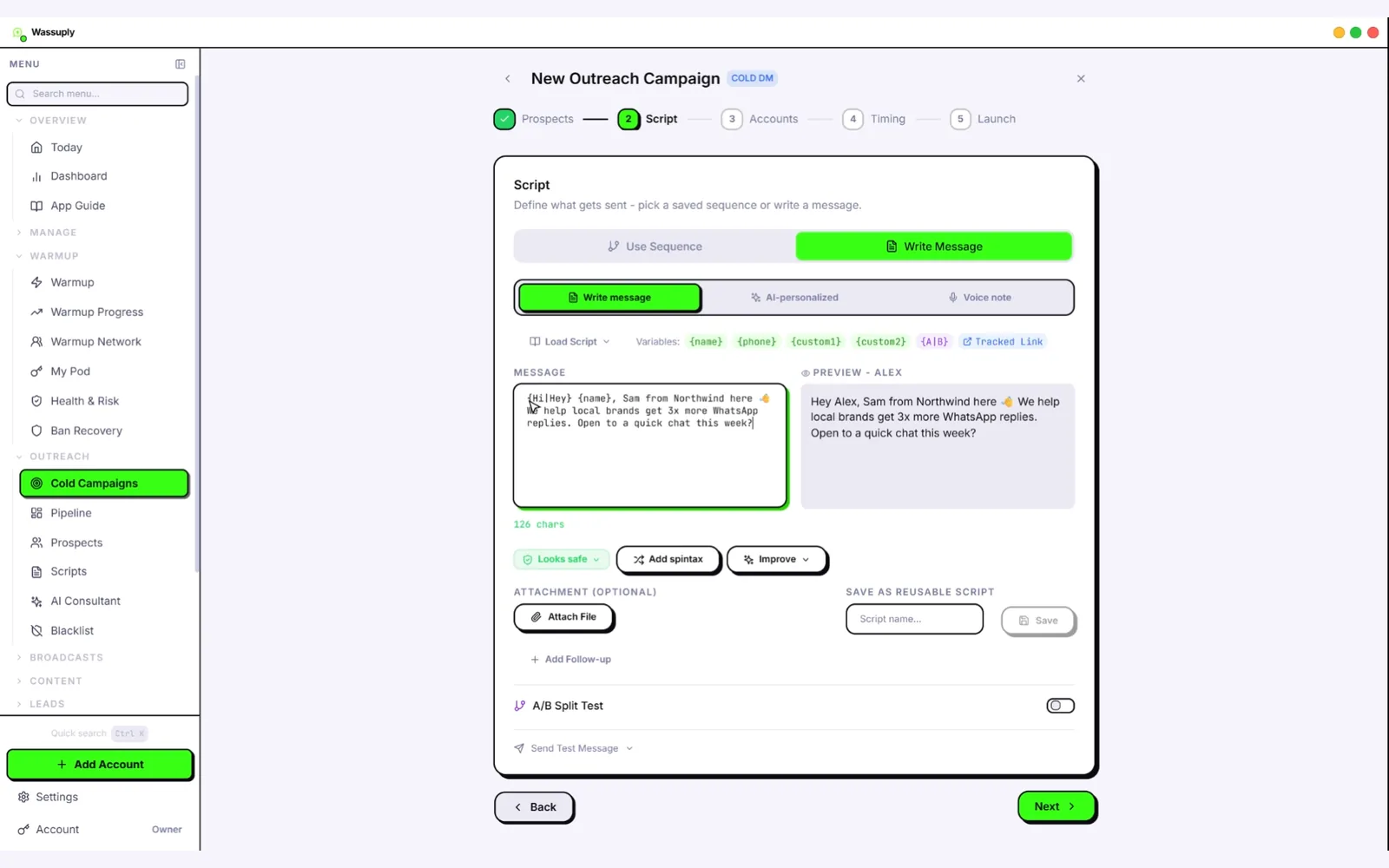
Writing a cold message in Wassuply: spintax, merge fields, AI-personalised and voice-note modes, a live preview, the Looks safe spam check and the Add spintax button
Writing a message: spintax and merge fields with a live preview, plus AI-personalised and voice-note modes, the Looks safe check and Add spintax.
✓ The Wassuply benefit

Every contact gets their own message, not a copy of someone else's.

  • No copy-paste text
  • AI writes one per contact
  • Spam-checked before launch
Layer 6 · Your list

Someone says STOP? They're off every list.

✕ The problem

Messaging people who said stop.

  • They block or report you
  • Reports lead to bans
  • A "stop" is easy to miss by hand
✓ Wassuply's fix

Stop means stop. Everywhere. Automatically.

  • Opt-out replies spotted for you
  • Removed from every campaign and follow-up
  • Checked before every single send
★ Why it works

Fewer people with a reason to report you.

  • No second message after a no
  • Lists stay clean
  • Works across all your numbers
Basic senders

You spot "stop" replies yourself. Or keep messaging them.

Wassuply

Spotted, removed from everything and checked before every send.

YouHey Priya, quick question about your Leeds office?
Priyastop

Opted out Removed from follow-ups · pending sends skipped

How Wassuply does it

  • Spotted automaticallystop, unsubscribe, opt out, "remove me". Checked every few minutes.
  • Whole words only"Stopwatch" doesn't count.
  • Off everything at onceOpted out, out of follow-ups, skipped by every campaign.
  • Checked before every sendBy every part of the app. With or without a country code.
  • Your own blacklistAdd numbers one by one, or paste a list.
  • A check before launchDrops invalid numbers and duplicates. Counts opt-outs.
  • Follow-ups that stopWhen someone replies, or after several ignored messages.
✓ The Wassuply benefit

People who said stop stay stopped, on every number.

  • Fewer reasons to report you
  • No manual tracking
  • Clean lists every launch
Layer 7 · Monitoring

Health & Risk: know each number's risk before you send.

✕ The problem

No warning until the ban screen.

  • No idea how risky a number is
  • Guessing how much it can send
  • Pushing a struggling number harder
✓ Wassuply's fix

A live 0–100 risk score for every number.

  • A safe daily limit by number age
  • A warm-up plan per number
  • Auto slow and pause, with Smart Send on
★ Why it works

You see risk before you press send.

  • Slow down early, not after a ban
  • Limits based on age and history
  • Every number tracked on its own
Basic tools

No score, no limit. You find out when the ban screen appears.

Wassuply

A 0–100 risk score, a safe daily limit and a plan for every number.

The 0–100 risk score

What moves it:

  • Warm-up days. No warm-up starts the score high. 60+ days brings it near the bottom.
  • Failed sends over the last 7 days.
  • Going over the number's safe daily limit.
  • Status. Disconnected or banned numbers go to the top.

A plan for every number

Answer 5 quick questions (how old the number is, any past bans, how you use it) and you get:

  • Days to warm, never fewer than 15
  • A warm-up ramp: a starting rate and how much to add each week
  • A safe daily DM limit after warm-up
  • A first campaign size: half the safe limit, 100 at most
Number ageStarting safe limit
Under 3 months30 a day
3 to 6 months50 a day
6 to 12 months80 a day
1 to 3 years150 a day
3+ years250 a day

Lowered further for past bans or heavy use.

How Wassuply does it

Wassuply · Health & Risk
Health & Risk

Each number's 0–100 risk score, safe daily limit and week-by-week warm-up plan.

Health & Risk: the score, the limit and the plan for every number in one place.
✓ The Wassuply benefit

You see each number's risk before you press send.

  • A live score per number
  • Safe daily limits
  • Auto slow-down with Smart Send
Layer 8 · Plan B

If a number still gets banned: Ban Recovery.

✕ The problem

A ban, a panic, a blank page.

  • Appeals written in a rush
  • Wrong reason, wrong tone
  • Other numbers still sending
✓ Wassuply's fix

50 ready-made appeals, one click away.

  • Pick the reason and the tone
  • Your number filled in
  • Panic button stops everything first
★ Why it works

A calm, clear appeal that fits your case.

  • Matches why you were banned
  • Sent once, the right way
  • No guesswork, no delay
Other tools

You're on your own, writing an appeal in a panic.

Wassuply

Pick the reason and tone. Your number is filled in. Copy and submit.

How Wassuply does it

  • 50 appeal templates10 ban reasons × 5 tones.
  • 5 tonesProfessional, Heartfelt, Detailed, Brief and Urgent.
  • Your number filled inPick the banned number. Copy the appeal in one click.
  • A step-by-step guideHow to submit it from the ban screen.
  • Stop sending firstThe panic button pauses every campaign and warm-up.

Pick the reason that fits

Personal useBusiness useThird-party appFalse reportsBulk sendingHackedToo many groupsMedia & linksAutomationNot sure

Not a customer yet? The same scripts are free in our WhatsApp ban appeal generator.

Wassuply · Ban Recovery
Ban Recovery

50 appeal templates: pick the reason and tone, the number is filled in, copy and send.

Ban Recovery: the right appeal for the right ban reason, ready to copy.
✓ The Wassuply benefit

If a ban happens anyway, you're ready in minutes.

  • The right appeal for the reason
  • Your number filled in
  • Everything paused in one click
All together

Every signal WhatsApp watches. A layer for each.

What WhatsApp watchesWhat Wassuply doesLayer
A new number messaging strangers15–30 days of warm-up, a plan per number, a safe daily limitWarm-up
Numbers that only ever talk to each otherMy Pod and Warmup Network with other people's real numbersPods
Many numbers on one deviceOwn fingerprint and own session per numberIsolation
Many numbers on one IPOwn proxy per number, leak check, no call leaksIsolation
Machine-like timingRandom waits, batches with breaks, small random pauses, quiet hoursSending
Sudden volume from one numberDaily caps, the list rotated across numbers, cross-campaign cooldownSending
Chasing people who don't answerFollow-ups that stop on a reply, after 3 unanswered messages or at a "stop", always from the same numberSending
The same text to many peopleSpintax, merge fields, AI messages, AI voice notes, a spam check, no-repeat warm-up linesContent
People blocking and reporting youAutomatic opt-outs, blacklist, pre-launch list check, follow-ups that stopYour list
Warning signs you can't see0–100 risk score, Smart Send, failure auto-pause, ban alert, panic buttonMonitoring
A ban anyway50 appeal templates with your number filled inPlan B

Wassuply vs a basic warmer vs a basic bulk sender

Every protection on this page, side by side.

 WassuplyBasic warmerBasic bulk sender
Warm-up chats between your numbersYesYesNo
No copy-paste lines between pairsYesNon/a
Warm-up with other people's real numbersYesNoNo
Own fingerprint per numberYesNoNo
Own proxy per number, with a leak checkYesNoNo
Random delay range, not one fixed delayYesn/aNo
Batches with breaksYesn/aNo
Follow-ups that stop on a replyYesn/aNo
One list rotated across many numbersYesn/aNo
AI messages and AI voice notes per contactYesNoNo
Automatic opt-outs, checked before every sendYesNoNo
Ban-risk score with auto slow and pauseYesNoNo
Ban appeal templatesYesNoNo
Warm-up and campaigns in one appYesNoNo

"Basic" means a bare-bones tool in each category. Some tools do more than this; check any tool you're comparing against this list. Want named comparisons? See WhatsApp warmers compared and bulk senders compared.

The honest part

So, how reliable is it?

It removes the patterns that get numbers banned. It can't remove all risk. Nothing can.

✅

What Wassuply handles

  • Warms your numbers before they send
  • Gives each number its own identity
  • Paces campaign sends at random
  • Makes every message different
  • Skips anyone who said stop
  • Shows each number's risk before you send
🎯

What still decides the outcome

  • Who you message. A list that reports you can get any number banned.
  • What you say. A spammy offer gets blocked, however it's sent.
  • Patience. Skip the 15-day warm-up and you skip the protection.

The numbers that get banned almost always skipped the warm-up or blasted a cold list.

📊

Why we don't publish a "success rate"

  • WhatsApp doesn't publish its rules or a ban rate.
  • Your list and message change results more than any tool.
  • So any exact % would be a guess. Anyone quoting one is guessing too.

Our proof instead: book 20 minutes and watch every layer run live.

One more honest line

  • WhatsApp's Terms don't allow bulk or automated messaging on regular accounts.
  • Lowering the risk doesn't change that.
  • To stay fully inside the rules, use the official Business Platform with opted-in contacts. Wassuply vs the WhatsApp API

Anti-ban FAQ

How does Wassuply's AI anti-ban protection work?

It works in layers, one for each thing WhatsApp watches. Wassuply warms new numbers for 15 to 30 days with two-way chats that don't repeat lines, lets them warm up with other people's real numbers through Pods, gives each number its own browser fingerprint, session and proxy, sends campaigns with random waits, small batches and breaks, rotates your list across numbers, skips anyone who opted out, and scores every number's ban risk from 0 to 100. The AI part writes a different first message and voice note for every contact, so no two people get the same text.

Is Wassuply's anti-ban protection reliable?

It reliably removes the patterns that get numbers banned: cold new numbers, shared devices and IPs, machine-like timing, copy-paste messages and messaging people who said stop. It cannot remove all risk. Who you message, what you say and whether you finish the warm-up still decide most of the outcome, and no honest tool can promise zero bans.

Do you have success rates or test results for the anti-ban?

We don't publish a success rate. WhatsApp doesn't publish its rules or a ban rate, and your list and message change the result more than any tool does, so any exact percentage would be a guess. Instead, book a free 20-minute demo and watch every layer run live.

Can WhatsApp tell if I send the same message to many people?

WhatsApp says it can't read message content, but copy-paste outreach still gives itself away. When someone reports you, WhatsApp receives up to five of your last messages to them, so the same text shows up across reports. Forwarded messages are labelled for recipients, and WhatsApp analyses how often an account sends. WhatsApp hasn't said it matches identical texts directly, but Wassuply makes every message different anyway.

Why do new WhatsApp numbers get banned so fast?

A new number has no history: no real chats, no saved contacts, no replies. When it starts messaging strangers straight away, it matches the pattern WhatsApp looks for, and strangers are quick to block or report it. Warming the number for 15 to 30 days first builds the history it is missing.

What is a browser fingerprint and why does it matter for WhatsApp?

A browser fingerprint is the description your browser gives of your computer: browser version, processor, memory, graphics card and small quirks in how it draws images and plays sound. If you run several WhatsApp numbers on one PC, they all share one fingerprint and look like one machine. Wassuply gives every number its own fingerprint by default.

Do I need a proxy for every WhatsApp number?

Proxies are optional, but if you run several numbers they stop them all sharing one IP address. Use one residential or 4G proxy per number; datacenter IPs are often blocked. Wassuply lets you paste or import proxies, auto-assign them, and run a leak check on each number.

How long should I warm up a WhatsApp number before outreach?

At least 15 days, and 30 is recommended. Health & Risk gives each number its own plan based on its age, past bans and how you use it, with a safe daily limit and a first campaign size.

Are Wassuply's warm-up messages written by AI?

No. Warm-up chats use lines from 10 built-in chat packs or your own lines, plus real two-way chats with Pod partners. AI is used for your outreach: personalised first messages and voice notes, with your own API key.

Is using an anti-ban tool against WhatsApp's rules?

WhatsApp's Terms don't allow bulk or automated messaging on regular accounts, and lowering the risk doesn't change that. If you need to stay fully within WhatsApp's rules, use the official WhatsApp Business Platform with opted-in contacts.

Keep reading

Warm it. Protect it. Then send.

Download Wassuply free, connect your numbers and start warming. Or book 20 minutes and watch every layer run live.

Free account. Windows 10 and 11. One payment, unlimited numbers.