Home › WhatsApp Bulk Sender
WhatsApp Bulk Sender

Wassuply: the WhatsApp bulk sender that warms up before it sends.

A WhatsApp bulk sender is software that sends a personalised message to a list of numbers from your own WhatsApp accounts. Wassuply is a WhatsApp sender for Windows PCs and Macs that does it from a CSV with merge fields, spintax, AI-written messages and voice notes, paces every send, and warms each number up before its first campaign.

Download the app freeGet lifetime access · $397

Free account. Windows 10/11 and macOS 12+. Warming and sending need a licence.

Quick answer: import a CSV, write one message with {name} and {custom1} merge fields (or let AI write one per contact), pick the WhatsApp numbers that will send, and launch. Wassuply sends with random 30-90 second gaps, in batches of 10, with a 1-5 minute break between batches, nothing during your blackout hours and a daily cap per number. No WhatsApp Business API, no templates, no per-message fees.

Watch a cold campaign go out

An unedited screen recording from the Windows app: new campaign, contacts, message, sending numbers, launch.

Creating and launching a cold campaign in Wassuply, from the Outreach screen to the first message going out. Unedited.

What is a WhatsApp bulk sender (and a "WhatsApp sender")?

People search for both terms and mean the same thing: a tool that takes a list of phone numbers and one message, and sends a copy to each number from a WhatsApp account you own. A good one personalises every copy, spreads the sends out over time and lets you stop at any moment.

It is not the same as WhatsApp's own broadcast list. According to the WhatsApp Help Center, a broadcast list holds up to 256 contacts, only reaches people who have saved your number, and is not supported on Windows, Mac or Web. That is fine for customers who already know you. It cannot start a conversation with a new lead.

It is not the official WhatsApp Business API either. The API runs on Meta's servers through a provider, and Meta's pricing documentation says the first message to a user must be an approved template, charged per delivered message since July 1, 2025.

Wassuply is a Windows and Mac app for warming up and running many WhatsApp numbers for cold outreach, and its bulk sender is the campaign side of that app. It drives your normal WhatsApp or WhatsApp Business numbers through WhatsApp Web sessions, each in its own isolated session with its own browser fingerprint and optional proxy, so you write free-form messages and pay no per-message fees.

How does sending work in Wassuply?

Five steps, the same five you click through in the app: Prospects, Script, Accounts, Timing, Launch.

1

Prospects

Bring your list

Import a CSV or paste numbers. Name your columns phone, name, custom1 and custom2 and they become merge fields.

  • Numbers need their country code; spaces and plus signs are fine
  • Duplicates are dropped on import
  • No need to save anyone to your phone's contacts
2

Script

Write once, send unique

Write a message, let AI write one per contact, or turn the text into an AI voice note.

  • Merge fields: {name} {phone} {custom1} {custom2}
  • Spintax like {Hi|Hey|Hello}, or one click to have AI add it
  • AI drafts and improves messages with your own Claude, ChatGPT or DeepSeek key
3

Accounts

Pick the numbers that send

Choose one or many connected numbers. The list is split across them, and when one number reaches its daily cap the next one picks up.

  • Every number runs side by side, no logging out and in
  • Each has its own session, fingerprint and optional proxy
4

Timing

Pace it like a person would

The defaults are already set for safety, and you can tighten them.

  • Random 30-90 second gaps between messages
  • Batches of 10, then a random 1-5 minute break
  • Blackout hours (no sending at night) and a daily cap per number

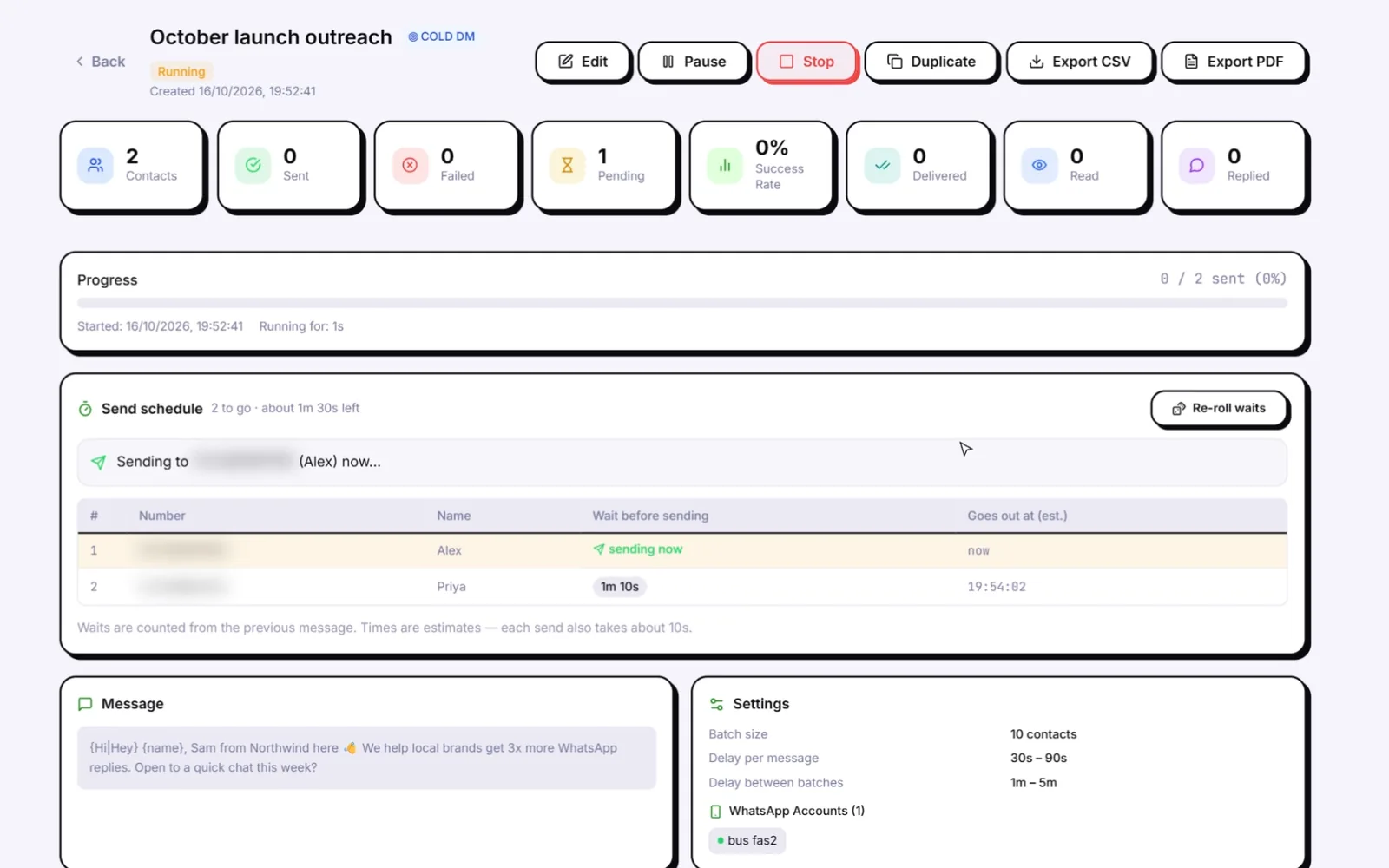
5. Launch. The campaign screen shows every contact in the queue with its planned wait and estimated send time, so you can see exactly when each message will go. Pause or stop at any point. With Smart Send on, a number slows down when its live ban-risk score reaches 60 and pauses at 80, and the panic button stops every number at once.
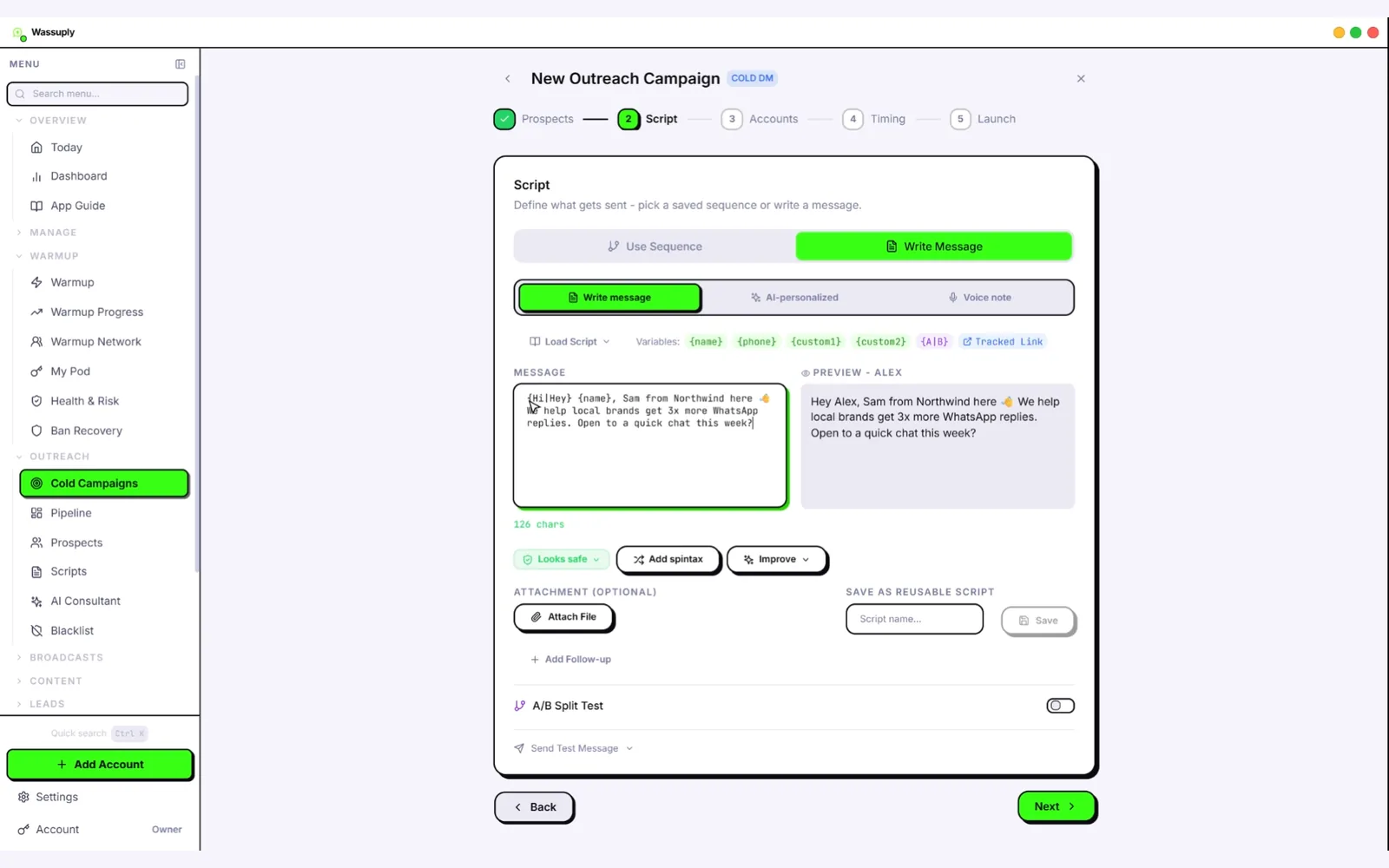
Wassuply Script step: a WhatsApp message with {name} merge field and {Hi|Hey} spintax next to a live preview for one contact
The Script step: merge fields and spintax on the left, the message one contact will actually receive on the right.

Merge fields, spintax and AI: how every message ends up different

Identical text sent to hundreds of strangers is the easiest pattern for any spam filter to spot, and the easiest message for a recipient to report. Wassuply gives you three layers to break it up, and you can stack them.

Merge fields

Single braces pull data from your CSV: {name}, {phone}, {custom1} and {custom2}. Put a company name in custom1 and a city or a detail you noticed in custom2, and every message carries something specific to that person.

Spintax

Spintax writes alternatives inside braces separated by pipes. {Hi|Hey|Hello} {name} picks one option at random for each contact. Two or three spun phrases in a short message already give dozens of combinations. If you would rather not write it by hand, the Add spintax button has AI turn your message into variations. Read more in what spintax is.

Message as written
{Hi|Hey} {name}, {Sam here|it's Sam} from Northwind. Saw {custom1} is hiring in {custom2}. {Worth a quick chat|Open to a 5-minute call} this week?
What one contact receives
Hey Priya, it's Sam from Northwind. Saw Brightline is hiring in Leeds. Open to a 5-minute call this week?

AI-personalised messages

Switch the campaign to AI-personalised and Wassuply writes a separate first message for every contact, using the details in your list (a short company brief in custom1 works well). It uses your own Claude, ChatGPT or DeepSeek API key. You pay the provider directly, usually cents per hundred messages, and Wassuply never marks it up. AI can also improve a draft, and it can write a whole go-to-market outreach script from a short intake.

Voice notes

A voice note stands out in a chat list full of text. Pick Voice note and Wassuply turns each message into an AI voice recording with your ElevenLabs key, then sends it as an audio file. AI-written text and voice combine: AI writes the message, ElevenLabs reads it out.

Can you send WhatsApp messages without saving contacts?

Yes. Wassuply sends to every number in your CSV or pasted list straight from the campaign, without adding anyone to your phone's address book. That is the main practical difference from a broadcast list, which only reaches people who saved your number. For a single chat, WhatsApp's own click-to-chat link (wa.me plus the full international number) does the same thing by hand. The step-by-step version is in how to send WhatsApp messages without saving the number, and list preparation is covered in sending WhatsApp messages from a CSV or Excel file.

Can you send bulk WhatsApp without getting banned?

No tool can honestly promise you'll never be banned. Wassuply removes what gets numbers banned. WhatsApp says it uses machine-learning systems to find and ban accounts doing automated or bulk messaging (WhatsApp Help Center). The patterns that give a sender away are well known: a brand-new number sending at volume, the same text to everyone, sends at fixed intervals, sending at 3 a.m., one number doing all the work, and lots of people tapping Report. Wassuply's safety layer is built against each of those.

What gets numbers flaggedWhat Wassuply does about it
A new number sending its first campaign in week oneWarm-up first: at least 15 days for a brand-new number, 30 recommended, with Warm-up Pods for real two-way chats. Health & Risk marks a number ready no earlier than day 15.
The same message to every contactMerge fields, spintax and AI-written messages, so no two contacts get identical text
Machine-regular timingRandom 30-90 second gaps, batches of 10, random 1-5 minute breaks
Sending at nightBlackout hours: a weekly grid of hours when nothing sends
One number carrying the whole listThe list is split across your numbers; each keeps its own daily cap
Many numbers on one IP and one browserAn isolated session, browser fingerprint and optional proxy per number (bring your own residential or 4G proxies; Wassuply checks them for leaks)
Pushing on after the warning signsA live 0-100 ban-risk score per number; Smart Send (when switched on) slows at 60 and pauses at 80; a panic button stops everything

The part no software can do for you: message people with a real reason to hear from you, keep the first message short and specific, and stop contacting anyone who says no. Fewer reports protect a number better than any setting. The full rulebook is on how to avoid a WhatsApp ban, the warm-up side on the WhatsApp warmer page, and the numbers behind daily caps in WhatsApp sending limits. If a number does get banned, start with what to do after a WhatsApp ban.

Wassuply cold campaign running: live send schedule with a wait per contact, batches of 10, 30-90 second gaps
A campaign sending. Each contact has its own random wait; the settings panel shows batches of 10, 30-90 second gaps and 1-5 minute breaks.

Bulk sender vs WhatsApp Business API vs Chrome extensions

The three ways to send WhatsApp messages at volume, side by side. Pick by who you are messaging, not by price alone.

 Wassuply (desktop bulk sender)Official Business API platformsChrome extension senders
How it sendsYour WhatsApp or WhatsApp Business numbers, through WhatsApp Web sessions in a Windows and Mac appMeta's Cloud API, through a provider such as WATI or AiSensyThe WhatsApp Web tab open in your browser
Status with WhatsAppUnofficial: automates WhatsApp WebOfficialUnofficial: automates WhatsApp Web
First message to a new contactAny text you writeMust be a Meta-approved templateAny text you write
Per-message feesNoneMeta charges per delivered message, plus the platform planNone
Numbers at onceUnlimited, side by side in one appPer number added to the platformUsually the one account in that browser
Own fingerprint and proxy per numberYesNot applicableNo, shares your browser and IP
Warm-up before sendingBuilt in, plus Warm-up PodsNot part of the modelNot offered
PacingRandom gaps, batches, breaks, blackout hours, daily caps, Smart SendHandled by Meta's own limitsUsually a delay setting and batches
AI messages and voice notesYes, with your own AI and ElevenLabs keysVaries by platformSome offer AI writing help
Runs onWindows 10/11 and macOS 12+; the computer stays on while sendingCloud, any deviceChrome or Edge; the tab stays open
Cost model$397 one-time lifetime (early-bird), unlimited numbersMonthly plan plus Meta's per-message chargesFree tier, then a monthly plan per user or per number
Best forCold outreach from several warmed numbersOpted-in customers, support and notificationsSmall sends from one number

If your contacts opted in and you want a shared team inbox and chatbots, an official API platform is the right tool, and we say so on our bulk sender vs Business API comparison. If you send a few dozen messages a week from one number, a free extension may be enough. Wassuply is built for the case in between: outreach from many numbers, where keeping each number alive is the whole game. We compare named tools, including competitors, in the best WhatsApp bulk sender in 2026.

Is Wassuply a WhatsApp sender app for PC?

Yes. Wassuply is a desktop app for Windows 10 and 11 and macOS 12 or later. The current version is 1.0.3: a Windows installer of about 115 MB, or a Mac app for Apple Silicon or Intel, delivered inside the customer portal after a free sign-up. There is no Linux version.

  • Your PC stays on while you send. Campaigns and warm-up run while the app is open.
  • Your data stays on your computer. Campaigns, contacts and message history are stored locally. Sign-in, Warm-up Pods and the optional encrypted backup use our cloud.
  • Moving to a new PC means deauthorising the old one; the encrypted vault restores your logged-in numbers without re-scanning.
  • Many numbers, one window. See running multiple WhatsApp accounts on one PC.

A word of caution if you are shopping for "bulk WhatsApp sender software for PC": marketplaces are full of cheap Windows senders, some bundled with "license key generators" or offered as cracked downloads. Those are a common way to get malware onto a machine that is logged in to your WhatsApp numbers. Download any sender only from its maker's own site.

How much does a WhatsApp bulk sender cost?

Wassuply's app and account are free to download. Warming and sending need an active licence. The lifetime licence is $397 one-time during early access (the regular price after early access is $2,499) and includes unlimited numbers, every feature and all future updates. Monthly plans are coming soon: Starter with 5 numbers at $7/month, and Unlimited at $37/month. AI and voice run on your own keys, billed by the provider. All sales are final. See the pricing page, or model your own sending volume in the sending calculator.

For context, this is what other ways of sending cost, taken from each vendor's own pricing page as of October 2026:

  • WADesk, a WhatsApp CRM for Windows and Mac with multi-account management and team features: 10 ports cost $599 a year on Pro and $1,099 a year on Max, renewed yearly (wadesk.io/pricing). It is the stronger pick if you need a team inbox or Android.
  • WASender, a desktop bulk sender for Windows and macOS: PRO is $29.90 a month for 5 ports, plus $5.90 a month per extra port, after a $19.90 first month (wasender.wadesk.io/pricing).
  • Official API platforms charge a monthly plan, and Meta bills every delivered template message on top, at rates that vary by country and message category.

Paying once matters most when you run many numbers: the licence covers unlimited numbers, so adding the eleventh or the fiftieth costs nothing extra.

Is bulk WhatsApp messaging allowed?

Straight answer: WhatsApp's own Help Center says its regular apps are not intended for bulk or automated messaging and that it bans accounts it detects doing it. That applies to every unofficial sender, whether a Chrome extension or a desktop app like ours. The route WhatsApp sanctions for business messaging at volume is the Business API, with opted-in contacts and approved templates.

Wassuply lowers the risk to your numbers; it does not make spam acceptable. The law is a separate question: consent and privacy rules such as GDPR differ by country. Read is bulk WhatsApp legal? and cold WhatsApp outreach and GDPR before you send, keep an opt-out line in your first message, and honour every "stop".

WhatsApp bulk sender FAQ

What is a WhatsApp bulk sender?

A WhatsApp bulk sender is software that sends one message, personalised per contact, to a list of phone numbers from your own WhatsApp accounts. Unlike a broadcast list, it can message people who have not saved your number, and it paces the sends instead of firing them all at once.

Is Wassuply a WhatsApp sender app for PC?

Yes. Wassuply is a desktop app for Windows 10 and 11 and for macOS 12 or later. It runs your WhatsApp numbers side by side through WhatsApp Web sessions, so your computer needs to stay on while campaigns send. There is no Linux version.

Can I send bulk WhatsApp messages without the API?

Yes. Wassuply drives normal WhatsApp and WhatsApp Business numbers through WhatsApp Web sessions, so there is no WhatsApp Business API, no Meta approval, no message templates and no per-message fees.

How do I send bulk WhatsApp without getting banned?

No tool can honestly promise you'll never be banned. What lowers the risk: warm a new number for at least 15 days (30 is better), vary every message with merge fields, spintax or AI, send with random gaps in small batches with breaks, stay under each number's daily cap, never send at night, and message people who have a reason to hear from you.

Can I send WhatsApp messages without saving contacts?

Yes. Wassuply sends to the numbers in your CSV or pasted list without saving them to your phone's contacts. Broadcast lists in the WhatsApp app cannot do this: they only reach people who have saved your number.

How many WhatsApp messages can I send per day?

There is no single safe number. In Wassuply, Health & Risk reads each number's age and history and gives it a safe daily limit and a first campaign size. To send more, add more warmed numbers and split the list across them instead of pushing one number harder.

Is bulk WhatsApp messaging allowed?

WhatsApp's Help Center says its regular apps are not intended for bulk or automated messaging, and it bans accounts it detects doing it. That risk applies to every unofficial sender, extension or desktop app. The official route is the WhatsApp Business API with opt-in contacts and approved templates. Consent and privacy laws also vary by country.

How much does Wassuply cost?

The app and the account are free to download. Warming and sending need an active licence: the lifetime licence is $397 one-time during early access (regular price $2,499) with unlimited numbers, every feature and future updates. Monthly plans are coming soon. All sales are final.

Does it work with WhatsApp Business numbers?

Yes. Wassuply works with normal WhatsApp and WhatsApp Business numbers. You link each one by scanning a QR code, the same way you open WhatsApp Web.

Can I send voice notes in bulk?

Yes. Wassuply can turn your message into an AI voice note for each contact using your own ElevenLabs key, and sends it as an audio file. You pay ElevenLabs directly.

Keep reading

Warm it. Protect it. Then send.

Download Wassuply free, connect your numbers and build your first campaign. One payment, unlimited numbers, every future update.