To avoid a WhatsApp ban, warm every new number for 15 to 30 days before outreach, message only people likely to welcome it, vary every message, send slowly in small batches with breaks, honour opt-outs at once, and keep each number on its own device fingerprint and IP. Stop sending the moment a number shows warning signs.
Last updated October 24, 2026 · Sources: WhatsApp Help Center, Terms of Service and WhatsApp's anti-abuse white paper
Stop sending on every number that shared the list, device or network. Read the exact ban screen and send one honest review request from it. Find the cause before anything sends again, usually a new number, a cold list or identical texts. Rebuild with 15 to 30 days of warm-up, small batches and opt-outs.
Wassuply, a Windows app for WhatsApp outreach, automates the warm-up, sending gaps, per-number isolation and risk score. No tool can guarantee you won't be banned.
That is the whole answer in one breath. The rest of this page is the detail: a first-hour checklist, what WhatsApp itself says it looks for, and a prevention system you can run by hand or with Wassuply, a Windows app for warming up and running WhatsApp numbers for outreach. One thing first, because most guides skip it: WhatsApp's Terms of Service do not allow bulk or automated messaging on normal WhatsApp accounts. Everything below lowers your risk. Nothing below makes it zero.
Work through this in order. The goal is to stop the damage spreading to your other numbers and to learn what caused it, not to get back to sending as fast as possible.
Not sure which screen you have? The appeal page has a table of every ban and restriction message and what each one means, and WhatsApp account restricted covers the temporary limits in detail.
You do not have to guess. WhatsApp has published a fair amount about how it finds accounts to ban, and it is consistent across its Terms, its Help Center and its anti-abuse white paper.
Two details from the white paper matter a lot for outreach. First, WhatsApp weighs a report more heavily when someone reports the first message they get from an unknown number, which is exactly what a cold opener is. Second, it rates new accounts partly by the reputation of the network they use: if an IP was recently used by known abusers, accounts on it start under suspicion.
A number with no history that starts messaging strangers in its first days. WhatsApp's example of certain abuse is an account sending 100 messages in 15 seconds, five minutes after registering.
People who never expected to hear from you tap Block or Report on the first message. Reports on a first message from an unknown number carry extra weight.
Hundreds of identical messages look like a broadcast, not a conversation, and they get reported more because they read like spam.
Fixed gaps, no breaks, sending through the night. WhatsApp names the rate of messaging as one of its signals.
Several numbers on one browser profile and one connection look like one operation. When one is flagged, the others are easier to find.
GB WhatsApp, WhatsApp Plus and similar clients, or tools that harvest numbers and profile data, lead to "Temporarily banned" and then permanent bans.
Messaging someone again after they asked you to stop is on WhatsApp's own list of practices that may get you banned.
Adding strangers to groups or creating many groups quickly. WhatsApp limits group creation and bans suspicious group behaviour even at low volume.
Want the detection side in more depth? Read does WhatsApp detect automation.
No, not on normal WhatsApp or WhatsApp Business app accounts. The Terms forbid bulk messaging and auto-messaging, and WhatsApp's responsible use guide says plainly not to do it. The authorised route for messaging customers at scale is the WhatsApp Business Platform (the API), which needs opt-in, approved templates and per-message fees. If your contacts have opted in and you want to stay inside the rules, that is the right tool. We compare the two in Wassuply vs the WhatsApp API.
Plenty of teams still do cold outreach from normal numbers, by hand or with software, because it reaches people the API can't. If that is your choice, own it: you are accepting a risk you can reduce but never remove, and you owe the people you message relevance, honesty and an easy way out. The local law on unsolicited messages applies too; see is cold WhatsApp outreach legal.
Ten habits, in the order they matter. Each one removes a signal from the lists above. You can do all of them by hand; the next section shows which ones Wassuply automates.
Before a new number sends a single outreach message, give it two weeks or more of ordinary two-way chats. Fifteen days is the minimum; 30 is better. Then start with a small first campaign.
Why: new accounts get the most scrutiny, and WhatsApp judges a new account's behaviour against its registration and history. More on timing in the WhatsApp warm-up timeline.
Each number gets its own session, its own browser fingerprint and, if you can, its own residential or 4G proxy. Never run ten numbers through one browser profile on one connection.
Why: WhatsApp rates accounts partly by the network they use, and shared devices and IPs make separate numbers look like one operation.
Random gaps of 30-90 seconds between messages, batches of about 10, and a 1-5 minute break between batches. Set a daily cap per number and keep new numbers well under it.
Why: the rate of messaging is a named signal, and fixed timers produce a rhythm no person has.
No sending at night in your recipients' time zone. Pick working hours and stay inside them.
Why: messages at 3 a.m. get more blocks and reports, and nobody chats around the clock.
Only contact people you have a real reason to message. Remove duplicates, wrong formats and numbers that are not on WhatsApp. Never use bought or scraped lists.
Why: WhatsApp lists "contact lists that aren't yours" as a ban risk, and bad lists are where most reports come from.
Tell people they can reply "stop". When anyone asks you to stop, remove them from every list on every number, permanently.
Why: continuing after a "stop" is on WhatsApp's list of practices that may get you banned, and it is how polite people turn into reporters.
Short, specific to the person, no link and no hard pitch in the opener, ending with an easy question. Replies turn a cold message into a conversation.
Why: the first message from an unknown number is where reports weigh most. A message that earns a reply is a message that does not get reported.
Use spintax and merge fields so no two people get identical text, and personalise the opening line, not just the name.
Why: identical messages to many people read as a broadcast and get reported as spam.
Track replies, failed sends and any warning WhatsApp shows. Slow down at the first sign of trouble and stop completely at a restriction. Never push through a temporary limit.
Why: restrictions are a warning. Numbers that keep sending through them are the ones that end up banned.
When you need more volume, add more warmed numbers instead of raising the daily cap on the ones you have. Keep a few warmed spares so one ban does not stop your outreach. See WhatsApp sending limits for how to think about caps.
Why: a modest, steady volume per number looks like a busy person. A spike looks like a campaign.
The quickest way to audit your setup. If you recognise yourself in the left column, start there.
| Risky behaviour | Safer practice |
|---|---|
| A brand-new number starts a campaign on day one | Warm it up for 15 to 30 days, then start with a small first campaign |
| The same message goes to 500 people | Spintax plus merge fields, with a personalised first line |
| A fixed timer sends one message every few seconds | Random 30-90 second gaps, batches of 10, 1-5 minute breaks |
| Sending at 2 a.m. in the recipient's time zone | Blackout hours: daytime only |
| Twenty numbers on one PC, one browser profile, one IP | An isolated session, fingerprint and proxy for each number |
| A bought or scraped list | Your own sourced list, with duplicates and invalid numbers removed |
| Messaging someone again after "stop" | Opt-outs removed from every list for good |
| Pushing through a temporary restriction | Stop at the first warning, wait it out, fix the cause |
| GB WhatsApp, WhatsApp Plus or another modified app | The official WhatsApp or WhatsApp Business app only |
| Adding strangers to groups | Ask first; only group people who said yes |
| A link and a pitch in the first message | A short, relevant question; links only after they reply |
| All volume on one number | Volume spread across several warmed numbers, with spares |
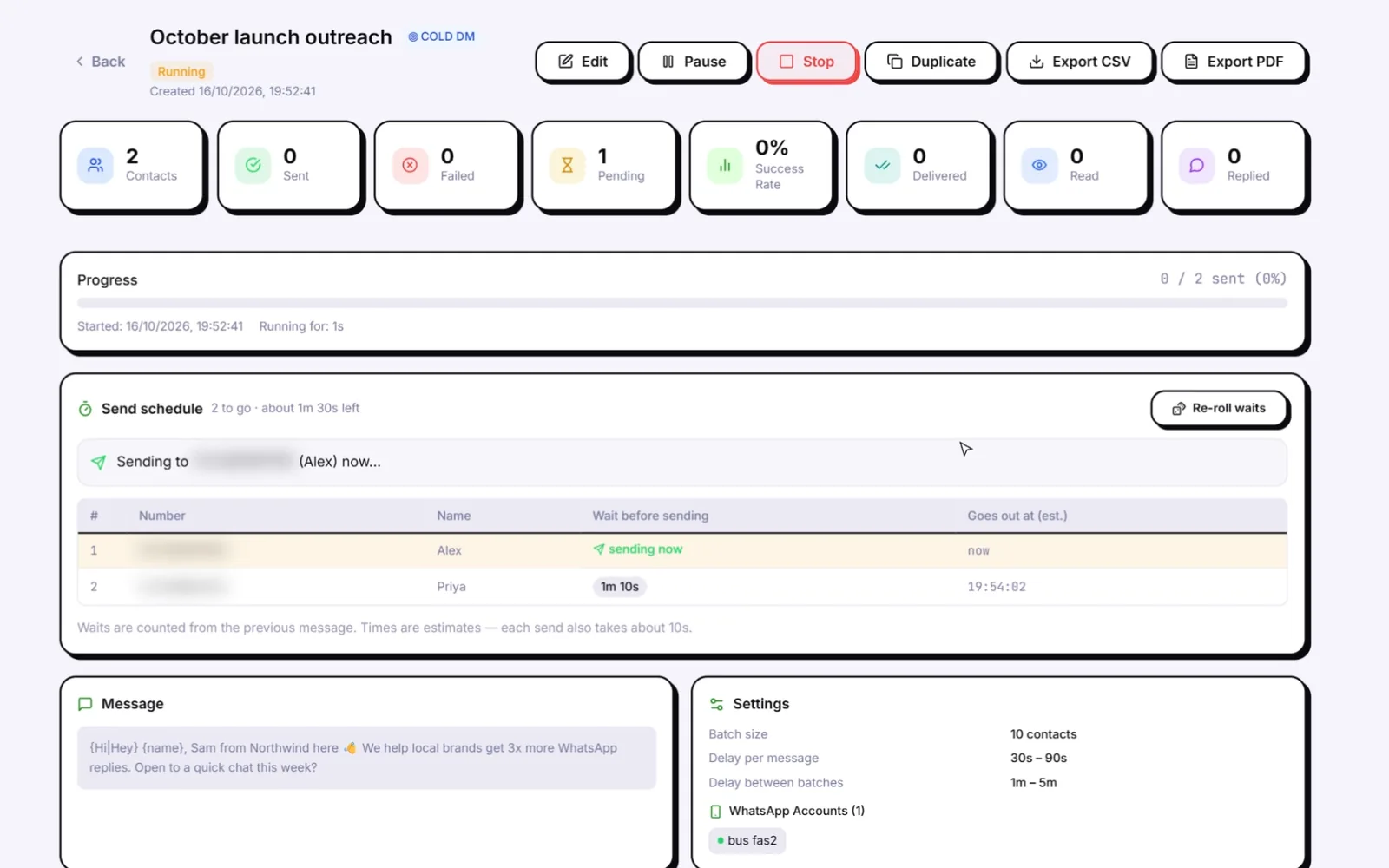
Wassuply is a Windows desktop app (Windows 10 and 11) for warming up and running many WhatsApp numbers for cold outreach. It drives normal WhatsApp and WhatsApp Business through WhatsApp Web sessions, so there is no API, no Meta approval and no per-message fee. Here is what it does for each habit, and what it leaves to you.
| Habit | What Wassuply does |
|---|---|
| Warm-up | Your numbers chat with each other on autopilot using natural chat lines (10 built-in packs or your own), never repeated by the same sender, with rotating pairs and random 30-120 second gaps, only inside the hours you set. Warm-up Pods pair your numbers with other Wassuply users' numbers for real two-way chats. Health & Risk reads each number's age and history, gives days to warm, a safe daily limit and a first campaign size, and flips the number to Ready. |
| Isolation | Every number gets its own isolated session, browser fingerprint and optional proxy. Bring your own residential or 4G proxies; Wassuply assigns one per number and checks it for leaks. All numbers run side by side in one app. |
| Slow sending | Random 30-90 second gaps, batches of 10, 1-5 minute breaks between batches, and daily caps. |
| Blackout hours | No sending outside the hours you allow. |
| Opt-outs and list hygiene | Replies such as "stop" or "unsubscribe" are marked as opt-outs automatically, and opted-out or blacklisted numbers are skipped in every campaign. A pre-launch check counts duplicates, invalid numbers, opt-outs and blacklisted numbers. List Cleaner and Phone Verifier are coming soon. |
| Message variety | Spintax and merge fields ({name}, {phone}, {custom1}, {custom2}). With your own Claude, ChatGPT or DeepSeek key, AI writes a personalised first message per contact and turns a message into spintax variations. |
| Risk score | A live 0-100 ban-risk score per number. Turn on Smart Send and it slows sending at 60 and pauses it at 80. A panic button stops everything. |
| After a ban | WA Ban Appeal: the same 50 appeal scripts as our free appeal generator, with the number filled in. |
| Left to you | Who you contact, what you say, whether they want to hear from you, and obeying the warnings. The warm-up chats are not AI-written. |
More on the warm-up itself on the WhatsApp warmer page. Wassuply is a lifetime licence (early-bird $397 one-time, unlimited numbers); the app and account are free to download, and warming and sending need a licence. See pricing.
Want to test your instincts first? Ban Arcade is a free game that teaches these rules by letting you keep numbers alive, or not.
Warm each new number for 15 to 30 days, isolate every number on its own session, fingerprint and IP, send with random 30-90 second gaps in batches of 10 with 1-5 minute breaks, avoid night hours, use clean lists, vary every message and honour opt-outs at once. Even then the risk is lower, not zero.
At least 15 days before its first outreach campaign, and 30 days is better. Then start with a small first campaign and grow slowly.
WhatsApp does not publish a safe number, and anyone who gives you one is guessing. Start small on a warmed number and grow slowly. Wassuply's Health & Risk gives each number its own safe daily limit based on its age and history.
No. Any tool that promises you will never be banned is not being honest. Good tools remove the behaviour that gets numbers banned; WhatsApp still makes the final call.
Yes. WhatsApp says it uses machine learning to find bulk and automated behaviour at registration, while messaging and from reports and blocks, and that most accounts it removes for this had no recent user report.
Proxies stop your numbers being linked through one shared IP, which matters when one number gets flagged. They do nothing about sending speed, identical messages or cold lists, which cause most bans.
They can if they share the same device, IP, contact list or message with the banned number. Pause those numbers, check their risk and keep every number isolated from now on.
If your contacts have opted in and you want to stay inside WhatsApp's rules, yes. The API is the authorised route, with templates and per-message fees. Tools like Wassuply are for teams that choose normal WhatsApp for outreach and accept the risk that comes with it.
Stop all sending on every related number, read the exact ban screen, request one honest review from it, write down what happened in the last 48 hours, and fix the cause before any number sends again.
Only WhatsApp can remove a ban. If the ban screen shows Request review, you can appeal once and WhatsApp says most reviews finish within 24 hours. If there is no review option, the ban is final.
Wassuply runs the warm-up, the gaps, the breaks and the risk score for every number, side by side in one Windows app. Free account. Windows 10 and 11.