Home › WhatsApp Warmer
Wassuply Warmer

Wassuply Warmer: the WhatsApp warmer for cold outreach.

A WhatsApp warmer is software that gets a new number chatting like a normal user before it does any outreach, so the account builds real history first. The Wassuply Warmer does it on autopilot for unlimited numbers on Windows, pairs them with other owners' numbers in Warm-up Pods, and tells you when each one is ready to send.

Download the app freeGet lifetime access · $397

Free account. Windows 10 and 11. Warming and sending need a licence.

Quick answer: warm a brand-new WhatsApp number for at least 15 days before its first campaign, and 30 if you can. In Wassuply your numbers chat with each other and with Warm-up Pod partners using natural lines from 10 chat packs, with random 30-120 second gaps inside the hours you set. Health & Risk turns each number's age and history into a plan: days to warm, safe daily limit and first campaign size.

Watch the Wassuply Warmer start a warm-up

An unedited screen recording from the Windows app: creating a warm-up session between WhatsApp numbers.

Setting up a warm-up session in Wassuply. The numbers then chat on their own inside the hours you choose.

What is a WhatsApp warmer?

A WhatsApp warmer is a tool that builds activity on a WhatsApp number before you use it for outreach. It has your numbers send and receive ordinary messages, the "how was your weekend?" kind, on an irregular schedule for a few weeks. By the time the number sends its first cold message, it has a history of two-way conversations instead of a blank record.

Wassuply is a Windows app for warming up and running many WhatsApp numbers for cold outreach, and the Wassuply Warmer is the warm-up engine inside it. It drives normal WhatsApp and WhatsApp Business through WhatsApp Web sessions, so there is no WhatsApp Business API, no Meta approval, no templates and no per-message fees.

Why do new WhatsApp numbers get banned?

WhatsApp acts hard on automated and bulk messaging. In its first India compliance report, WhatsApp said more than 95% of the accounts it bans are banned for unauthorised automated or bulk messaging (Outlook India, July 2021). A number that registers today and messages 200 strangers tomorrow looks exactly like that.

Warming does not make cold outreach invisible, and no tool can honestly promise you'll never be banned. What it does is remove the most common trigger: a brand-new number with no history suddenly sending at volume. For the background, read what WhatsApp warm-up means or the longer complete WhatsApp warmer guide.

How does the Wassuply Warmer work?

Four stages, the same four you see in the app: Connect, Chat, Ramp, Launch.

1

Connect

Plug in every number you own

Scan a QR code, like WhatsApp Web. Each number gets its own isolated session, browser fingerprint and optional proxy, and all of them run side by side in one app, so you never log out and in to switch accounts.

  • Unlimited numbers on the lifetime licence
  • Bring your own residential or 4G proxies; Wassuply assigns one per number and checks it for leaks
2

Chat

Your numbers start talking

Pick one of 10 built-in chat packs (General Chat, Business Talk, Sports Banter, Hindi and Hinglish, and more) or paste your own lines. Pairs rotate and the same sender never repeats a line.

  • Random gaps between messages, 30-120 seconds by default
  • Only inside the hours you set, weekends on or off, or 24/7
  • A daily warm-up cap per number (20 by default)
3

Ramp

Follow a plan, not a guess

Health & Risk reads each number's age, ban history and how it has been used, then gives you its plan.

  • How many days to warm (never fewer than 15)
  • A week-by-week warm-up volume to follow
  • The safe daily limit after warm-up and the size of the first campaign
4

Launch

Send when the number has earned it

From day 15 a number is campaign-ready at the first-campaign size its plan suggests. Every number keeps a live 0-100 ban-risk score.

  • Turn on Smart Send and it slows sending at 60 and pauses at 80
  • A panic button stops everything at once
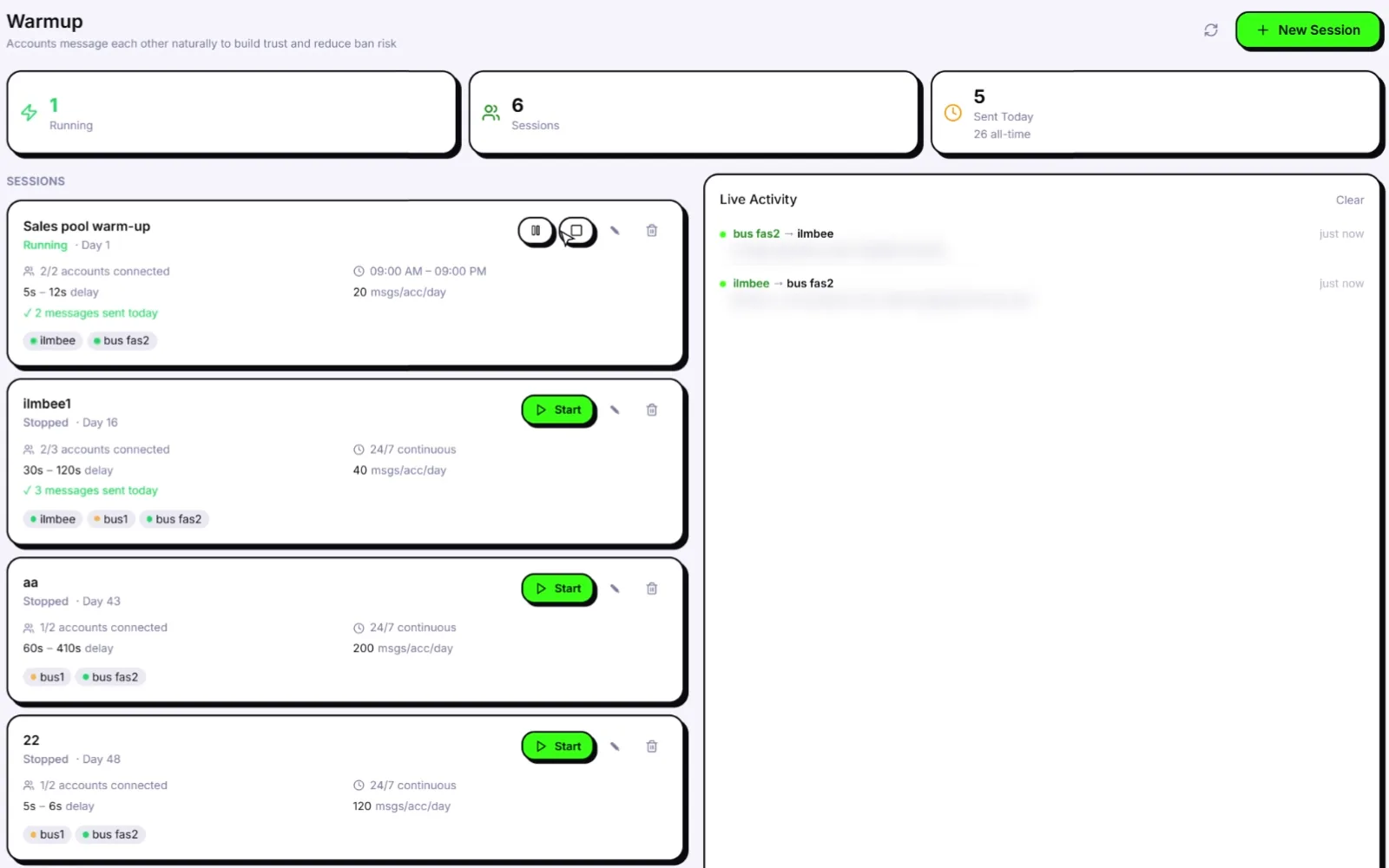
Wassuply Warmup screen: a Sales pool warm-up session running on Day 1, two numbers messaging each other in Live Activity
The Warmup screen: one session running on Day 1, with its two numbers messaging each other in Live Activity.

Closed loop or Warm-up Pods: who should your numbers talk to?

Most WhatsApp warmers pair your own numbers with each other. That is a closed loop: one owner, usually one internet connection, and the same small circle of numbers talking only to one another. It is far better than nothing, and the Wassuply Warmer does it too. But it is still a pattern.

Warm-up Pods widen the circle. A pod pairs your numbers with numbers owned by other Wassuply users, on different IPs and in different countries, for real two-way chats. Our server times the turns, so replies arrive minutes apart instead of instantly. Join a public pod chosen by niche, size and country mix, or create a private, invite-only pod with your own code, for example with partner agencies.

 Closed loopWarm-up Pod
Who your number talks toYour own other numbersNumbers owned by other Wassuply users
OwnersOne: youMany different owners
IPs and countriesUsually one IP, one countryDifferent IPs and countries
Reply timingRandom 30-120 second gapsServer-timed turns, minutes apart
Who can joinOnly your numbersPublic pods by niche, size and country, or private invite-only pods
Good forStarting out, or a fully private setupA wider, more natural set of contacts

Pods are the one part of warm-up that runs through our cloud. Your campaigns, contacts and message history stay on your computer.

How long does it take to warm up a WhatsApp number?

At least 15 days for a brand-new number before its first campaign, and 30 days is the recommended start. Health & Risk sets a longer plan, up to 60 days, for a SIM that is only weeks old or a number that has been banned or restricted before. An older number with a clean history still gets the 15-day floor.

Other guides quote shorter windows: tool vendors such as Whapi.Cloud and Echobox suggest 3 to 10 days of gradual use, and Green-API's guide says a number becomes noticeably harder to ban after about 10 days and fully trusted after 25 to 30 (Green-API). Our numbers are deliberately conservative because cold outreach to strangers is the riskiest thing you can do with a WhatsApp number.

Warm-up daysStatus in Health & RiskWhat to do
Day 0Needs WarmupConnect the number and start a warm-up session. Send nothing else.
Days 1-14Too NewWarm-up only. No campaigns.
Days 15-29Min. ReachedA first small campaign, at the size the plan suggests.
Days 30-59WarmingThe recommended start for regular campaigns, under the safe daily limit.
Day 60 and upReadyFull warm-up done. Scale gradually and keep to the limit.

Health & Risk: how do you know a number is ready to send?

Warming is only half the job. The other half is knowing when to stop warming and how hard to push once you start. Health & Risk does that for every number:

  • A plan per number. From the number's age, any past bans and how it has been used, it works out days to warm, a week-by-week warm-up volume, the safe daily limit after warm-up and the first campaign size.
  • A status you can read at a glance. Too New, Min. Reached, Warming, Ready.
  • A live 0-100 ban-risk score. Turn on Smart Send and a number's sending slows at 60 and pauses at 80. The panic button stops every number at once.

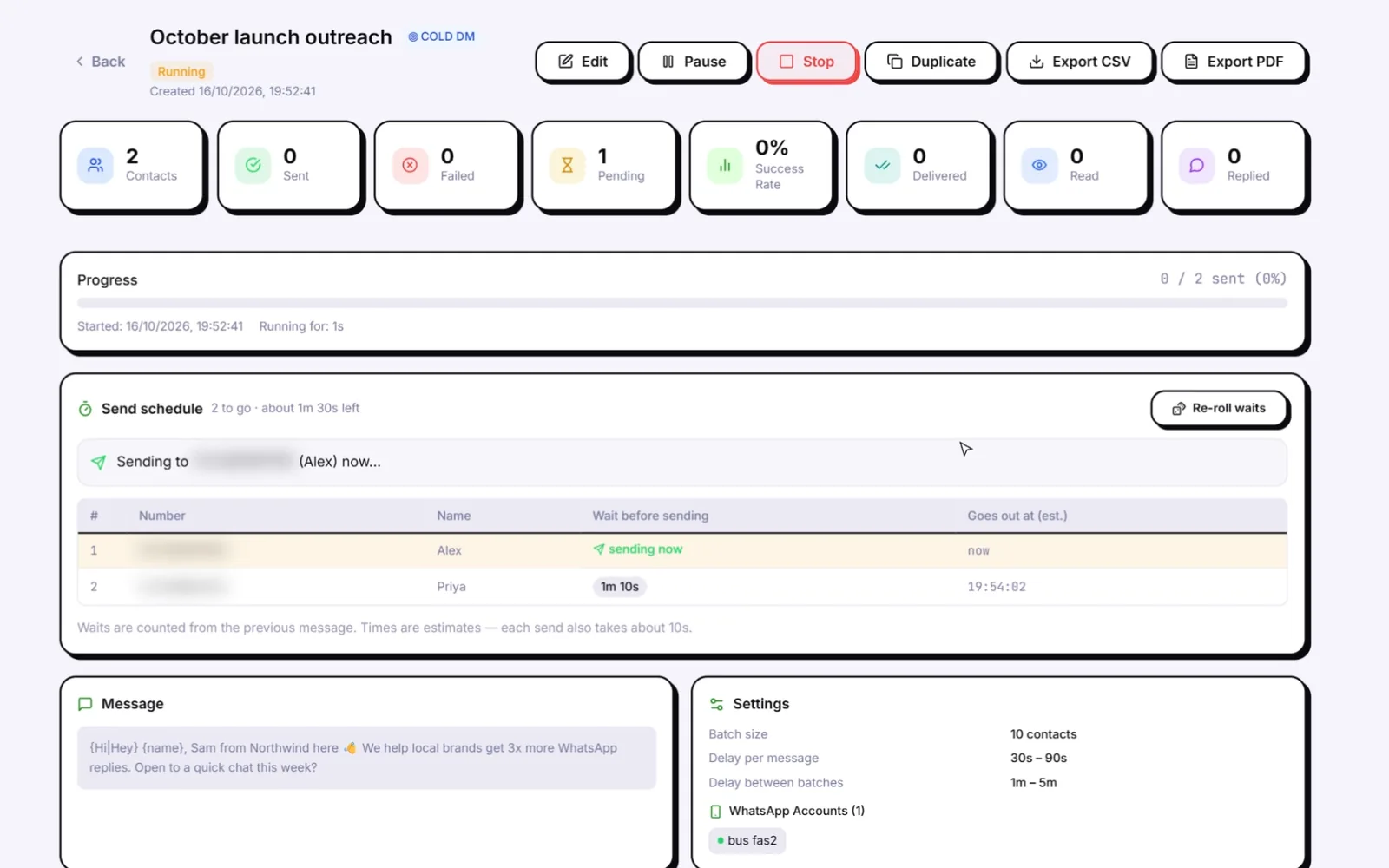
When campaigns start, the sending side keeps the same discipline: random 30-90 second gaps, batches of 10, 1-5 minute breaks between batches, blackout hours so nothing goes out at night, and daily caps. The full rulebook is on how to avoid a WhatsApp ban, and the numbers behind it are in WhatsApp sending limits.

A cold campaign running in Wassuply: send schedule with per-contact waits, batches of 10, 30-90 s delays, 1-5 min breaks
A campaign in progress: each contact's wait is planned up front, in batches of 10 with breaks between them.

WhatsApp warmer vs manual warming vs no warming

The three ways people prepare a number for outreach, side by side.

 Wassuply WarmerManual warmingNo warming
EffortSet up once, runs on autopilotSomeone chats by hand every day for 2 to 4 weeksNone
Numbers at onceUnlimited, side by side in one appOne or two per person, realisticallyAny
Who the number talks toYour numbers plus Warm-up Pod partnersFriends, colleagues, familyNobody before the campaign
Repeated lines, fixed timingNo line repeated per sender; random 30-120 s gapsDepends on disciplineNot applicable
Separate fingerprint and proxy per numberYesNeeds separate phonesUsually not
A plan per numberDays to warm, safe limit, first campaign sizeGuessworkNone
Risk monitoring after warm-upLive 0-100 score, Smart Send, panic buttonNoneNone
Cost$397 lifetime licence (early-bird); free downloadYour time and extra phonesFree, until the number is banned
Risk on the first campaignLower: the number has history and a planLower, if done properlyHighest

What makes a good WhatsApp warmer?

Whatever tool you pick, check it against this list. These are the things that separate a warmer that helps from one that just generates a different pattern:

  1. Two-way chats. Numbers should receive and reply, not only send.
  2. No repeated lines. The same sender should never send the same line twice.
  3. Random timing inside sensible hours. No fixed intervals, no messages at 4 a.m. unless you chose 24/7.
  4. Contacts beyond your own loop. Something like Warm-up Pods, so your numbers do not only talk to each other.
  5. Isolation per number. Separate sessions, browser fingerprints and proxies, so one number's trouble does not spread.
  6. A plan per number. A two-year-old number and a SIM bought yesterday should not get the same schedule.
  7. Protection after warm-up. Paced sending and a risk score, because a warmed number can still be burned by a careless campaign.

We put the main options, including tools that compete with us, through these criteria in the best WhatsApp warmer software in 2026. If you are weighing a browser extension against a desktop app, see WhatsApp warmer extension vs desktop.

Is the Wassuply Warmer an AI WhatsApp warmer?

Partly, and we are precise about which part. The warm-up chats are not written by AI. They come from chat packs or your own lines, and from real conversations with Warm-up Pod partners.

The warmer sits inside an AI outreach app. Once a number is warm, AI (your own Claude, ChatGPT or DeepSeek key) writes a personalised first message for each contact, turns a message into spintax variations, improves your drafts and writes a go-to-market outreach script from a short intake. That is the part of outreach your prospects actually read. The AI WhatsApp warmer page explains how the two halves fit together.

What does the Wassuply Warmer cost?

The app and the account are free to download. Warming and sending need an active licence. The lifetime licence is $397 one-time during early access (the regular price after early access is $2,499) and includes unlimited numbers, every feature and all future updates. Monthly plans are coming soon: Starter with 5 numbers at $7/month, and Unlimited at $37/month. All sales are final. Details on the pricing page.

Not ready to buy? Play Ban Arcade, a free game that teaches the rules that get WhatsApp numbers banned.

WhatsApp warmer FAQ

What is a WhatsApp warmer?

A WhatsApp warmer is software that has a new number send and receive ordinary messages on a natural schedule for a few weeks before it does outreach. The number builds a history of two-way chats, so its first campaign does not come from a blank account.

How long should I warm up a new WhatsApp number?

At least 15 days before its first campaign, and 30 days is recommended. In Wassuply, Health & Risk can set a longer plan for a very new SIM or a number with past bans, and marks a number campaign-ready no earlier than day 15.

Does a WhatsApp warmer stop bans?

No tool can honestly promise you will never be banned. A warmer removes the most common trigger, a brand-new number sending at volume. Wassuply also paces campaigns with random gaps, batches and daily caps, and Smart Send can slow or pause a number whose risk score climbs.

Is the Wassuply Warmer free?

The app and the account are free to download. Warming and sending need an active licence: the lifetime licence is $397 one-time during early access, with unlimited numbers. Monthly plans are coming soon.

Can I warm up several WhatsApp numbers on one PC?

Yes. Wassuply runs unlimited numbers side by side in one app, each with its own isolated session, browser fingerprint and optional proxy, so you never log out and in to switch accounts.

Are the warm-up messages written by AI?

No. Warm-up chats use lines from 10 built-in chat packs or your own lines, plus real two-way chats with Warm-up Pod partners. AI in Wassuply writes your campaign messages, not the warm-up chats.

Does it work with WhatsApp Business numbers?

Yes. Wassuply drives normal WhatsApp and WhatsApp Business through WhatsApp Web sessions. There is no WhatsApp Business API, no Meta approval, no templates and no per-message fees.

Do I need proxies to warm up WhatsApp numbers?

Proxies are optional. If you run several numbers, a residential or 4G proxy per number stops them all sharing one IP. You bring your own; Wassuply assigns one per number and checks it for leaks.

Does my PC need to stay on while numbers warm up?

Yes. Wassuply is a Windows desktop app that drives WhatsApp Web sessions, so warm-up runs while the app is open. Set your hours, or 24/7, and leave it running.

Is there a Mac version of the Wassuply Warmer?

Not yet. Wassuply runs on Windows 10 and 11. There is no Mac or Linux version today.

Is using a WhatsApp warmer against WhatsApp's rules?

WhatsApp's terms restrict bulk and automated messaging on the regular app, and warming does not change that. A warmer lowers the risk to your numbers; it does not make spam acceptable. Message people with a reason to hear from you, honour opt-outs and follow the law where you operate.

Keep reading

Warm it. Protect it. Then send.

Download Wassuply free, connect your numbers and start warming. One payment, unlimited numbers, every future update.