Wassuply vs WhatsApp API: which to use for outreach, support and notifications
Wassuply vs WhatsApp API comes down to the job you need done. The official WhatsApp Business API, through Meta's Cloud API or a provider such as WATI, AiSensy or Twilio, is built for opted-in notifications and support at scale, with approved templates and per-message fees. Wassuply is a Windows and Mac app for warming and running ordinary WhatsApp numbers for outreach, with no templates and no per-message fees, but with a ban risk you carry yourself.
- The API: Meta's official platform, used directly through the Cloud API or via providers like WATI, AiSensy and Twilio. Opt-in, templates and per-message pricing.
- Wassuply: a Windows and Mac desktop app that runs ordinary WhatsApp and WhatsApp Business numbers through WhatsApp Web, with warm-up built in.
- Cost: Meta charges per delivered message by category and country. Wassuply is a $397 one-time licence with no per-message fees.
- Risk: the API is the compliant route for opted-in messaging. Outreach from ordinary numbers needs no approval but carries ban risk you own.
- Pick by job: the API for notifications, support and regulated work; Wassuply for outreach numbers. Many businesses can use both.
What is the difference between Wassuply and the WhatsApp Business API?
The WhatsApp Business API is Meta's official, programmable platform for business messaging. Wassuply is a Windows and Mac app that runs ordinary WhatsApp accounts for outreach. They are built for different jobs, so the useful comparison is job by job.
You reach the API in one of two ways: directly through Meta's Cloud API, which needs developer work, or through a Business Solution Provider such as WATI, AiSensy or Twilio, which wraps it in an inbox, a chatbot builder and campaign tools. Either way, Meta's rules apply. Outside a 24-hour customer service window, businesses can only send template messages, and Meta bills per delivered message. The audience is huge: Meta says about a billion people message a business each week across its messaging apps.
Wassuply is a desktop app for Windows 10/11 and macOS 12+ that drives normal WhatsApp and WhatsApp Business accounts through WhatsApp Web sessions, each with its own isolated session, browser fingerprint and optional proxy. There is no Business API, Meta verification or template approval, and you write each message yourself. The trade-off: WhatsApp's Terms of Service list bulk messaging and auto-messaging as impermissible, so outreach from ordinary accounts carries a ban risk that sits with you. For how a no-API WhatsApp sender works, see our guide to WhatsApp senders with no API.
Wassuply vs WhatsApp API: side-by-side comparison
The API wins on official status, compliance and integrations. Wassuply wins on setup speed, message freedom and cost for outreach. The table covers the points that decide most choices.
| Factor | WhatsApp Business API (Cloud API or a provider) | Wassuply |
|---|---|---|
| What it is | Meta's official business messaging platform, used directly or through a provider | A Windows and Mac desktop app that runs ordinary WhatsApp and WhatsApp Business accounts through WhatsApp Web |
| Setup | A Meta business portfolio, a number registered to the platform, and a developer or provider integration | Install on Windows 10/11 or macOS 12+ and link each number as a WhatsApp Web session; warm new numbers for 15 to 30 days first |
| Approval | Meta reviews message templates; verifying the business is one way to raise sending limits | No Meta verification, review or approval |
| Templates | Required to start conversations outside the 24-hour customer service window | Not used; free text with merge fields, spintax and optional AI-written first lines |
| Cost model | Per delivered message, by category and recipient country, plus any provider fees | $397 one-time lifetime licence (early-bird), no per-message fees; you pay for SIMs and proxies |
| Numbers | Numbers registered to your business portfolio, sharing one messaging limit | Unlimited numbers on one licence, each with its own session, fingerprint and optional proxy |
| Sending limits | 250 unique users per 24 hours for a new portfolio, rising to 2,000, 10,000, 100,000 and unlimited as quality and volume allow | WhatsApp publishes no limit for ordinary accounts; Wassuply suggests 30 to 250 a day per number by age, with daily caps |
| Opt-in | Required by WhatsApp's Business Messaging Policy | Your responsibility; privacy law still applies |
| Ban and compliance risk | Lower when you message opted-in users within policy, though numbers can still be restricted | Real and yours; warm-up and pacing lower it without removing it |
| Verified business presence | Available through Meta's verification options | Not provided |
| Integrations | CRMs, chatbots, webhooks and shared inboxes, usually through providers | Built-in Pipeline CRM board for replies; works from CSV files |
| Best for | Opted-in notifications, support at scale, regulated industries, official presence | Outreach from ordinary numbers, warming many numbers, agencies running campaigns from one PC |
How much does the WhatsApp Business API cost?
The WhatsApp Business API costs a per-message fee set by Meta, which varies by message category and the recipient's country, plus whatever your provider charges. Meta has charged per delivered message since 1 July 2025, replacing the old per-conversation model.
How Meta's per-message pricing works
- By category. Marketing, utility and authentication messages are charged. Service messages, your replies inside a customer service window, come with a free tier of 1,000 delivered messages per business number each month.
- By country. Charges vary with the country calling code of the recipient's number.
- By volume. Utility and authentication rates fall as monthly volume rises.
- Free inbound. Meta doesn't charge for messages people send to a business.
- Recent changes. From 1 October 2026, Meta began charging for utility messages sent inside an open customer service window, free since July 2025, and for service messages beyond the free tier.
Rates differ by market and change over time, so check Meta's pricing page for your recipients' countries rather than trusting a figure in a blog post. Providers such as WATI, AiSensy and Twilio usually charge for their own software on top, through a subscription, a markup or both. We compare two of them in Wassuply vs WATI and AiSensy.
What Meta's own numbers say about the model
Paid messaging is a fast-growing business for Meta, which shows how the API is meant to be paid for. On the Q4 2025 earnings call, CFO Susan Li said paid messaging inside WhatsApp had passed a $2 billion annual run rate. Meta's "Other revenue" line, which it attributes mainly to WhatsApp paid messaging and subscriptions, grew from $1,058 million in 2023 to $1,722 million in 2024 and $2,584 million in 2025. In Q2 2026 it passed $1 billion in a single quarter for the first time.
Analysts expect more. Juniper Research forecasts global OTT business messaging revenue to grow from $3.6 billion in 2025 to $9.8 billion in 2029, and credits WhatsApp's switch to per-message pricing.
That isn't a criticism. For a delivery update or a one-time passcode, a per-message fee is a fair price for an official, reliable channel. For outreach, where most messages get no reply, every message still costs money, and the policy requires opt-in anyway.
Wassuply's model is the opposite: a $397 one-time lifetime licence during early access (the regular lifetime price afterwards is $2,499), unlimited numbers and no per-message fees. You still pay for SIMs, proxies and the weeks it takes to warm each number.
When is the official WhatsApp Business API the right choice?
The API is the right choice whenever people have opted in and the messages need to be official, reliable and auditable. That covers most of the customer communication a business sends.
- Opted-in notifications: order and delivery updates, appointment reminders, payment receipts and one-time passcodes. Utility and authentication messages exist for exactly this.
- Support at scale: several agents sharing one number, a chatbot answering first and handover to a person, usually through a provider's shared inbox.
- Regulated industries: finance, healthcare, insurance and others that need documented consent, approved wording and an audit trail.
- A verified business presence, so customers can see they are talking to the real company, through Meta's verification options.
- Official compliance: WhatsApp's Business Messaging Policy requires opt-in permission and says you must respect every request to block or opt out, whether it is made on or off WhatsApp. The API is built around those rules.
- High volume to opted-in lists: Meta limits how many unique people you can message outside customer service windows in a moving 24 hours. A new business portfolio starts at 250, reaches 2,000 by verifying the business or sending 2,000 high-quality template messages within 30 days, then scales automatically to 10,000, 100,000 and unlimited.
Even here, the API is not a cold outreach tool. The same policy that makes it compliant requires opt-in before you message anyone, so a scraped or bought list is off limits on the API too.
When is Wassuply the better fit?
As a WhatsApp API alternative, Wassuply fits when the job is outreach from ordinary numbers you control: warming them, running many side by side and sending personalised first messages from a desktop, without templates or per-message fees.
- Outreach across many numbers. Agencies and sales teams can run unlimited numbers on one licence, each isolated with its own fingerprint and proxy. See running multiple WhatsApp accounts.
- New numbers that need warming. The API has no warm-up. In Wassuply, your numbers chat with each other using natural lines from 10 built-in chat packs, and Warm-up Pods can pair them with other users' numbers for two-way chats.
- Messages you write freely, with merge fields, spintax, AI-written first lines through your own Claude, ChatGPT or DeepSeek key, and voice notes.
- Predictable cost: one licence and no fee per message.
- No developer needed: install, link numbers and import a CSV, without saving contacts on the phone.
What it doesn't give you is a verified badge, official compliance or protection from bans. Wassuply is built to manage ban risk with warm-up, pacing, per-number limits and a live risk score, not to remove it. For the bulk-sending view of the same trade-off, read WhatsApp bulk sender vs API.
Is the WhatsApp Business API safer from bans?
The API is safer for compliant, opted-in messaging, but API numbers can still be banned, and messaging people who don't expect you gets numbers restricted on either route. Reddit has examples on both sides; they are individual anecdotes, not data.
- r/whatsapp, 2024: an API number banned while messaging form-fill leads. A business ran Meta lead-form ads and messaged each lead through the API two to three minutes after the form was filled. The poster says most replied, but the number was banned for spam and the appeal was rejected within seconds. A commenter with the same problem took away one lesson: stop following up with leads who go quiet. (thread)
- r/whatsapp, 2024: an ordinary number banned at 50 a day. The poster used a bulk-sender browser extension to cold-message prospects and was banned even at 50 messages a day. Most replies were vendor pitches, one of them from an API partner. (thread)
On the API, quality is built into the limits: Meta only scales a portfolio when its messages and templates have a high quality rating, and holds the limit where it is if a request is denied. WhatsApp is also testing changes that affect both routes: a monthly cap on messages to people who haven't replied, and a folder that moves messages from large businesses on the Business Platform out of the main chat list after up to 24 hours.
With Wassuply, the controls are in your hands. Warm a new number for at least 15 days, ideally 30 (see a new WhatsApp number's first 30 days), keep daily volume inside its limit and stop sequences when people reply. Our guide to avoiding WhatsApp bans covers the rest.
Which should you use? A decision checklist
Use the API if most of the first list describes you, and Wassuply if most of the second does. If both lists fit, use both, as the next section explains.
Choose the WhatsApp Business API if
- People have opted in to hear from you on WhatsApp.
- Your messages are notifications, receipts, reminders or passcodes.
- You run support with several agents or a chatbot.
- You work in a regulated industry or need an audit trail.
- Customers need to see a verified business.
- You have a developer, or you're happy to pay a provider.
- A fee per message is fine because each message has clear value.
Choose Wassuply if
- Your job is outreach and follow-up, not notifications.
- You run several ordinary WhatsApp numbers and need to warm them.
- You want to write messages freely, without template approval.
- You prefer a one-time licence to fees that grow with every message.
- You work from a Windows PC or a Mac and don't want an integration project.
- You accept that ordinary numbers can be banned, and you'll pace them accordingly.
Can you use both? The API for transactional messages, Wassuply for outreach
Yes, and for many businesses it is the cleanest setup: the official API on your main customer number for transactional and support messages, and Wassuply on separate numbers for outreach.
- 1Keep your main number officialPut the number customers already know on the API for receipts, reminders and support.
- 2Use separate numbers for outreachRun them in Wassuply, each in its own session with its own proxy, so a ban on an outreach number can never touch your support line.
- 3Warm before you sendAt least 15 days for a brand-new number before its first campaign, 30 recommended.
- 4Hand over when someone opts inWhen an outreach lead becomes a customer and agrees to receive updates, move them to the official channel.
- 5Share opt-outs across bothAnyone who asks you to stop on one channel comes off both lists.
Outreach still has to respect privacy law where your prospects live. Our guide to cold WhatsApp messages and GDPR covers the basics.
Where Wassuply fits
Wassuply is the outreach half of that setup. It warms and runs ordinary WhatsApp and WhatsApp Business numbers from a Windows 10/11 or macOS 12+ computer, each in an isolated WhatsApp Web session with its own browser fingerprint. You bring residential or 4G proxies; Wassuply assigns one per number and checks it for leaks.
New numbers warm up by chatting with each other on random 30-120 second gaps inside the hours you set. Health & Risk reads each number's age and history and suggests days to warm, a safe daily limit and a first campaign size, next to a live 0-100 risk score. Turn on Smart Send and it slows sending at 60 and pauses at 80, and a panic button stops everything.
Campaigns run from a CSV with phone, name, custom1 and custom2 columns. You write the message yourself, with merge fields and spintax, and send it with random 30-90 second gaps, batches of 10, 1-5 minute breaks, blackout hours and a daily cap per number. Opt-outs get an automatic reply, follow-ups stop the moment someone replies, and replies land on a Pipeline CRM board.
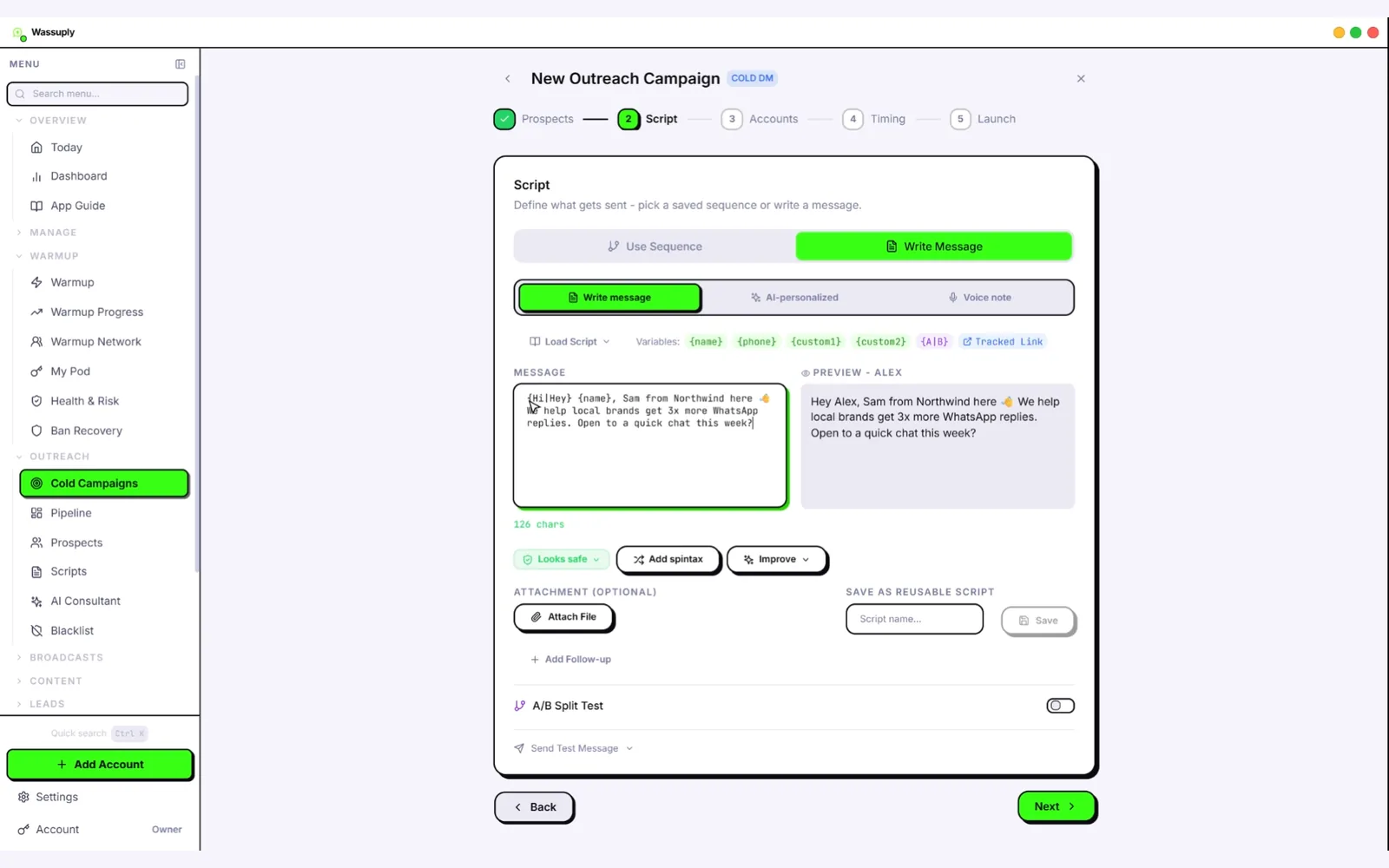
It doesn't replace the API for notifications or support, and it can't remove ban risk. The download and account are free; connecting numbers, warming and sending need a licence, currently $397 one-time for lifetime access.
Run your outreach numbers without per-message fees
Warm up and run ordinary WhatsApp numbers for outreach from one desktop app, alongside whatever you use for official messaging.
Free account. Windows 10/11 and macOS 12+. Warming and sending need an active licence.
Frequently asked questions
Is Wassuply a WhatsApp Business API alternative?
For outreach, yes; for official messaging, no. Wassuply runs ordinary WhatsApp and WhatsApp Business numbers from a Windows and Mac app, with warm-up built in, no template approval and no per-message fees. It does not give you a verified business presence, official compliance or chatbot integrations, so for opted-in notifications and support at scale the WhatsApp Business API remains the right tool.
How much does the WhatsApp Business API cost?
Meta charges per delivered message, at rates that depend on the message category (marketing, utility, authentication or service) and the country code of the recipient's number. Messages from customers to you are free, and each business number gets 1,000 delivered service messages a month free. Providers such as WATI, AiSensy or Twilio usually charge for their software on top. Current rates are on Meta's pricing page.
Can I send cold messages with the WhatsApp Business API?
Not within the rules. WhatsApp's Business Messaging Policy says businesses may only contact people who have given opt-in permission, and outside a 24-hour customer service window you can only send template messages. Messaging a scraped or bought list through the API breaks that policy and can get the number restricted, as Reddit reports of API numbers banned for spam show.
Do I need Meta approval or verification to use Wassuply?
No. Wassuply runs normal WhatsApp and WhatsApp Business accounts through WhatsApp Web sessions, so there is no Business API, no Meta business verification and no template approval. The download and the account are free; connecting numbers, warming and sending need an active licence. Because the accounts are ordinary ones, WhatsApp's normal terms apply, and outreach from them carries ban risk.
Can I use the WhatsApp Business API and Wassuply together?
Yes. A common split is to keep your main customer number on the official API for receipts, reminders and support, and run separate outreach numbers in Wassuply. Keeping them apart means a ban on an outreach number never touches your support line. Move leads to the official channel once they opt in, and honour every opt-out across both.
Which is safer from bans, the API or Wassuply?
The API is safer when you message people who opted in, because that is what it is built for, though API numbers can still be banned for spam. Outreach from ordinary numbers in Wassuply carries more risk, since WhatsApp's terms list bulk messaging and auto-messaging as impermissible. Warm-up, slow pacing, per-number daily limits and a live risk score lower that risk, but nothing removes it.