Best WhatsApp Warmer Software in 2026: 8 Options Compared Honestly
The best WhatsApp warmer depends on how many numbers you run and what happens after warm-up. For cold outreach from many numbers on Windows or Mac, Wassuply (our product) puts warm-up, Warm-up Pods and sending in one app for $397 lifetime. WAWarmer suits teams warming across devices, WaWarm is the lowest-priced paid desktop warmer, and Whapi.Cloud suits developers.
- Many numbers, cold outreach, Windows or Mac: Wassuply. Warm-up with real pod partners, a plan per number, and sending built in.
- A team warming across devices: WAWarmer. AI warm-up chats, pool mode, Windows and macOS.
- Lowest paid price, warm-up only: WaWarm from WAToolkit, $5 a month, Windows.
- Developers on an API: Whapi.Cloud's warm-up module, included with a $29/month channel.
- One or two numbers and spare time: manual warming still works and costs nothing.
In this comparison
Which WhatsApp warmer tools are worth a look in 2026?
Here is the short version. Prices are as listed on each vendor's site in October 2026; "warm-up focused" means the tool prepares numbers but you send campaigns with something else.
| Option | Platform | How warm-up works | AI in warm-up | Sends campaigns | Price |
|---|---|---|---|---|---|
| Wassuply | Windows 10/11, macOS 12+ | Your numbers plus Warm-up Pods with other owners; 10 chat packs or your own lines | No (AI writes outreach) | Yes, built in | Free download; $397 lifetime licence (early-bird), unlimited numbers |
| WAWarmer | Windows 10+, macOS | Self-warming, team multi-device and account pool modes | Yes | Warm-up focused | Plans by ports (10, 30, 50, 100+); price via sales; 3-day trial |
| WaWarm | Windows | Conversations between accounts you add; 2 modes | Optional | Warm-up focused | $5/month, $20/6 months, $30/year; 1-day trial |
| Whapi.Cloud module | Cloud API | Your connected channels message each other on a pause timer | Not mentioned | Through the API | In Developer Premium, $29/month per channel; 5-day trial |
| CodeCanyon scripts | Windows | Senders chat with each other using stored messages | Not mentioned | Warm-up focused | $20 to $59 one-time |
| GitHub scripts | Self-hosted (e.g. Node.js) | A scripted chat between two accounts | No | No | Free |
| Chrome extensions | Chrome, WhatsApp Web | Varies by extension | Varies | Varies | Varies |
| Manual warming | Your phone | Real chats with people you know | No | No | Free (your time) |
1. Wassuply: warm-up, pods and sending in one desktop app
Free download · $397 lifetime licence (early-bird, regular $2,499) · unlimited numbers
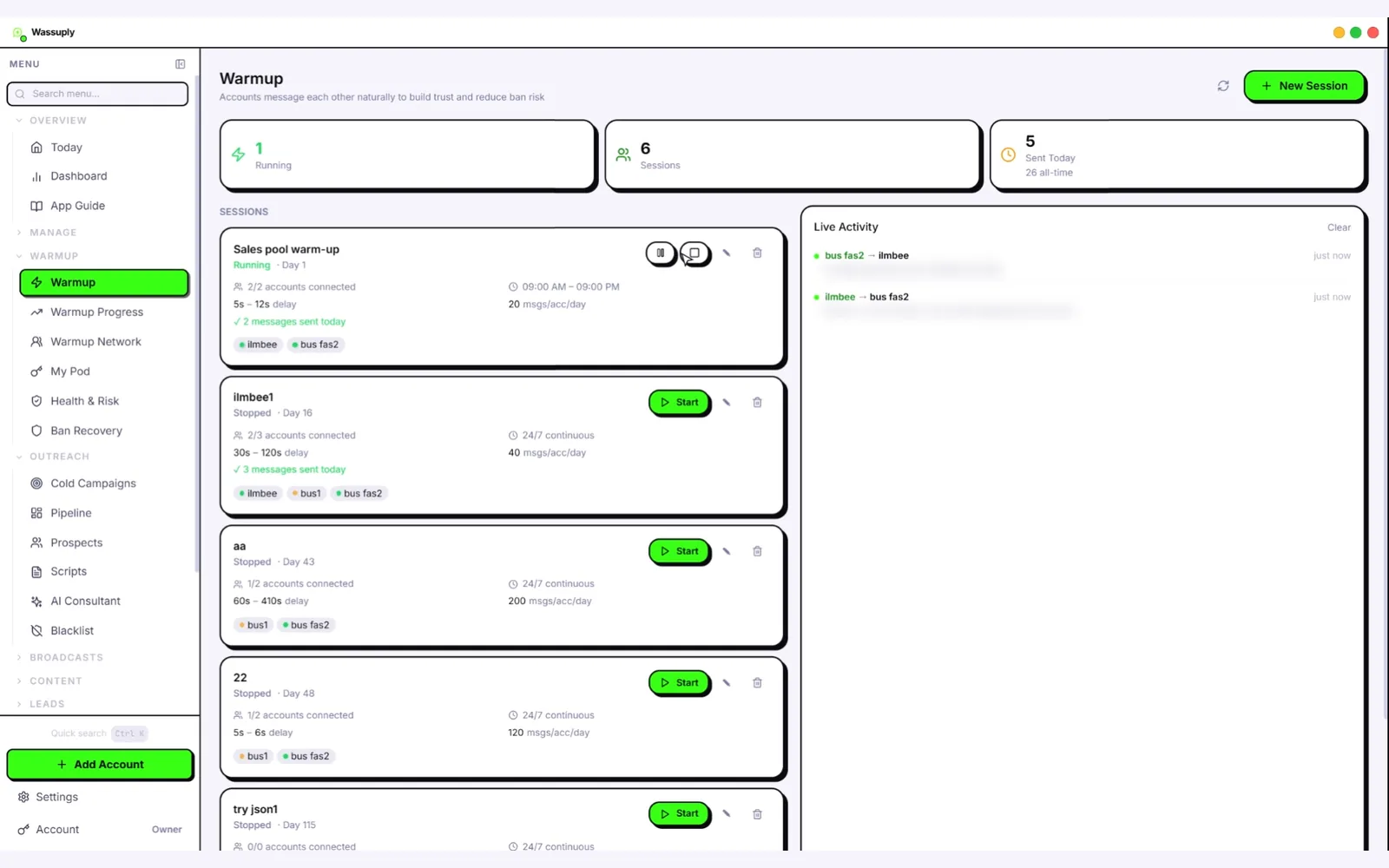
Wassuply is a Windows and Mac app for warming up and running many WhatsApp numbers for cold outreach. Your numbers chat with each other on autopilot using natural lines from 10 chat packs (or your own), never repeated by the same sender, with rotating pairs and random 30-120 second gaps inside the hours you set. Warm-up Pods pair your numbers with other Wassuply users' numbers, on different IPs and in different countries, for real two-way chats with server-timed turns. Health & Risk reads each number's age and history and gives it a plan: days to warm (at least 15, 30 recommended), a safe daily limit and a first campaign size. Sending is built in: CSV import, spintax, AI-personalised openers with your own Claude, ChatGPT or DeepSeek key, voice notes, random 30-90 second gaps and batches of 10.
Does well
- Warms beyond a closed loop with Warm-up Pods
- A plan per number, plus a live 0-100 risk score
- Warm-up and sending in the same app
- Unlimited numbers for one price
- Own session, fingerprint and optional proxy per number; no API
Watch out for
- Desktop only: Windows and Mac, no Linux or phone app
- Warm-up chats are not AI-written (by design)
- You bring your own proxies and AI key
- Free download, but warming needs a licence; all sales final
- Monthly plans ($7 and $37) are still coming soon
Best for: agencies and sales teams doing cold outreach from several numbers who want one tool from first warm-up to first reply. Full details on the Wassuply WhatsApp warmer page; what the AI does (and doesn't) is on the AI WhatsApp warmer page.
2. WAWarmer: AI warm-up chats, Windows and Mac
Plans by ports: 10, 30, 50 or 100+ · prices via sales · 3-day free trial
WAWarmer comes from the team behind WADesk. You connect accounts by QR code, pick a strategy (topics, delays, daily volume) and start; the system pairs accounts and runs AI-generated, multi-turn conversations on trending topics. It offers three modes: self-warming for many accounts on one device, a team network across devices, and an account pool with random matching. Its guide describes preset plans of 7, 14, 21 or 28 days and per-account health scores, and supports HTTP, HTTPS, SOCKS5, VMess and Shadowsocks proxies.
Does well
- Runs on Windows and on Intel and Apple Silicon Macs
- Pool mode adds partners beyond your own numbers
- Team warm-up across several devices
- Clear preset plans and a free trial
- Honest that no tool can promise zero bans
Watch out for
- Prices are not published; you contact sales
- Plans are counted in ports, so more numbers means a bigger plan
- Its guide says to keep the client open while tasks run
- Warm-up focused; outreach happens in other tools
WADesk, the same team's multi-account WhatsApp app, is priced separately: Pro from $300 a year for 5 ports, Max from $550 a year (about $9.20 per port per month). If you are comparing the two, see our WADesk alternative page, or the full WAWarmer vs Wassuply comparison.
Sources: warmer.wadesk.io, pricing, guide, wadesk.io/pricing (October 2026)
3. WaWarm by WAToolkit: the low-cost Windows warmer
$5/month · $20 for 6 months · $30/year · 1-day free trial, no card
WaWarm is Windows software that runs automatic conversations between the WhatsApp accounts you add. You set delays in seconds, give each account its own proxy, and choose between two warmer modes. Warm-up lines can be generated with AI (OpenAI, Claude, Gemini, DeepSeek and others, with your key) or built offline from templates with no API key. WAToolkit lists 21 languages and unlimited accounts.
Does well
- The lowest-priced paid desktop warmer we found
- AI lines or offline templates, your choice
- Unlimited accounts and a proxy per account
Watch out for
- Windows only
- As described, your own accounts talk to each other: a closed loop
- Warm-up only; you need a separate sender
- Its page advertises "99% Ban Protection", a figure no tool can verify
Source: watoolkit.net/wawarm (October 2026)
4. Whapi.Cloud warm-up module: for developers on an API
Developer Premium $29/month per channel (listed down from $40) · 5-day trial · free sandbox with limits
Whapi.Cloud is a WhatsApp API built on linked-device sessions ("channels"). Its automatic warm-up module connects two or more of your channels so they message each other in the background; you set a pause timer, and its guide suggests pauses of over 30 minutes for new numbers, shortened day by day. It also publishes a manual warming guide with a 3 to 10 day plan. The free Developer Sandbox is limited (for example, 150 messages a day).
Does well
- Nothing to install; runs in the cloud
- Fits neatly if you already build on its API
- Warm-up included with a paid channel
- Clear, free warming guides
Watch out for
- A developer tool: you build sending and logic yourself
- Priced per number (channel)
- Your own channels only: a closed loop
- No AI or per-number plan mentioned
Sources: warm-up module, whapi.cloud/price (October 2026)
5. CodeCanyon warmer scripts: cheap one-time licences
$20 to $59 one-time · support windows vary
Envato's CodeCanyon marketplace sells several small Windows warmers. Turbo Whatsapp Warmer Pro v3 (by oshenes, $59) has your senders chat with each other and with cloud-based numbers using varied, cloud-stored messages, with a loop controller and delays in seconds; it includes 6 months of support and was last updated on May 1, 2023. A newer listing, Turbo Warmer WhatsApp Phone Numbers Filter, Validator & Warmer (by ydulana, $20, Windows 11), was updated on October 6, 2026.
Does well
- Low one-time price
- Simple to run for a handful of numbers
Watch out for
- Small single-developer products
- Check the last-update date: WhatsApp Web changes can break automation
- No AI, plan or risk scoring mentioned in the listings
Sources: Turbo Whatsapp Warmer Pro, Turbo Warmer Filter, Validator & Warmer (October 2026)
6. Open-source warmers on GitHub: free, if you can run them
Free · you install, run and maintain them
A GitHub search for "whatsapp warmer" returns around 80 repositories, most with a handful of stars. A typical example, wa-warmer, is a Node.js script on the unofficial Baileys library that runs a scripted conversation between two accounts; you edit the message list yourself, and its README warns that numbers can be blocked.
Does well
- Free, and you can read every line of code
- Full control over timing and messages
Watch out for
- Needs coding skills and ongoing upkeep
- Built on unofficial WhatsApp libraries
- Usually two accounts and a fixed script; no support
Sources: GitHub topic: whatsapp-warmer, noeroelama/wa-warmer (October 2026)
7. Chrome-extension warmers: quick to try, hard to scale
Prices and features vary by extension
Extension warmers run inside Chrome on top of WhatsApp Web. They are quick to install. The trade-offs come from the browser itself: one WhatsApp Web session per browser profile, so several numbers mean several profiles; every profile uses your computer's IP unless you add a proxy to each; and Chrome has to stay open. Extensions also come and go from the Chrome Web Store, so check a listing is live and recently updated before you rely on it.
Does well
- Fast to try, nothing else to install
- Fine for one or two numbers
Watch out for
- Numbers share one machine, browser and usually one IP
- Store listings can be pulled or stop working
- Rarely include a plan or risk monitoring
We go deeper in WhatsApp warmer extension vs desktop app.
8. Manual warming: free, authentic, slow
Free · costs your time
You use the new number like a person: complete the profile, chat with people who will reply, join a small group, make a call, and build up slowly over two to four weeks. Green-API and Whapi.Cloud both publish day-by-day manual plans.
Does well
- Free
- The most genuine activity there is
- No software touching your account
Watch out for
- Takes time every day for weeks
- Realistic for one or two numbers, not twenty
- Easy to repeat yourself or skip days; no plan or risk score
Want the step-by-step? Our complete WhatsApp warmer guide covers manual warming in full, and free WhatsApp warmer options compares the no-cost routes.
How do you choose a WhatsApp warmer?
Ignore the ban-protection percentages; nobody can prove them. Judge a warmer on these eight things instead:
- Platform. Windows, Mac, browser or cloud. WaWarm and the CodeCanyon scripts are Windows only; Wassuply and WAWarmer also run on macOS.
- How pricing scales. Per port, per channel or unlimited. Ten numbers on a per-port plan can cost far more than one licence with unlimited numbers.
- Who your numbers talk to. Only each other (a closed loop), or partners outside your setup, like WAWarmer's pool mode or Wassuply's Warm-up Pods.
- Where the AI goes. Into warm-up lines, into the outreach messages prospects read, or nowhere. Decide which matters to you.
- Isolation per number. Separate sessions, browser fingerprints and proxies, so one number's problem doesn't spread to the rest.
- A plan and a warning light. Does it tell you how long each number needs and when it is getting risky, or does every number get the same timer?
- What happens after warm-up. If the warmer doesn't send, you need a sender with its own pacing. See our best WhatsApp bulk sender tools.
- Trial, terms and updates. Trials here run from none to 5 days; Wassuply's sales are final. A tool last updated years ago may not survive the next WhatsApp Web change.
Which WhatsApp warmer fits which team?
| Your situation | Start with |
|---|---|
| Cold outreach from several numbers on Windows or Mac, one tool end to end | Wassuply |
| You warm numbers across a team's devices | WAWarmer |
| You already have a sender and want the cheapest paid warmer | WaWarm |
| You are a developer building on a WhatsApp API | Whapi.Cloud warm-up module |
| You code and want full control for free | An open-source script |
| One or two numbers and time to spare | Manual warming |
Try the warmer we built.
Wassuply is free to download for Windows 10/11 and macOS 12+. Warm up unlimited numbers with Warm-up Pods and Health & Risk, then send from the same app.
Best WhatsApp warmer: FAQ
What is the best WhatsApp warmer in 2026?
It depends on your setup. For cold outreach from many numbers on Windows or Mac, with warm-up and sending in one app, we built Wassuply ($397 lifetime, unlimited numbers). For team warm-up across devices, WAWarmer is the stronger fit. WaWarm is the lowest-priced paid desktop warmer we found, and Whapi.Cloud's module suits developers already on its API.
Is there a free WhatsApp warmer?
Manual warming and open-source scripts on GitHub cost nothing but your time. Paid tools offer short trials: WAWarmer 3 days, WaWarm 1 day and Whapi.Cloud 5 days, plus Whapi's limited free sandbox. Wassuply is free to download, but warming and sending need a licence.
Can a WhatsApp warmer guarantee my number won't be banned?
No. No tool can honestly promise you will never be banned, and WAWarmer's own guide says it can't guarantee that either. A warmer removes the most common trigger, a brand-new number sending at volume. Pacing, list quality and consent still matter after warm-up.
Do I need AI in a WhatsApp warmer?
Not for the warm-up itself. What matters is two-way chats, lines that are never repeated by the same sender, random timing and who your numbers talk to. AI earns its keep on the messages prospects read. Some warmers use AI for warm-up lines (WAWarmer, optionally WaWarm); Wassuply uses chat packs for warm-up and AI for outreach.
How long should I warm up a WhatsApp number?
For cold outreach, at least 15 days before the first campaign, and 30 is the safer start. Vendor advice ranges from 3 to 10 days for gentle use to 25 to 30 days before a number is fully trusted.
Is a desktop warmer better than a Chrome extension?
For more than a couple of numbers, usually yes. A desktop app can give every number its own isolated session, browser fingerprint and proxy. An extension runs inside your browser, so several numbers mean several browser profiles, all on your own IP unless you add a proxy to each.