Home › Download
Wassuply download · Windows 10 and 11

Wassuply download for Windows

Wassuply is a Windows app for warming up WhatsApp numbers and running cold outreach without the API. To download it, create a free account, confirm your email, then open the Get started tab in your account and click Download for Windows. The installer is version 1.0.3, about 115 MB, for Windows 10 and 11 (64-bit).

Download the app freeSee the install steps

Free account. Windows 10 and 11.

Quick answer: The Wassuply download is free and lives inside your Wassuply account, not on a public file link. Sign up at wassuply.com/signup, confirm your email, and the Get started tab gives you the Windows installer. Downloading, installing and signing in cost nothing. Connecting numbers, warming them up and sending campaigns need an active licence.

Wassuply download at a glance

The current release, straight from Wassuply's update feed.

DetailWassuply for Windows
Latest version1.0.3
ReleasedOctober 16, 2026
FileWindows installer (.exe), about 115 MB
Works onWindows 10 and Windows 11, 64-bit (x64)
Mac, Linux, phonesNot yet. Wassuply is Windows only for now.
Price to downloadFree, with a free Wassuply account
Needed to warm and sendAn active licence (see pricing)
UpdatesAutomatic: the app downloads new versions in the background
Where to get itYour Wassuply account, Get started tab

What do you get when you download Wassuply?

One desktop app that warms your WhatsApp numbers, keeps them separate and sends outreach at a human pace.

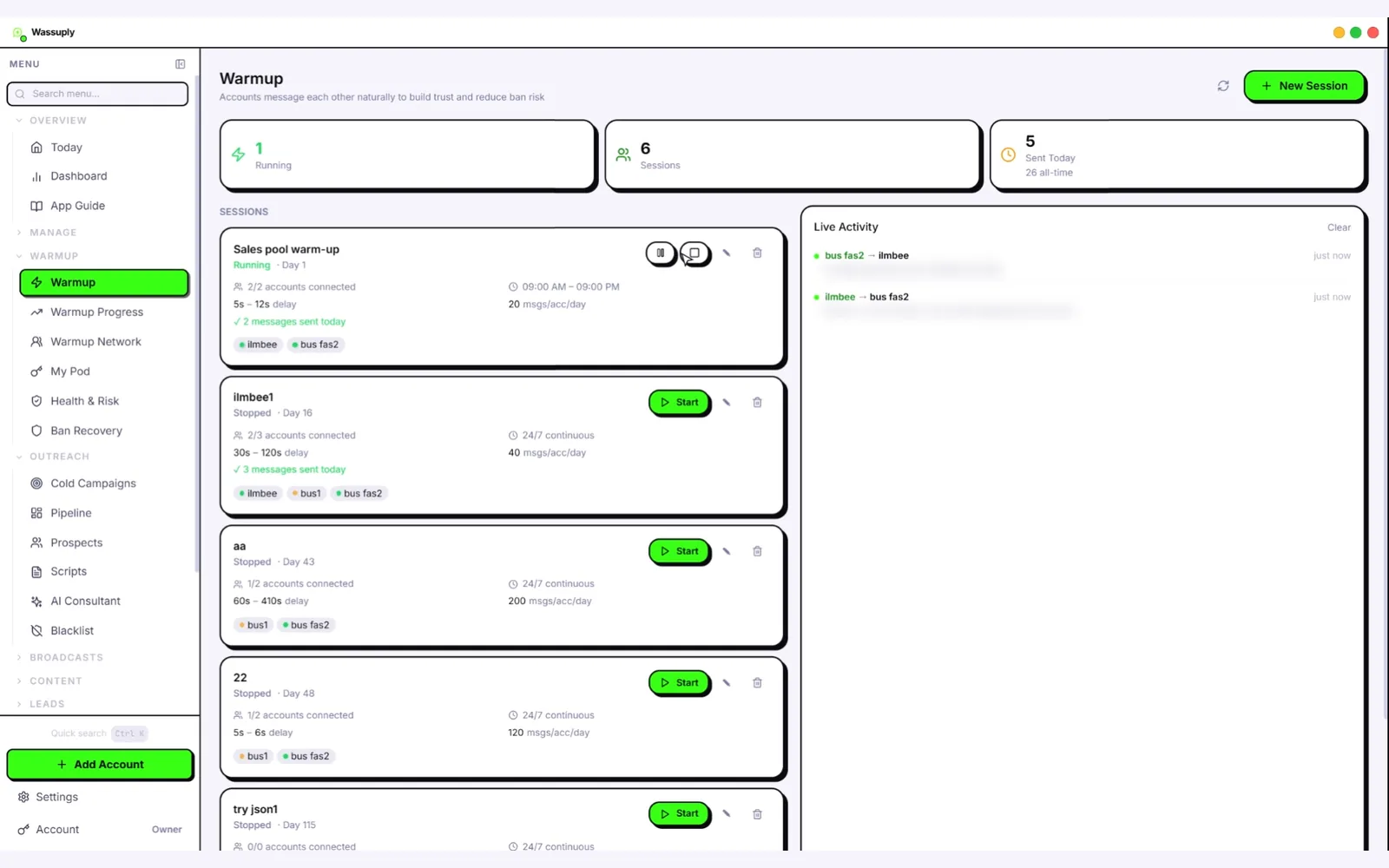
Wassuply app window on the Warmup screen: one session running, six sessions, session cards and live activity

The Wassuply app on its Warmup screen: your warm-up sessions, the numbers in each one, and live activity as your numbers message each other.

🔥

Warm-up on autopilot

Your numbers chat with each other using natural lines from 10 built-in chat packs or your own, with random 30-120 second gaps, only inside the hours you set. Warm-up Pods add real two-way chats with other Wassuply users' numbers.

🩺

Health & Risk

Reads each number's age and history and gives a plan: days to warm, safe daily limit and first campaign size. A live 0-100 ban-risk score per number; Smart Send (when switched on) slows sending at 60 and pauses at 80.

📱

Many numbers, one app

Every number gets its own isolated session, browser fingerprint and optional proxy. They all run side by side, so there is no logging out and in to switch accounts.

📨

Cold campaigns

CSV import, merge fields like {name}, spintax, AI-personalised messages and voice notes. Send without saving contacts to your phone.

⏱️

Safe sending pace

Random 30-90 second gaps, batches of 10, 1-5 minute breaks between batches, blackout hours at night and daily caps. A panic button stops everything.

✨

Wassuply AI

Bring your own Claude, ChatGPT or DeepSeek key to write a personalised first message per contact. You pay the provider directly. How Wassuply AI works.

What are the Wassuply system requirements?

Wassuply is built for 64-bit Windows. The installer is an x64 Windows setup file; there is no 32-bit build and no build for older Windows versions.

RequirementWhat you need
Operating systemWindows 10 or Windows 11
Processor type64-bit (x64)
Disk spaceAbout 115 MB for the installer, plus room for each number's session and your campaign data
MemoryEach connected number runs its own WhatsApp Web session, so more numbers use more memory
InternetNeeded for WhatsApp, sign-in, updates and Warm-up Pods
WhatsApp numbersEach number active on a phone, so you can link it by scanning a QR code
AccountA free Wassuply account (the app signs in with the same email and password)
OptionalYour own residential or 4G proxies if you run many numbers; your own AI and ElevenLabs keys for AI features

Not sure your PC is 64-bit? On Windows 11 open Settings › System › About and look at "System type". On Windows 10 it is under Settings › System › About too. It should say "64-bit operating system".

How to download and install Wassuply (step by step)

The same order as the Get started tab in your account, from sign-up to your first linked number.

  1. 1
    Create your free account
    Go to wassuply.com/signup and answer four quick questions: your WhatsApp number, email, name and a password. No card is needed.
  2. 2
    Confirm your email
    Click the link Wassuply emails you. It signs you in and opens your account on the Get started tab. No email after a few minutes? Check spam or send it again.
  3. 3
    Download the installer
    On the Get started tab, click Download for Windows. The same button is on your account overview whenever you need it again.
  4. 4
    Install Wassuply
    Open the downloaded setup file. You can keep the default folder or choose your own. The installer adds a desktop shortcut and opens Wassuply when it finishes.
  5. 5
    Sign in with the same email
    Use the email and password from step 1. That links the app to your account, so there is no licence key to type.
  6. 6
    Activate a licence
    Connecting numbers, warming and sending need an active licence. Buy one, or redeem a gift or activation code in your account; the app picks up an activated plan within a minute. See pricing.
  7. 7
    Connect your numbers by QR code
    In the app click Add account. On your phone open WhatsApp › Linked devices › Link a device and scan the code. Repeat for each number; each one gets its own session.
  8. 8
    Warm up before your first campaign
    Start warm-up and let it run: at least 15 days for a brand-new number, 30 recommended. Health & Risk tells you when each number is Ready. How the WhatsApp warmer works.

Is Wassuply free to download?

Yes. The Wassuply download and the Wassuply account are free. You can sign up, download, install and sign in without paying. What needs an active licence is the work itself: connecting WhatsApp numbers, warming them up and sending campaigns. Wassuply is not a free WhatsApp warmer, and we would rather say that up front than surprise you after the install.

FreeNeeds an active licence
Creating your Wassuply accountConnecting WhatsApp numbers
Downloading and installing the appWarm-up and Warm-up Pods
Signing in and looking aroundCampaigns and sending
Automatic updates of the appEvery feature, unlimited numbers (lifetime licence)

The lifetime licence is the early-bird price of $397 one-time (the regular price will be $2,499 after early access). It covers unlimited numbers, every feature and all future updates. Monthly plans are coming soon. All sales are final. Full details are on the pricing page.

How does Wassuply update itself?

You install Wassuply once. After that it keeps itself current from Wassuply's update server:

  • About 15 seconds after you open the app, it checks for a new version, then checks again every 4 hours while it runs.
  • When there is one, it downloads quietly in the background while you keep working.
  • When the download finishes you see a "Restart to update" banner. Restart then, or the update installs the next time you quit the app.
  • You can also check by hand with the Check for updates button in the app's Settings.

Updates are included in the lifetime licence. You never need to come back to this page to reinstall a new version.

Is there Wassuply for Mac or Linux?

Not yet. Wassuply runs on Windows 10 and 11 only. There is no Mac, Linux, Android or iPhone version today. If you are on a Mac, you will need a Windows 10 or 11 PC for now. Your WhatsApp numbers themselves stay on your phones as usual; Wassuply links to them the same way WhatsApp Web does.

Is the Wassuply download safe, and where does my data go?

Only install Wassuply from the download button inside your own Wassuply account on wassuply.com. If anyone sends you a Wassuply installer from somewhere else, do not run it.

  • On your PC: your campaigns, contacts and message history are stored on your computer.
  • In Wassuply's cloud: sign-in, Warm-up Pods and the optional encrypted backup.
  • With your AI provider: if you use Wassuply AI, requests go straight from your PC to the provider you chose (Claude, ChatGPT or DeepSeek, and ElevenLabs for voice), not through Wassuply's servers.

When you first run a newly released app, Windows SmartScreen can show "Windows protected your PC". If the file came from your Wassuply account, click More info, check the app name, then Run anyway. You do not need to switch SmartScreen off, and we would not advise it.

How do I uninstall Wassuply?

On Windows 11, open Settings › Apps › Installed apps, find Wassuply, click the three dots and choose Uninstall. On Windows 10, open Settings › Apps › Apps & features, select Wassuply and click Uninstall.

Moving to a new PC instead? Deauthorise the old PC in your account (the Your devices list) to free its seat, install Wassuply on the new one and sign in. With the optional encrypted backup, your logged-in numbers come back without re-scanning QR codes.
See the app before you download

An unedited screen recording of setting up a warm-up session in Wassuply.

Wassuply download FAQ

Is Wassuply free to download?

Yes. The download and the account are free. Connecting numbers, warming them up and sending campaigns need an active licence, which is $397 one-time at the early-bird price.

Where is the Wassuply download link?

Inside your Wassuply account. Create a free account at wassuply.com/signup, confirm your email, and click Download for Windows on the Get started tab. The same button is on your account overview.

What is the latest version of Wassuply?

Version 1.0.3, released October 16, 2026. The Windows installer is about 115 MB. Once installed, Wassuply updates itself in the background.

Does Wassuply work on Windows 7 or Windows 8?

No. Wassuply needs Windows 10 or Windows 11, 64-bit.

Is there a Wassuply app for Mac, Linux, Android or iPhone?

Not yet. Wassuply is a Windows desktop app only. Your WhatsApp numbers stay on your phones; Wassuply links to them like WhatsApp Web does.

Do I need a licence key?

No. You sign in to the app with the same email and password as your Wassuply account, and your licence is attached to that account.

Windows says "Windows protected your PC". What do I do?

That is Windows SmartScreen, which can appear for newly released apps. If the installer came from your Wassuply account, click More info, then Run anyway. Never run a Wassuply installer from anywhere else.

Can I install Wassuply on more than one PC?

Each plan allows a set number of devices. To move to a new PC, deauthorise the old one in your account to free its seat, then sign in on the new PC.

Does Wassuply need the WhatsApp Business API?

No. Wassuply drives normal WhatsApp and WhatsApp Business through WhatsApp Web sessions, so there is no API approval, no templates and no per-message fees.

Is it spelled Wassuply or Wassupply?

Wassuply, with one p: W-A-S-S-U-P-L-Y. It is not WhatsApp itself and not affiliated with Meta. It is a Windows app for warming up WhatsApp numbers and running cold outreach without the API.

Read next

Get Wassuply on your PC.

Free account, free download, Windows 10 and 11. Activate a licence when you are ready to warm and send.