How to Use Wassuply: From Download to Your First Campaign
To use Wassuply, download the free app for Windows or Mac from your account, sign in, activate a licence and connect each WhatsApp number by QR code. Warm every new number for at least 15 days (30 recommended) until Health & Risk marks it Ready, then import a CSV, write or AI-generate your message and launch at a human pace.
- The order: download, sign in, activate, connect numbers, warm up, follow the plan, build a campaign, launch, watch the risk score.
- The rule that matters: a brand-new number warms for at least 15 days before its first campaign; 30 is better.
- Messages: merge fields
{name}{phone}{custom1}{custom2}, spintax, AI-personalised messages or voice notes. - Safety is on by default: random 30-90 second gaps, batches of 10, 1-5 minute breaks, blackout hours and daily caps.
Wassuply is a Windows and Mac app for warming up WhatsApp numbers and running cold outreach without the API. It is simple to run, but the order of the steps matters, because the one mistake that loses numbers is sending from a number that has not been warmed. This guide follows the order the app is designed for.
How do I set up Wassuply, step by step?
- 1Create a free account and download the appSign up at wassuply.com/signup, confirm your email, then click Download for Windows or Download for Mac on the Get started tab of your account. Wassuply runs on Windows 10 and 11 (64-bit) and on macOS 12 or later. Every detail is on the Wassuply download page.
- 2Install and sign inOn Windows, run the installer. On a Mac, open the DMG and drag Wassuply into Applications; the first time you open it, confirm it in System Settings › Privacy & Security › Open Anyway (once). Then sign in with the same email and password as your account. There is no licence key to type.
- 3Activate a licenceConnecting numbers, warming and sending need an active licence. Buy the lifetime licence or redeem a gift or activation code in your account, and the app picks it up within a minute. See pricing.
- 4Connect your numbers by QR codeClick Add account. On your phone open WhatsApp › Linked devices › Link a device and scan the code. Repeat for each number. Each one gets its own isolated session and browser fingerprint, and they all run side by side.
- 5Add proxies if you run many numbers (optional)Bring your own residential or 4G proxies. Wassuply assigns one per number and checks it for leaks, so numbers do not share an IP.
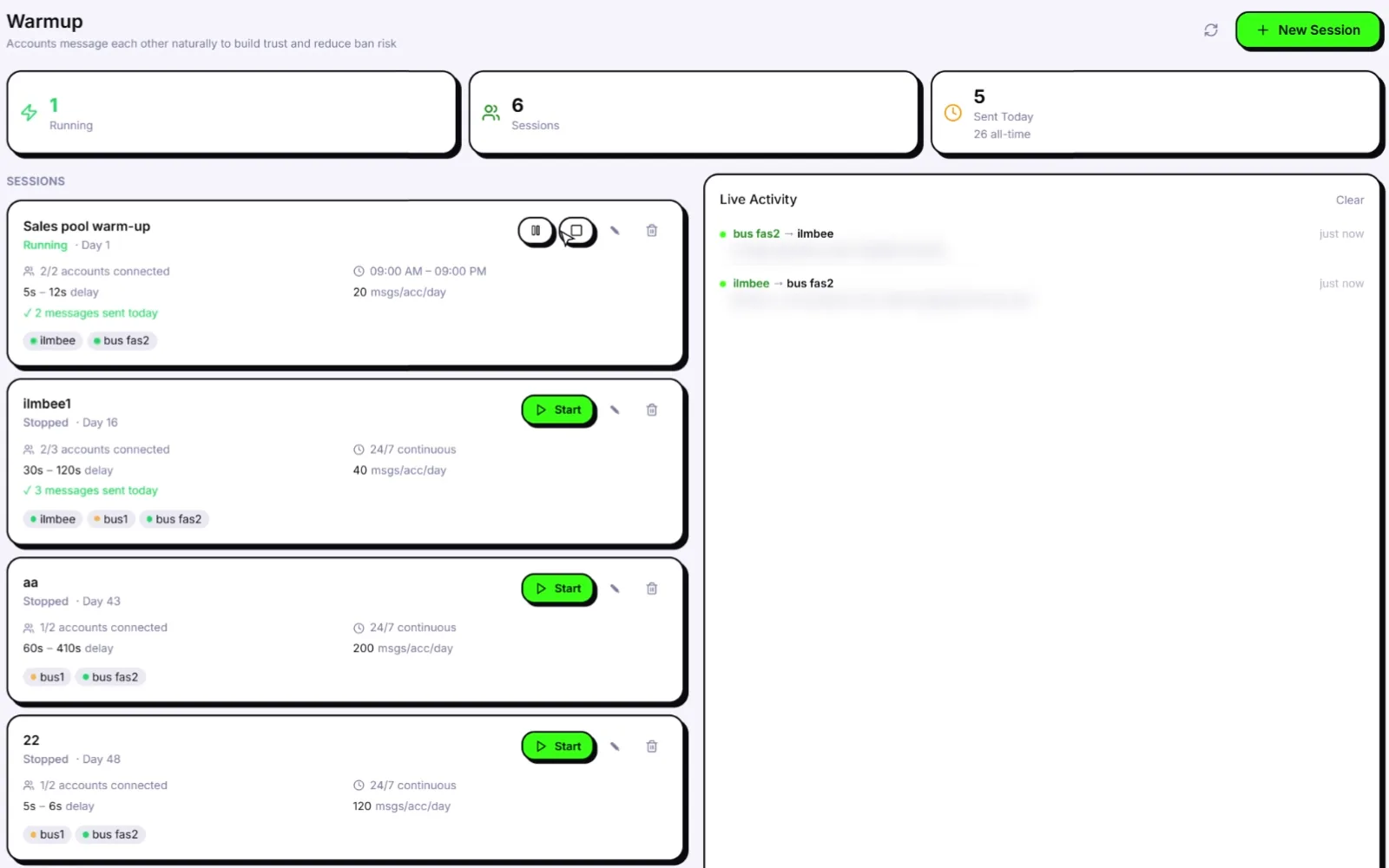
- 6Start warm-upTurn on warm-up. Your numbers chat with each other using natural lines from 10 built-in chat packs or your own, with random 30-120 second gaps, only inside the hours you set (or 24/7). Join a Warm-up Pod to add real two-way chats with other Wassuply users' numbers.
- 7Follow the Health & Risk planHealth & Risk reads each number's age and history and gives you days to warm, a safe daily limit and a first campaign size. Wait until the number flips to Ready: at least 15 days for a new number, 30 recommended.
- 8Build a campaignStart a campaign and import a CSV with the columns phone, name, custom1 and custom2. You do not need to save contacts on your phone. Pick which Ready numbers send it.
- 9Write the messageWrite it yourself with merge fields and spintax, choose AI-personalized so Wassuply AI writes a different first message per contact with your own key, or send a voice note. Send yourself a test first.
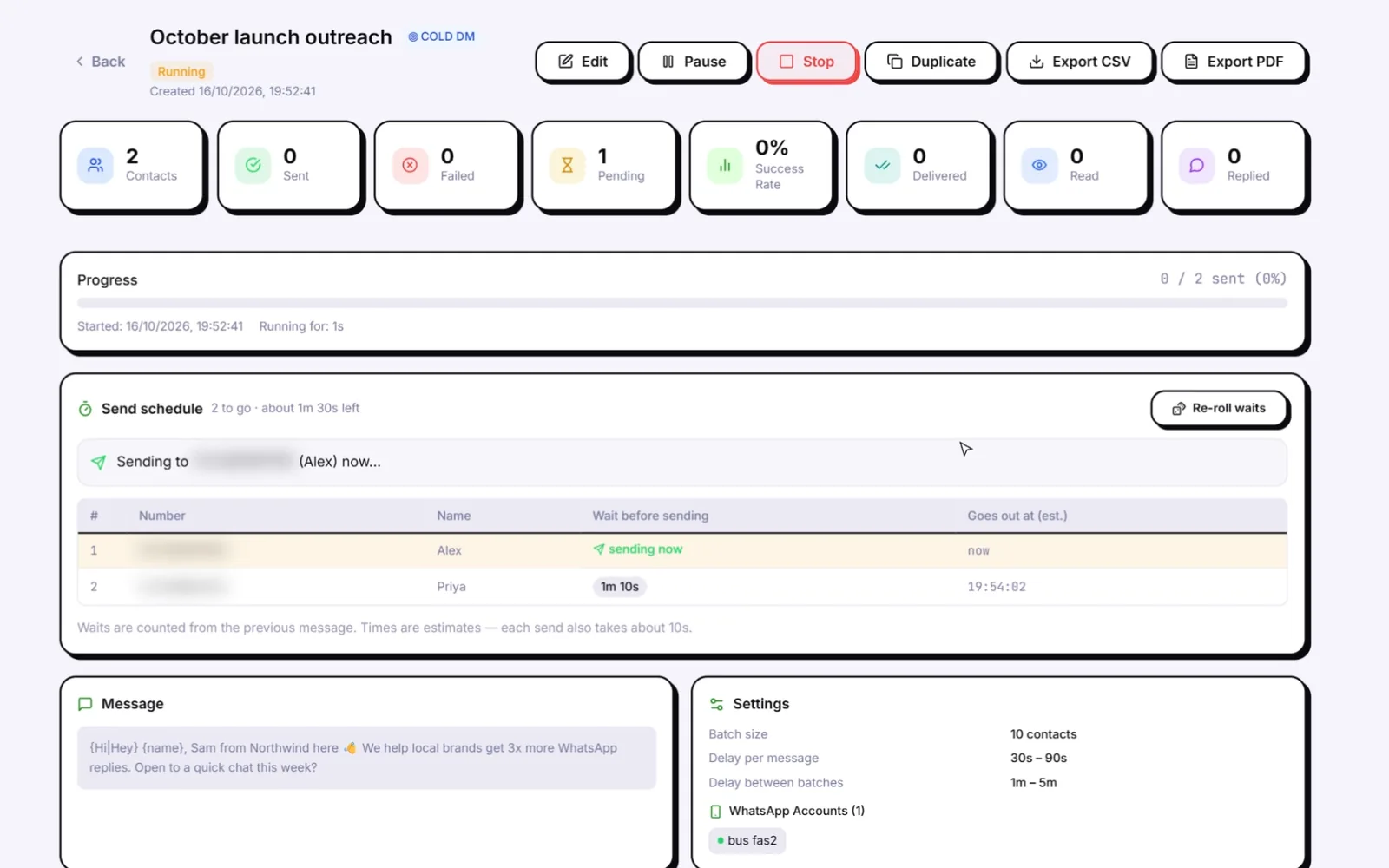
- 10Check the safety settingsKeep the random 30-90 second gaps, batches of 10 and 1-5 minute breaks between batches. Set blackout hours so nothing sends at night, a daily cap per number, and an automatic reply for contacts who opt out.
- 11Launch and watch the risk scoreEach number has a live 0-100 ban-risk score. Smart Send (when switched on) slows sending at 60 and pauses at 80. If something looks wrong, the panic button stops everything.
How long before I can send my first campaign?
For a brand-new number: at least 15 days, and 30 if you can wait. An older number with real history may get a shorter plan, because Health & Risk reads each number's age and history. Here is what the first month usually looks like for a new number:
| When | What you do | What Wassuply does |
|---|---|---|
| Day 0 | Connect the number by QR, add a proxy if you use them, start warm-up | Creates an isolated session and fingerprint, builds the Health & Risk plan |
| Days 1 to 15 | Nothing: let warm-up run. Use the time to clean your list and write your message | Natural chats between your numbers and Warm-up Pod partners, inside your hours |
| Day 15 or later | When the number shows Ready, send the first campaign at the size the plan suggests | Sends with random gaps, batches and breaks, under the safe daily limit |
| Day 30 | The recommended warm-up length for a new number | Keeps scoring risk live on every send |
The longer version, with the reasoning behind each stage, is in the WhatsApp warm-up timeline and the WhatsApp warmer guide.
How do I write messages that do not look like spam?
- Use merge fields.
{name},{phone},{custom1}and{custom2}fill in from your CSV. Single braces. - Add spintax. Options like
{Hi|Hey|Hello}mean each recipient gets a slightly different message. See what spintax is. - Or let AI write each one. Put a company brief or notes in custom1 or custom2 and the AI-personalized mode can use it to write a specific opener for each contact. Messages are generated before sending, so you can review them.
- Keep the first message short. Two to four sentences, no links, a simple question at the end.
What are the most common mistakes?
- Skipping warm-up because a campaign is urgent. This is the fastest way to lose a new number.
- Sending far over the safe daily limit on day one of campaigns. Start at the size the plan suggests.
- Turning the gaps down to finish faster. The random gaps, batches and breaks exist for a reason.
- One number doing everything. Spread a campaign across several warmed numbers instead.
- Messaging people with no reason to hear from you. Spam reports hurt a number more than anything Wassuply can fix.
No tool can honestly promise you'll never be banned. Wassuply removes what gets numbers banned, and the rest is in how you use it. If a number is restricted, the app's WA Ban Appeal feature has 50 appeal scripts to start from, and our guide to avoiding a WhatsApp ban covers what to change next time.
Set it up the right way from day one.
Free account and download for Windows 10/11 and macOS 12+. Warm first, then send at a human pace.
Frequently asked questions
How does Wassuply work?
You install it on Windows or Mac, connect your WhatsApp numbers by QR code and let them warm up on autopilot. Health & Risk tells you when each number is Ready. Then you import a CSV, write or AI-generate your message and launch, and Wassuply sends with random gaps, batches and breaks.
How long do I need to warm up a number?
At least 15 days for a brand-new number before its first campaign, and 30 days is recommended. Health & Risk sets each number's plan from its age and history.
How do I import contacts into Wassuply?
Start a campaign and import a CSV file with the columns phone, name, custom1 and custom2. You do not need to save the contacts on your phone first.
Which merge fields does Wassuply support?
{name}, {phone}, {custom1} and {custom2}, written with single braces. You can combine them with spintax such as {Hi|Hey|Hello}.
Can I use Wassuply without a licence?
You can download the app, create an account and sign in for free. Connecting numbers, warming them up and sending campaigns need an active licence.
How many numbers can I connect?
Unlimited on the lifetime licence. Each number gets its own isolated session, browser fingerprint and optional proxy, and they all run side by side in one app.