A new WhatsApp number's first 30 days: how to warm it up, day by day
To warm up a new WhatsApp number, set it up like a real person's phone, let it have genuine two-way conversations for at least 15 days (30 is better) before any outreach, then start with a small campaign to your warmest contacts and grow slowly. This illustrative walkthrough follows one new number through all 30 days.
| When | What happens | What doesn't |
|---|---|---|
| Day 0 | Real SIM, full profile, a few saved contacts, a couple of real chats on the phone | No WhatsApp Web, no tools |
| Day 1 | Connect to Wassuply, one proxy for this number, a Health & Risk plan | No outreach |
| Days 1 to 7 | Automated warm-up with partners plus normal phone use | No links, no strangers, no groups |
| Days 8 to 15 | Warm-up continues; the first campaign gets built | Still nothing sent to leads |
| Days 16 to 30 | A small first campaign to warm contacts, then slow growth | No big list, no night sending |
Day 0: the SIM, the phone and the profile
Monday · Number status: brand new
Sam runs a two-person web design studio and wants to reach local businesses on WhatsApp without risking his main studio number. So he starts with a new one, chosen carefully.
He buys a prepaid SIM from a mainstream carrier, not a virtual number from an app, and not a recycled number someone else has used. WhatsApp's own help page on bans notes that a new number can be banned because of what its previous owner did, and virtual numbers tend to start with less trust. He puts the SIM in a spare Android phone and installs WhatsApp Business.
Before a single message goes out, he fills in everything a real business would: the studio logo as the profile photo, the business name, a one-line description, opening hours, category and website. Then he saves eight people who know the number is coming: his business partner, two friends and a few past clients. His partner sends a hello, Sam replies, and they swap a voice note about lunch.
What he doesn't do matters more: no WhatsApp Web QR code, no tools, no messages to anyone who hasn't heard of the number. A number linked to automation minutes after registering is the textbook spam pattern.
Day 1: connecting the number, one proxy, one plan
Tuesday · Number status: Too New
A day later, Sam opens Wassuply, the Windows app he uses for warming up and running WhatsApp numbers, clicks Add Account and scans the QR code with the new phone, exactly like linking WhatsApp Web. The number gets its own isolated session and browser fingerprint, so it never shares cookies or a fingerprint with his other numbers (how that works is covered in our guide to running multiple WhatsApp accounts).
He assigns it one residential proxy in his own country. Wassuply checks it for leaks before the number goes online. His older spare number, which he has used lightly for a couple of years, already has a different proxy, so the two never appear to come from the same connection.
Then he opens Health & Risk and answers five questions about the new number: how old it is, whether it was warmed before, roughly how many messages it has sent, whether it has ever been restricted or banned, and what it has mainly been used for. The plan comes back in seconds: how many days to warm, the safe daily limit once warm, and the size of the first campaign. For a brand-new number all three are cautious, and the status reads Too New. The full plan for a fresh number also runs well past day 30, which is the point: a month is the start of trust, not the finish.
Last, he switches on Smart Send Protection in Settings (it's off by default, when the 0-100 ban-risk score is only a warning). With it on, a number's sending slows at a score of 60 and pauses at 80. The panic button, Stop Everything, is on the same screen.
Days 1 to 7: quiet, two-way conversations
Week one · Number status: Too New
Sam creates a warm-up session called "Sales pool warm-up" with the new number and his spare number, picks one of the 10 built-in chat packs and leaves the gaps at the default random 30-120 seconds. He limits it to 9:00 to 21:00 on weekdays, because his studio doesn't chat at 3 a.m. and neither should its number.
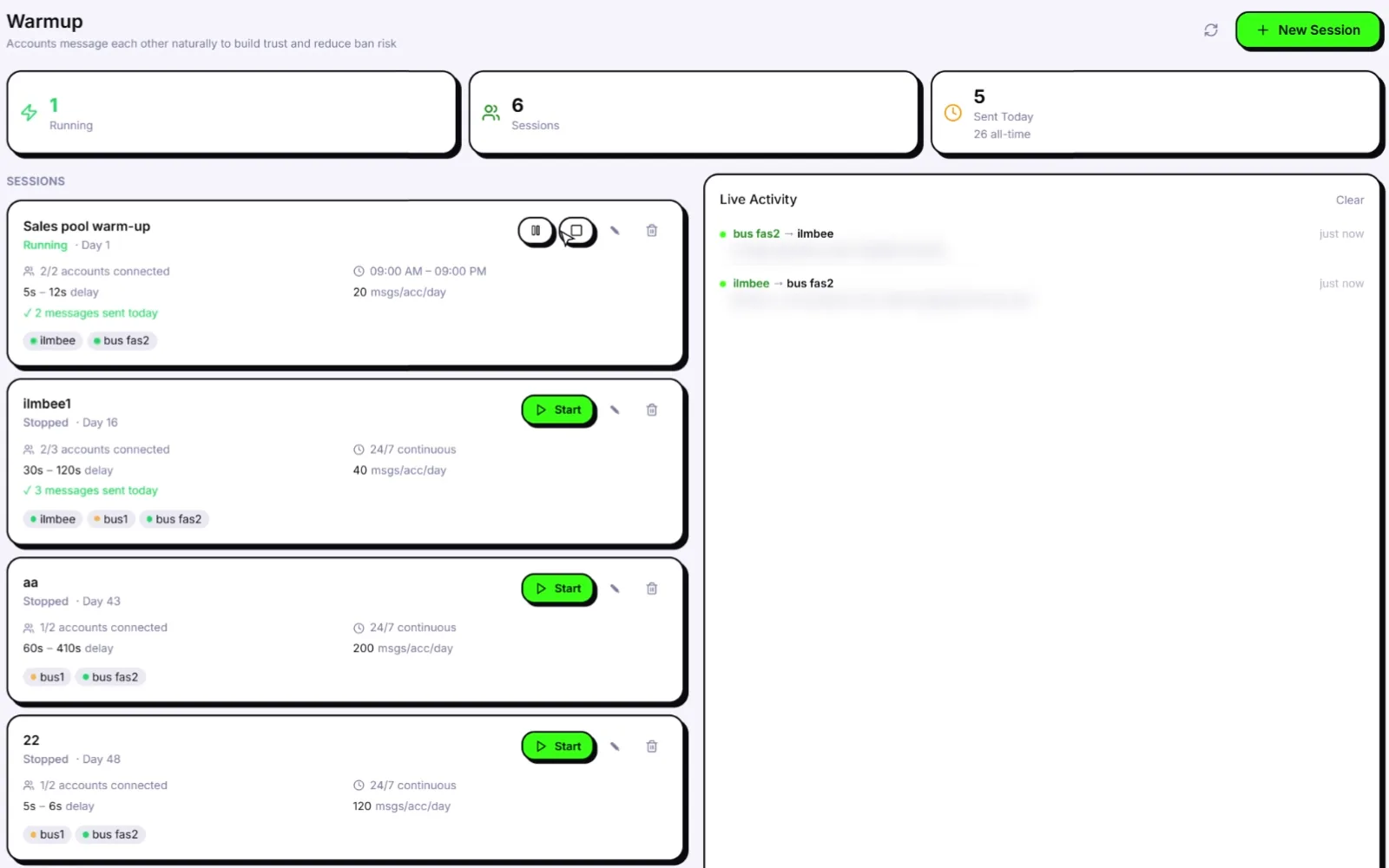
Two numbers owned by one person, talking only to each other, is a closed loop, one of the risks we unpack in is a WhatsApp warmer safe. So Sam also joins a public Warm-up Pod filtered by his country and a similar business size. The app tells him first that pod partners will see his number (WhatsApp always shows numbers in a chat) and that he can leave any pod or report a partner. Now the new number also has two-way chats with other Wassuply users' numbers, on different connections, with server-timed turns.
The lines come from natural chat packs, never repeated by the same sender, and pairs rotate. They are not AI-written; AI comes later, for outreach. Here is the recording of setting up a session like this one:
Meanwhile the phone lives a normal life: friends message and Sam answers, he makes a short call, posts one status and replies to a past client who says hello. No links, forwards, group adds or leads all week.
Days 8 to 15: building history and the first campaign
Week two · Number status: Too New, then Min. Reached
Warm-up keeps running inside its hours. Health & Risk counts the days, and Sam uses the waiting time to build the campaign properly instead of rushing it.
He starts with his warmest people: businesses that filled in his website form or gave him their number at a local event. Cold lists can wait. He exports them to a CSV with columns for name, phone, the business name and one thing he noticed about their current website, which map to the merge fields {name}, {phone}, {custom1} and {custom2}. Our guide to sending WhatsApp messages from a CSV covers the format.
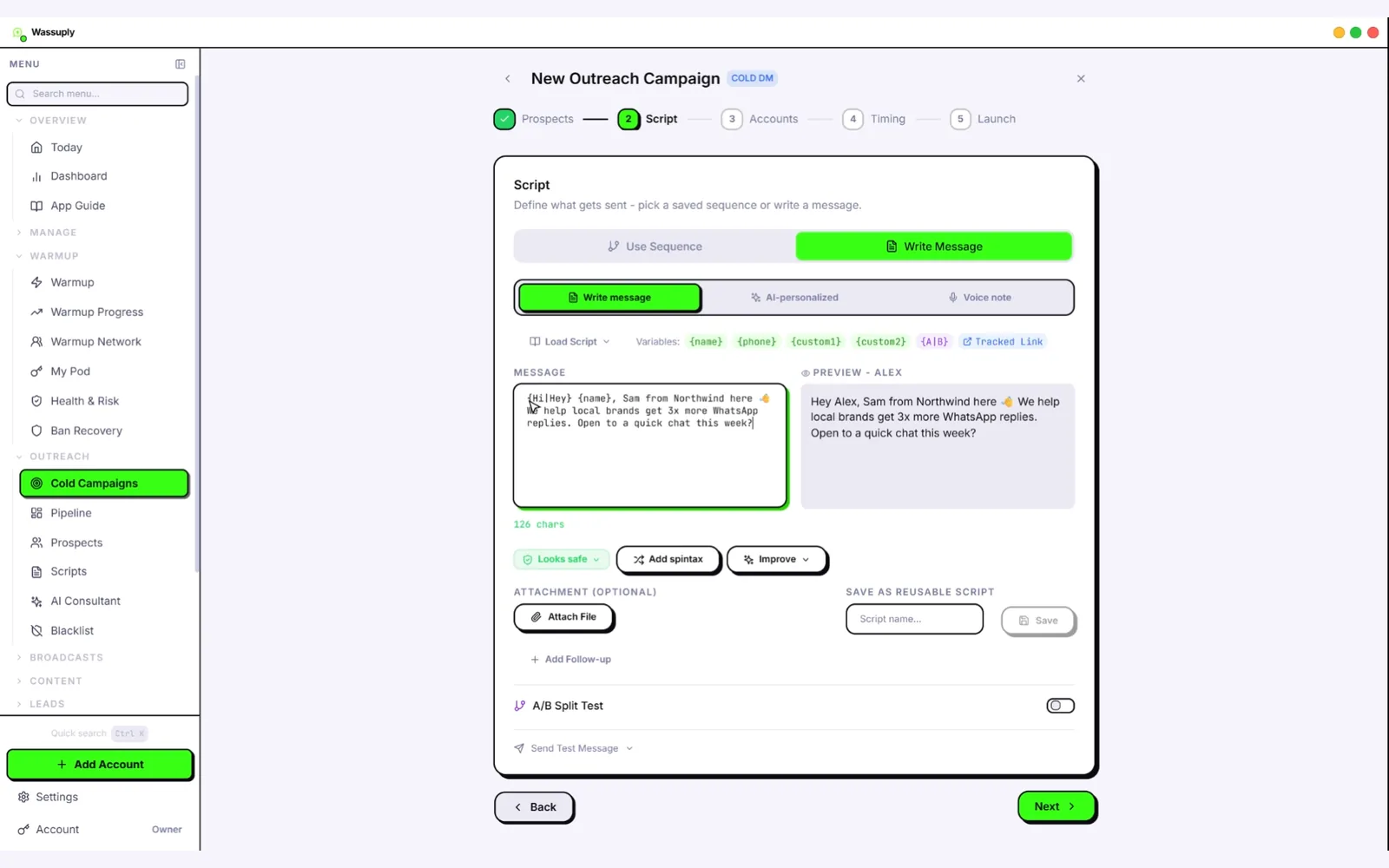
He writes a short opener with spintax, so not every contact gets identical text, and uses AI with his own Claude key to write a personalised first line for each contact, referencing the note in {custom2}. He reads every AI line before saving, because a wrong detail is worse than a generic one. He sets blackout hours so nothing sends at night, and caps the number's daily sends at the safe limit from its plan.
On day 15 the Health & Risk status changes from Too New to Min. Reached, and the plan says a small first campaign, at the size it suggested on day 1, is now reasonable.
Days 16 to 30: the first small campaign
Weeks three and four · Number status: Min. Reached, then Warming
On day 16, a Tuesday morning, Sam launches. His list is longer than the plan allows, so he sends to the warmest slice only, at the plan's first campaign size. Warm-up keeps running in the background, so outreach is never the only thing the number does.
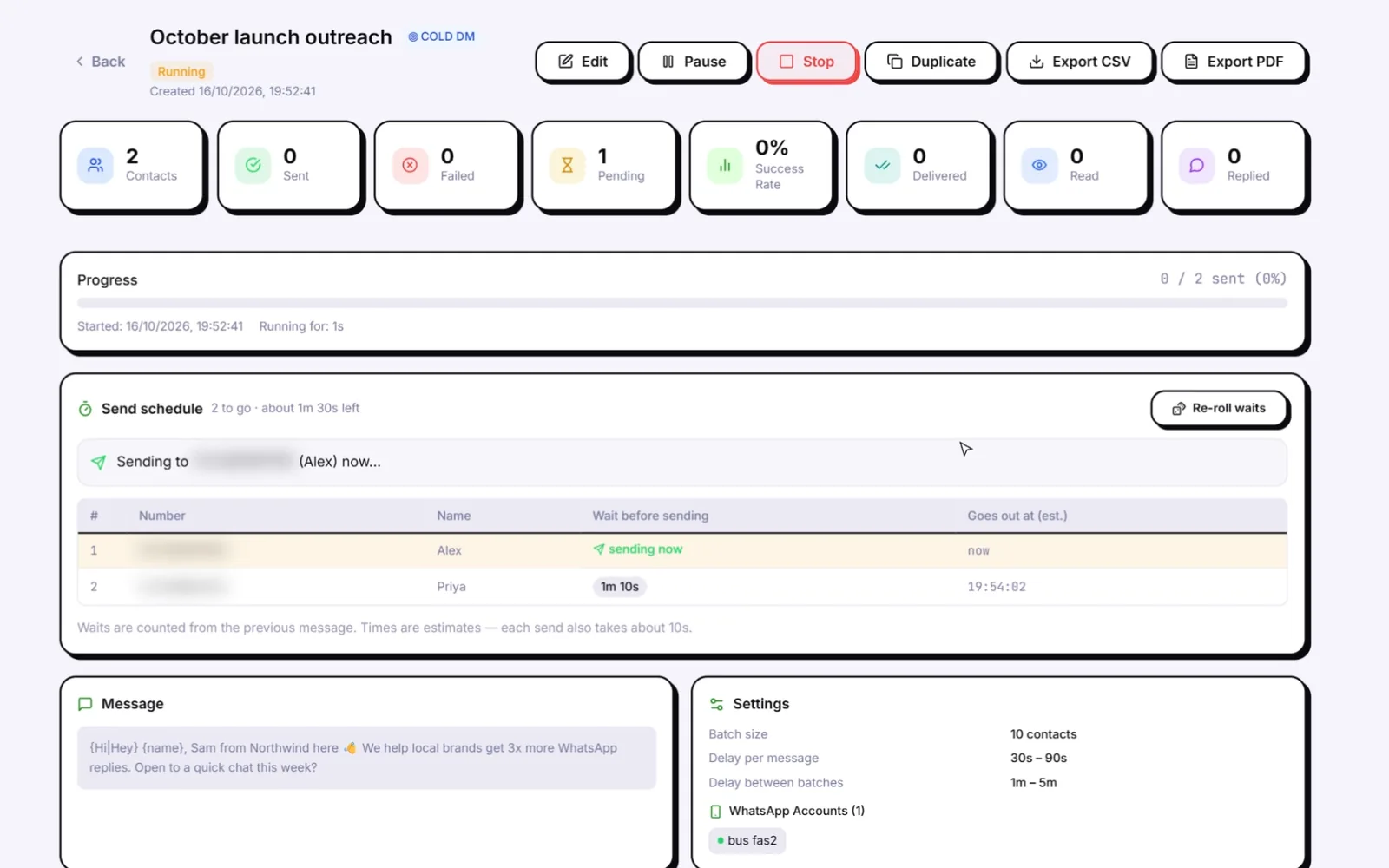
The send schedule does the pacing: random 30-90 second gaps, batches of 10, a 1-5 minute break between batches, nothing outside working hours. Sam watches two things instead: the replies, which he answers personally, and the number's risk score on the Health & Risk screen. Anyone who asks him to stop is removed on the spot.
Over the next two weeks he leaves a few days between sends and only grows the next batch if replies keep coming and nobody seems to be blocking him. If WhatsApp ever showed "Your account may be restricted soon", the plan is simple: panic button, stop everything, read what a WhatsApp restriction means, and wait. On day 30 the status moves to Warming: the 30-day milestone has passed, the plan still has days to run, and warm-up stays on at low volume.
How many replies did Sam get? We won't say, because Sam doesn't exist. The point is the order: identity, isolation, history, a plan, then small, paced outreach.
Why do new WhatsApp numbers get banned?
Almost every "my new number got banned on day two" story contains one of these. The right column is what the walkthrough did instead.
| Common mistake | Why it hurts | What Sam did instead |
|---|---|---|
| Linking a tool minutes after registering | Fresh registration plus instant automation is the classic spam pattern | Used the number only on the phone for the first day |
| Blank profile | Looks like a throwaway number | Full business profile on day 0 |
| Messaging strangers in week one | New chats with people who never saved you, from a number with no history | Received and replied only |
| Numbers that only talk to each other | A closed loop from one owner and one connection | A Warm-up Pod plus real contacts |
| One IP for every number | Links your numbers, so one flag can spread | One proxy per number, checked for leaks |
| First campaign to the whole list | A sudden spike in new chats | Plan-sized first campaign, warmest contacts first |
| Ignoring the first warning | A restriction is the step before a ban | Panic button at the first warning |
For the reasoning behind each row, read how to avoid a WhatsApp ban, and for what the timeline looks like in phases, the WhatsApp warm-up timeline. No tool can honestly promise you'll never be banned. The walkthrough simply removes the things that get new numbers banned.
The 30-day warm-up plan as steps
Give your next number a proper first month
Isolated sessions, Warm-up Pods, a Health & Risk plan for every number and paced campaigns, in one Windows app.
Free account. Windows 10 and 11. Warming and sending need an active licence.
Frequently asked questions
How long should I warm up a new WhatsApp number?
At least 15 days before the first campaign, and 30 days is better. For a brand-new number, keep warming at low volume after day 30 too; Wassuply's Health & Risk plan for a fresh number runs past the first month.
Why did my new WhatsApp number get banned?
Usually because it did outreach before it had any history: linking a tool straight after registering, messaging strangers in the first days, sending the same text to many people or sharing an IP with other numbers. A recycled SIM can also carry a ban caused by its previous owner, which WhatsApp's help center says can happen.
What is a good WhatsApp warm-up schedule?
Day 0: real SIM, full profile, a few saved contacts. Days 1 to 7: warm-up chats plus replying to people you know. Days 8 to 15: more two-way activity while you prepare the campaign. Days 16 to 30: a small first campaign to your warmest contacts, then slow growth only while replies come in.
Can I warm up a new WhatsApp number with only one phone?
Yes, by hand, using real contacts on that phone. In Wassuply, a warm-up session between your own numbers needs at least two of them, but a single number can also warm up through a Warm-up Pod with other users' numbers.
Should I use a virtual number for WhatsApp outreach?
A prepaid SIM from a mainstream carrier is the safer start. Virtual and recycled numbers often begin with less trust, and a recycled number may already be banned because of what its previous owner did.