WhatsApp account restricted: what it means, how long it lasts, and what to do next
"Your account is restricted right now" means WhatsApp thinks recent activity on your number looks like spam, automated or bulk messaging. It is temporary and ends by itself. Until the timer runs out you can keep chatting with people and groups you've talked to before, but you can't start new chats, create groups, add members or use linked devices.
- Restricted is not banned. A restriction is a timed limit that lifts on its own. A ban ("This phone number can't use WhatsApp") stops the account until WhatsApp reviews it.
- To see the time left, tap New chat and pick a contact you've never chatted with. WhatsApp shows the remaining time in a pop-up.
- There is no appeal button for a restriction, and no third party can lift it. You wait it out.
- Stop all automation and outreach now. Sending into a restriction is how a timed limit turns into a ban.
What does "Your account is restricted right now" mean?
WhatsApp explains it in its help center article About restricted accounts (checked October 24, 2026). If you see "Your account is restricted right now", or the earlier warning "Your account may be restricted soon", recent activity on your account may be showing signs of spam, automated or bulk messaging, which breaks WhatsApp's terms.
You don't need to do anything to remove it. The restriction ends automatically once its set time has passed, and WhatsApp sends you a notification when it does. The same page is clear about what comes next if the behaviour continues: anyone engaging in spam, automated or bulk messaging could have their account banned.
Think of it as a warning shot with a timer. WhatsApp started testing this kind of temporary restriction in 2024 (it was spotted in an Android beta, as MediaNama reported) as a step short of banning accounts that act like spammers.
What can you do while your WhatsApp account is restricted?
You can still
- Chat with contacts you've exchanged chats or calls with before
- Chat in groups you've already been active in
- Receive messages and calls
- Use WhatsApp normally on your main phone for those chats
You can't
- Start chats or calls with new contacts
- Create new groups
- Add new members to groups
- Use linked devices, and you may be logged out of some
The linked devices point matters if you use any tool. WhatsApp Web, the desktop app and every outreach tool that runs through WhatsApp Web (Wassuply included) stop working on that number until the restriction ends. Don't keep relinking to get around it.
WhatsApp restricted vs banned vs temporarily banned
People use "banned" for all of these, but WhatsApp shows different messages and each one needs a different response.
| Message you see | What it means | How it ends | What to do |
|---|---|---|---|
| "Your account may be restricted soon" | Warning: recent activity is close to the line | Nothing happens if the behaviour changes | Stop outreach and automation immediately |
| "Your account is restricted right now" | Timed limit on new chats, groups and linked devices | Automatically, when the time is up | Wait, check the time left, fix the cause |
| "Account in review" | Activity and device info are being checked (widely reported in August 2026) | WhatsApp said results typically come within 24 hours | Wait for the result; don't re-register |
| "Temporarily banned" | Often linked to an unofficial app or scraping | Timed, but can become permanent | Switch to the official app; stop scraping |
| "This phone number can't use WhatsApp" | Banned; no chats or backups | Only if WhatsApp lifts it after a review | Tap Request review; no option means it's final |
| "Account locked due to inactivity" | Not a penalty; the number hasn't been used | When you re-register | Re-register quickly or data may be deleted |
Sources: WhatsApp's help center pages on restricted accounts, temporarily banned accounts and account bans, and Digit's report on the August 2026 reviews. Restrictions on the WhatsApp Business Platform (the API) are a separate system that Meta handles in WhatsApp Manager; this article is about the WhatsApp and WhatsApp Business apps. If you are already looking at a ban, go to what to do when your WhatsApp account is banned.
How long does a WhatsApp restriction last?
WhatsApp doesn't publish a fixed length. Its help center only says the restriction ends when the allotted time has passed. You can see your own timer:
- Open WhatsApp and tap New chat.
- Select a contact you've never chatted with before.
- A pop-up shows the time remaining if the account is still restricted.
User reports vary widely. Many describe roughly a day. On one tech forum in July 2026, users described restrictions on linked devices lasting about four days, and one close to two weeks (TechEnclave thread). Treat any article that says "it's always 24 hours" with suspicion, and read your own timer instead. WhatsApp doesn't say how repeat restrictions are handled, but it is safe to assume a number that keeps getting restricted is heading towards a ban.
Why did WhatsApp restrict my account?
The official reason is always the same: activity that looks like spam, automated or bulk messaging. In practice, these patterns are the usual triggers, and they line up with WhatsApp's own responsible use guidance:
- Many new chats in a short time, especially to people who never saved your number.
- Low replies and high blocks. WhatsApp says it bans accounts that are reported multiple times.
- Copy-paste messages, often with a link, sent to many people.
- Group activity: adding lots of people to groups or creating groups quickly.
- A brand-new number doing outreach before it has any normal history.
- Unofficial apps or web clients linked to the account.
Two more things worth knowing. In October 2025, WhatsApp began testing a monthly cap on messages sent to people who haven't replied; hitting it could stop you messaging new contacts for a while (Gulf News, citing TechCrunch). Its rollout status in 2026 isn't clear. And sometimes the system is simply wrong: during the August 2026 wave of account reviews, WhatsApp acknowledged that it sometimes gets bans wrong. For how detection works, see does WhatsApp detect automation.
What to do when your WhatsApp account is restricted
For step 7, our free WhatsApp ban appeal tool writes a clear, calm appeal for the review form. WhatsApp says most reviews are completed within 24 hours and that contacting it outside the review process won't speed things up.
How do you avoid the next restriction?
Restrictions come from patterns, so change the pattern. The full playbook is in how to avoid a WhatsApp ban; the short version:
- Warm new numbers first: at least 15 days before any campaign, 30 if you can. The illustrative walkthrough a new WhatsApp number's first 30 days shows how.
- Pace every send: random gaps, small batches, breaks between batches, daily caps and no sending at night. Our guide to WhatsApp sending limits explains the numbers.
- Message people likely to want it, and vary the wording so recipients don't all get the same text.
- Treat "may be restricted soon" as a stop sign, not a suggestion.
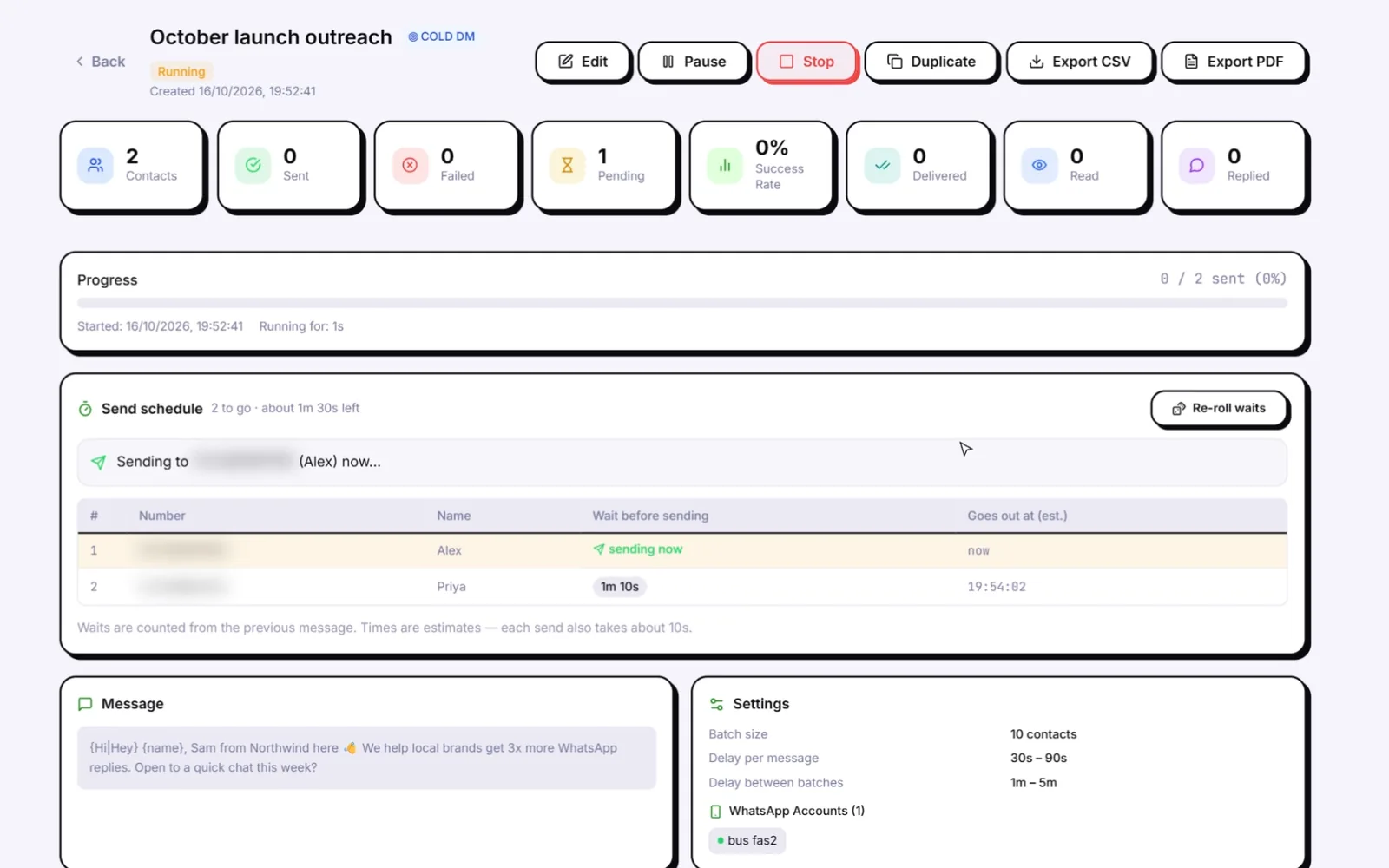
This is what Wassuply, a Windows app for warming up and running many WhatsApp numbers, is built to do: random 30-90 second gaps, batches of 10, 1-5 minute breaks, blackout hours and daily caps on every campaign. Its Health & Risk screen gives each number a live 0-100 ban-risk score, and if you mark a number as previously restricted, its warm-up plan gets longer and its safe daily limit gets lower. With Smart Send Protection switched on in Settings, sending slows at a score of 60 and pauses at 80. No tool can honestly promise you'll never be banned; the goal is to stop doing the things that get numbers restricted. Want to learn the rules without risking a real number? Try the Ban Arcade.
Stop tripping restrictions
Warm-up, Health & Risk scores and paced campaigns for every number, in one Windows app. Unlimited numbers on the lifetime licence.
Free account. Windows 10 and 11. Warming and sending need an active licence.
Frequently asked questions
How long does a WhatsApp restriction last?
WhatsApp doesn't publish a fixed length. The restriction ends automatically when its allotted time passes, and WhatsApp notifies you. To see the time left, tap New chat and choose a contact you've never chatted with; a pop-up shows the remaining time. Users report anything from about a day to a couple of weeks.
Can I still receive messages when my WhatsApp is restricted?
Yes. You can keep chatting with contacts and groups you've exchanged chats or calls with before, and people can still message you. You can't start chats or calls with new contacts, create groups, add group members or use linked devices.
Is a restricted WhatsApp account the same as a banned one?
No. A restriction is a temporary limit on new chats, groups and linked devices that ends on its own. A ban shows the message "This phone number can't use WhatsApp" and blocks the account entirely unless WhatsApp lifts it after a review.
Can I appeal a WhatsApp restriction?
There is no Request review button for a restriction, and WhatsApp says you don't need to take any action: it lifts automatically. Third-party services can't remove it. If the restriction turns into a ban, use Request review in the app.
Will a WhatsApp restriction turn into a ban?
It can if the behaviour continues. WhatsApp says anyone engaging in spam, automated or bulk messaging could have their account banned. Stop all outreach and automation, wait out the timer, and restart slowly with lower volume.