WhatsApp Business vs WhatsApp: the real differences, and which to use for outreach
WhatsApp Business vs WhatsApp is not a choice between two networks: both reach the same people. The free Business app adds a business profile, catalogue, labels, quick replies, automatic greeting and away messages, and more linked devices. For outreach from a business, use the Business app, which matches WhatsApp's terms on business use, but no official data shows either account type gets banned less.
- Same network: both apps message the same WhatsApp users. The Business app is a separate free app with extra tools for small businesses.
- What Business adds: a business profile, catalogue, labels, quick replies, greeting and away messages, an automatic short link, landline support and more linked devices.
- The rules: WhatsApp's consumer Terms rule out non-personal use unless authorised, and neither app allows bulk or auto-messaging. The Business app also comes with an opt-in policy.
- Bans: WhatsApp has published no data showing that one account type gets banned more than the other. Behaviour matters more than the app.
- For outreach: put dedicated numbers on the Business app, fill in the profile, and warm each one for at least 15 days before its first campaign.
What is the difference between WhatsApp and WhatsApp Business?
WhatsApp Business is a separate free app from Meta that adds business tools to an ordinary WhatsApp account. Both apps run on the same network and message the same people.
WhatsApp launched the Business app on 18 January 2018 as a free Android app for small businesses, and the iPhone version followed in April 2019. Meta's Business app page still says it is "built with the small business owner in mind". Larger companies use a different product, the WhatsApp Business Platform, covered further down.
Meta's last published figure is 200 million monthly users of the Business app (TechCrunch, June 2023), out of more than 3 billion WhatsApp users a month (May 2025). Bigger numbers on stats sites, such as "764 million", are app-intelligence estimates, not Meta figures.
| If you need... | Choose | Why |
|---|---|---|
| A profile customers can check before they reply | WhatsApp Business app | Business name, description, hours, website and catalogue |
| Chats with friends and family | Personal WhatsApp | The consumer Terms cover personal use, and you need none of the business tools |
| Outreach and follow-up from dedicated numbers | WhatsApp Business app | It matches WhatsApp's terms on business use, and labels keep track of leads |
| Several staff on one number | Business app, with Meta Verified for more devices | Five devices in total, or up to 10 with Meta Verified (as of October 2026) |
| WhatsApp on a landline number | WhatsApp Business app | Landlines are only supported on the Business app |
| Templates, chatbots and opted-in notifications at scale | WhatsApp Business Platform (API) | Built for volume, billed per message by Meta |
| Many conversations from several numbers, without the API | Either app, run through a warmer such as Wassuply | Wassuply runs both account types through WhatsApp Web and warms them the same way |
WhatsApp Business vs WhatsApp: feature by feature
The Business app keeps the everyday WhatsApp features and adds tools for presenting a business and handling customer chats. The table uses Meta's Business app features page, its App Store listing and the WhatsApp Help Center, as of October 2026.
| Feature | Personal WhatsApp | WhatsApp Business app |
|---|---|---|
| Built for | People | Small businesses |
| Price | Free | Free, with some paid features |
| Business profile | No | Yes, a "virtual storefront" with business details |
| Catalogue | No | Yes, with collections, shown on the profile |
| Labels for chats | No | Yes, up to 20 |
| Quick replies | No | Up to 50 saved replies |
| Greeting message | No | Sent on a customer's first message, or after 14 days without contact |
| Away message | No | Yes, outside your business hours |
| Automatic short link | No | Yes, created for every account |
| Linked devices | Up to four alongside your phone | Five devices in total, or up to 10 with Meta Verified |
| Landline numbers | No | Yes |
| Meta Verified | No | Yes, from $14 a month |
| Paid business broadcasts | No | In select countries, charged per delivered message |
| Rules that apply | Consumer Terms: personal use, no bulk or auto-messaging | The same Terms, plus the Business Messaging Policy: opt-in and opt-outs |
The Help Center details are worth knowing: up to 50 quick replies, up to 20 labels, and greeting messages that go out on a first message or after 14 days of silence. On personal WhatsApp, you can link up to four devices, and they log out if the phone isn't used for more than 14 days.
One limit matters before you set anything up. According to WhatsApp's About WhatsApp Business page, one number can't run on both apps at the same time, and chat history moved to the Business app can't be moved back. Choose the app for each number first.
Is WhatsApp Business free, and what does Meta Verified cost?
Yes, the WhatsApp Business app is free: Meta's App Store listing calls it "free to download and use, with a mix of free and paid features". The two main paid features are Meta Verified and business broadcasts.
Meta Verified is Meta's paid subscription that adds a verified badge and account protection to a business. Meta announced it for WhatsApp in September 2023 and began rolling it out on 6 June 2024 in Brazil, India, Indonesia and Colombia. It includes the badge, impersonation protection, enhanced support, multi-device use for staff and a custom WhatsApp web page. Meta's post gives no price; TechCrunch reported that plans start from $14 a month (June 2024). Meta's features page now offers it to Business app users without naming countries.
Broadcasts changed too. In March 2025 WhatsApp began testing a monthly cap on broadcast messages for people and businesses, using 30 a month as its example, and made broadcasts a paid feature for Business app users, with 250 customised messages free during the pilot (TechCrunch, March 2025). Meta's features page lists business broadcasts as available to eligible users in select countries.
Can you use personal WhatsApp for business?
Not within WhatsApp's rules. The consumer Terms rule out "non-personal use" unless WhatsApp authorises it, and WhatsApp built the Business app as the authorised route for small businesses.
WhatsApp's Terms of Service (the version served in the US, effective 4 January 2021; the UK and EEA have their own) bar any "non-personal use of our Services unless otherwise authorized by us." They also list "bulk messaging, auto-messaging, auto-dialing, and the like" as impermissible, and WhatsApp may disable or suspend accounts that break them.
Switching to the Business app makes business use legitimate. It does not make cold outreach legitimate. The WhatsApp Business Messaging Policy (updated September 2026) covers the Business app and says:
- You may only contact people who gave you their phone number or username and opted in.
- You must honour requests to block or opt out, whether they are made on or off WhatsApp.
- WhatsApp may limit or remove your access, or limit how much you can send.
- Messaging about "Regulated Verticals" is not allowed on the Business app.
WhatsApp's Messaging Guidelines (also September 2026) add that unofficial clients, bulk messaging and auto-messaging can lead to warnings or temporary or permanent suspension. Privacy law applies on top, as our guide to cold WhatsApp messages and GDPR explains.
Does WhatsApp Business get banned more than personal WhatsApp?
Nobody outside WhatsApp knows. WhatsApp has published no data comparing bans on Business app accounts with personal ones, and claims that one type is "safer" come from vendor blogs, not WhatsApp.
What WhatsApp has said points to behaviour, not account type. In its 2019 white paper on bulk messaging, it said it removed over two million accounts a month for bulk or automated behaviour, that over 75% of those were caught without a recent user report, and that roughly 20% of bans happened at registration. Detection is mostly automatic, so a careful number on either app fares better than a careless one.
Enforcement works the same way on both apps. WhatsApp's Help Center describes temporary restrictions, where an account can keep messaging existing chats but can't start new ones until the time runs out, and bans, which you can ask WhatsApp to review. The Business app has its own page on account bans, and our guide to a banned WhatsApp Business account walks through the review.
Two recent tests treat the apps differently, or don't
- The unanswered-message cap applies to both. In October 2025 WhatsApp announced a test of a monthly limit on messages to people who haven't replied, for individuals and businesses alike. It hasn't said what the limit is.
- The business folder exempts Business app accounts. In July 2026 WhatsApp began testing an "Offers & Updates" folder that moves messages from select large businesses on the Business Platform out of the main chat list after up to 24 hours. TechCrunch reports that small businesses and individual accounts using WhatsApp Business are exempt, though WhatsApp could include small businesses later.
What do people on Reddit report about WhatsApp Business vs personal?
These are individual anecdotes, not data, and none of them can show whether one app gets banned more than the other:
- r/whatsapp, 2024: asked what you lose by using only the Business app, repliers listed what you gain instead: a catalogue, away and automatic replies, and coloured chat labels. (thread)
- r/whatsapp, 2024: a business owner who relies on WhatsApp broadcasts for events was tempted by CRM automation but feared that converting their personal account to Business could bring a restriction or ban: "WhatsApp is the life blood of my business". The only reply pointed to the official API, which it said carries low ban risk but costs per message beyond a threshold. (thread)
- r/whatsapp, 2024: a Business number taking leads from Facebook click-to-WhatsApp ads kept being banned for "Business/Commerce Policy" violations, and a fresh SIM was banned before any campaign. A reply said all four of their postpaid Business numbers were banned on the same day after fewer than 20 ad leads. (thread)
- r/whatsapp, 2024: a business account was banned for a second time. The poster says the first unban took a month of sending evidence, writing "Last time it took me a month to get my number unbanned", and this time was told to appeal in the app. (thread)
WhatsApp Business or personal for outreach and warm-up?
For outreach numbers, use the WhatsApp Business app. It is the account type WhatsApp's terms point businesses to, and it shows prospects who you are, but we know of no evidence that it lowers ban risk.
The practical case is about the person receiving your message. A complete business profile, with a name, description, website and hours, lets a prospect check you before replying, and a catalogue shows what you sell. Labels let you sort leads into new, replied and booked, and quick replies and an away message keep response times short. The folder test above also leaves Business app accounts alone, for now.
Warm-up doesn't change with the app. A new number needs the same gradual start on either one, because what WhatsApp sees is the number's age, history and behaviour. Wassuply warms Business and personal numbers the same way, and our WhatsApp warm-up timeline shows the schedule. Before the first warm-up chat:
- Use a dedicated number for outreach, never your main customer line.
- Pick the app first: one number can't run on both, and history moved to Business can't move back.
- Fill in the business profile: name, description, website and hours.
- Set up labels for lead stages and a few quick replies.
- Keep the phone in use: WhatsApp says linked devices log out if the phone goes unused for more than 14 days.
WhatsApp Business app vs WhatsApp Business Platform (API)
The Business app is a free phone app for small businesses, used by hand. The WhatsApp Business Platform, often called the API, is Meta's programmable service for messaging at scale, billed per message.
| Factor | WhatsApp Business app | WhatsApp Business Platform (API) |
|---|---|---|
| What it is | A free app on a phone, plus linked devices | A programmable service, through Meta's Cloud API or a provider |
| Built for | Small businesses | Larger businesses, support teams and notifications |
| Cost | Free; paid extras such as Meta Verified and business broadcasts | Charged per delivered message since 1 July 2025, plus any provider fees |
| Starting a conversation | You type it; the policy requires opt-in | Only template messages outside a 24-hour customer service window; opt-in required |
| Automation | Greeting and away messages, quick replies, Meta's AI agent | Chatbots, CRMs and webhooks |
| Business folder test (2026) | Exempt | Select large businesses' messages moved to "Offers & Updates" |
| Best for | One-to-one conversations handled by people | Opted-in notifications and support at scale |
Meta's pricing page confirms the per-message model and the template rule (as of October 2026). Neither product is a cold outreach tool on paper, because both sit under the opt-in policy. Our comparison of Wassuply and the WhatsApp API covers when the Platform is worth it, and Telegram vs WhatsApp for business covers when another app fits better.
How to start WhatsApp outreach safely
Whichever app you choose, the order of steps is the same.
- 1Create a free accountSign up and download Wassuply on Windows 10 or 11. The account and download are free; connecting numbers, warming and sending need an active licence.
- 2Set up each outreach numberPut it on the Business app, fill in the profile and keep it separate from your main line.
- 3Warm it for at least 15 daysThirty days is better. Let the number chat with your other numbers before it sends a single outreach message.
- 4Start small and personalSend short, relevant first messages to a small list, stay inside the daily limit and honour every opt-out. Our honest look at whether WhatsApp outreach works sets expectations.
How Wassuply runs both account types through WhatsApp Web
Wassuply is a Windows desktop app for warming up WhatsApp numbers and running cold WhatsApp outreach from unlimited numbers, sold as a one-time $397 lifetime licence during early access. It drives normal WhatsApp and WhatsApp Business accounts through WhatsApp Web sessions, so there is no Business API, no Meta verification and no template approval.
- Both types, side by side. Each connected number, Business or personal, runs in its own isolated WhatsApp Web session with its own browser fingerprint and an optional proxy, so you can run multiple WhatsApp accounts on one licence.
- The same warm-up. Numbers chat with each other using natural lines from 10 built-in chat packs, with random 30-120 second gaps inside the hours you set, or join Warm-up Pods with other users' numbers.
- Limits by number, not app. Health & Risk reads each number's age and history and suggests days to warm, a safe daily limit of 30 to 250 and a first campaign size, next to a live 0-100 risk score.
- Campaigns without saving contacts. Import a CSV, personalise with merge fields, and let opt-outs get an automatic reply. Replies land on a Pipeline CRM board.
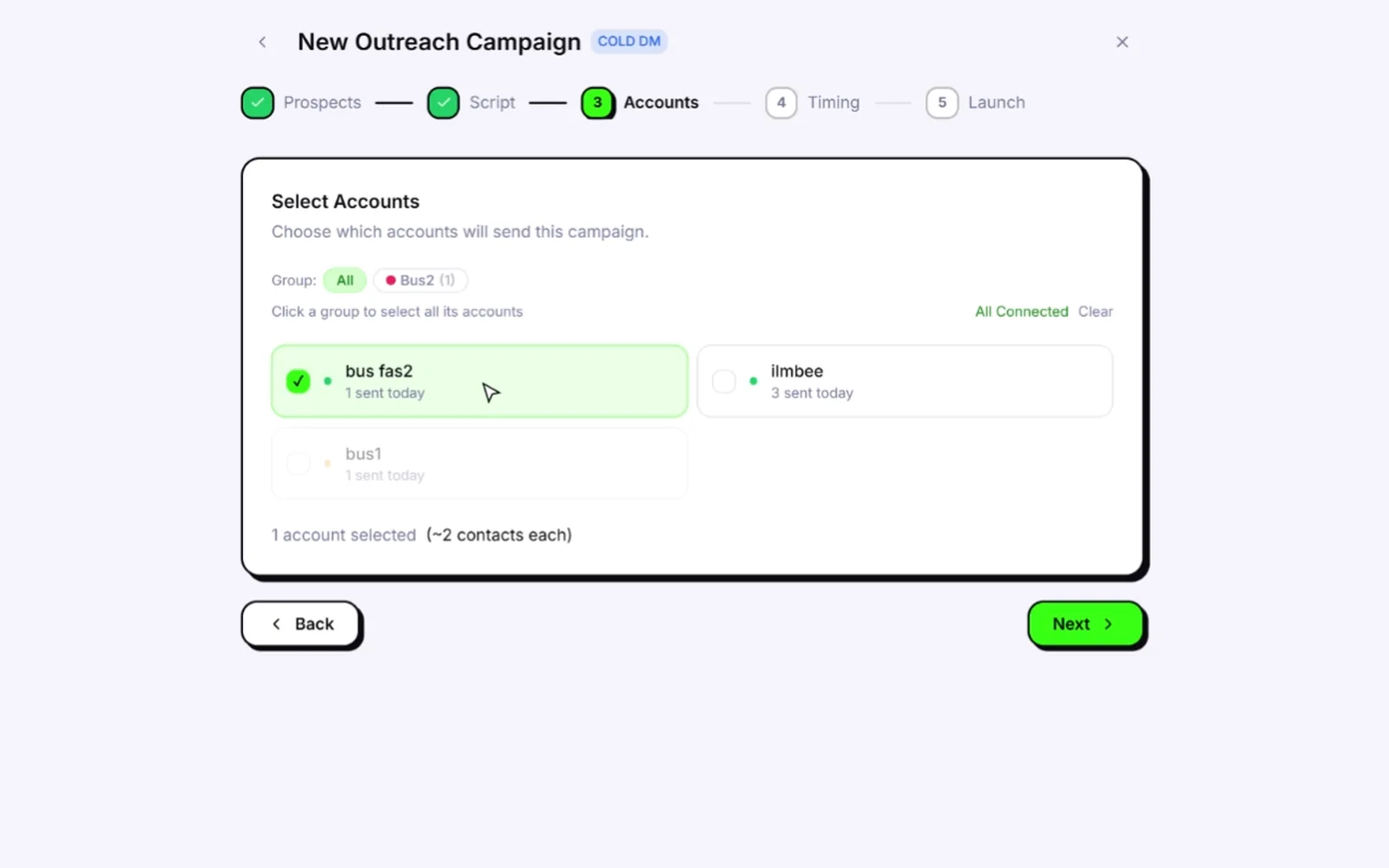
Wassuply doesn't change which rules apply to your numbers, and it can't remove ban risk. It gives each number a slower, steadier start. See pricing for the current licence.
Set up your outreach numbers once, then warm them properly
Wassuply runs WhatsApp Business and personal numbers side by side, with warm-up, daily limits and a live risk score for each one.
Free account. Windows 10 and 11. Warming and sending need an active licence.
Frequently asked questions
Is WhatsApp Business better than regular WhatsApp?
For a business, yes. The WhatsApp Business app is free and adds a business profile, catalogue, labels, quick replies, greeting and away messages, an automatic short link and more linked devices, none of which personal WhatsApp has. It reaches exactly the same users. For chatting with friends and family, personal WhatsApp is all you need, and WhatsApp's consumer Terms say that account is for personal use.
Can I use the same number on WhatsApp and WhatsApp Business?
Not at the same time. WhatsApp's Help Center says one number can't run on both apps simultaneously, though you can move a number from personal WhatsApp to the Business app. Your chat history comes with it, but history moved to the Business app can't be moved back. Decide which app each number will use before you start warming it.
Is the WhatsApp Business app free?
Yes. Meta's App Store listing says it is free to download and use, with a mix of free and paid features. The main paid extras are Meta Verified, with plans from $14 a month according to TechCrunch (June 2024), and business broadcasts, which are charged per delivered message in the countries where they are available.
Does WhatsApp Business get banned more than personal WhatsApp?
There is no official data either way. WhatsApp has not published ban or restriction rates by account type, and claims that one is safer come from vendor blogs. What WhatsApp has said, in 2019, is that over 75% of the accounts it removed for bulk or automated behaviour had no recent user report, so how a number behaves matters far more than which app it runs on.
Can I do cold outreach with the WhatsApp Business app?
Not within WhatsApp's rules. The Business Messaging Policy says businesses may only contact people who gave them their number and opted in, and the Terms rule out bulk messaging and auto-messaging. People still do cold outreach from Business numbers, and it carries ban risk you own. Warm-up, slow pacing and personal messages lower that risk without removing it, and privacy law still applies.
What is the difference between the WhatsApp Business app and the WhatsApp API?
The Business app is a free phone app for small businesses that people use by hand. The WhatsApp Business Platform, often called the API, is Meta's programmable service for larger businesses, with per-message pricing and template messages outside a 24-hour customer service window. The Platform suits opted-in notifications and support at scale; the app suits one-to-one conversations.
Sources
- WhatsApp Business: WhatsApp Business App Features (checked October 2026)
- WhatsApp Business: The WhatsApp Business app (checked October 2026)
- Apple App Store: WhatsApp Business listing (checked October 2026)
- WhatsApp Help Center: About WhatsApp Business (checked October 2026)
- WhatsApp Help Center: Quick replies (checked October 2026)
- WhatsApp Help Center: Labels (checked October 2026)
- WhatsApp Help Center: Greeting messages (checked October 2026)
- WhatsApp Help Center: How to link a device (checked October 2026)
- WhatsApp Blog: Introducing the WhatsApp Business App (January 2018)
- TechCrunch: WhatsApp Business crosses 200M MAUs (June 2023)
- TechCrunch: WhatsApp now has more than 3 billion users a month (May 2025)
- Meta Newsroom: New AI Tools, Meta Verified and More for Businesses on WhatsApp (June 2024)
- TechCrunch: Meta Verified for WhatsApp businesses, plans from $14 a month (June 2024)
- TechCrunch: WhatsApp will soon limit number of broadcast messages users and businesses can send (March 2025)
- WhatsApp: Terms of Service (effective January 2021)
- WhatsApp: Business Messaging Policy (September 2026)
- WhatsApp: Messaging Guidelines (September 2026)
- WhatsApp: Stopping Abuse, How WhatsApp Fights Bulk Messaging and Automated Behavior (February 2019)
- WhatsApp Help Center: About restricted accounts (checked October 2026)
- WhatsApp Help Center: About account bans on the WhatsApp Business app (checked October 2026)
- TechCrunch: WhatsApp will curb the number of messages people and businesses can send without a response (October 2025)
- TechCrunch: WhatsApp is testing a new folder for messages from large businesses (July 2026)
- Meta for Developers: WhatsApp Business Platform pricing (checked October 2026)
Sources checked October 2026. Vendor figures are labelled as such in the text.