Free WhatsApp warmer: the honest options, the risks, and a free 30-day manual plan
The only truly free WhatsApp warmer is a manual one: your phone, real contacts and 15 to 30 days of patience. Free GitHub scripts, trials and Chrome extensions exist, but they cost you in other ways, through ban risk, data access or malware. Below is the free plan anyone can follow, and when paid tooling earns its price.
- Four kinds of "free": a manual warm-up plan (truly free), open-source code on GitHub (free, but you build and run it), trials and freemium extensions (free for a while), and cracked "free downloads" (avoid).
- The manual plan below works for one or two numbers if you can spare some minutes every day for 15 to 30 days.
- Past three or four numbers, warming by hand stops being realistic. That is where paid tools earn their keep.
- Wassuply's download and account are free, but warming and sending need a licence. It is not a free warmer, and we won't pretend it is.
What are the free WhatsApp warmer options?
When people search for a free WhatsApp warmer they usually land on one of five things. Here is what each really costs.
| Option | What it costs | Main risk | Good for |
|---|---|---|---|
| Manual warm-up plan | Your time, every day, for 15 to 30 days | Slow; easy to get impatient and send too early | One or two numbers |
| Open-source code on GitHub | Free code, plus your time to build, host and maintain it | Unofficial clients, breakage when WhatsApp Web changes, ban risk is all yours | Developers |
| Free trials and freemium tools | Free for a limited time or a limited number of accounts | The trial can end halfway through a warm-up; your data sits with the vendor | Testing a tool before paying |
| Free browser extensions | Free or freemium | Broad access to WhatsApp Web; numbers share one browser fingerprint and IP | One number you watch yourself |
| Cracked "free download" warmers | Free until it isn't | Malware, hijacked sessions, no updates | Nobody |
Is there a free WhatsApp warmer on GitHub?
We searched GitHub on October 24, 2026. A search for "whatsapp warmer" returns around 80 repositories, and almost all of them are tiny: a handful of stars, many untouched for a year or more, some that are only promo pages for paid tools with no code at all. At least one advertises a key generator in its description, which means it is a cracked copy of a paid warmer. Stay away from those.
The solid projects on GitHub are libraries, not warmers. whatsapp-web.js (around 22,800 stars) drives WhatsApp Web through a headless browser, and Baileys (around 11,400 stars) is a socket-based WhatsApp Web client. You could build a warmer on either, but you would be writing the scheduling, the conversations, the per-number isolation and the proxy handling yourself.
Their own documentation is honest about the risk. The whatsapp-web.js README says it is not guaranteed you won't be blocked, and adds: "WhatsApp does not allow bots or unofficial clients on their platform." The Baileys maintainers say they don't condone use that breaks WhatsApp's terms. If you are a developer who is happy to own both the code and the risk, GitHub is a real option. If you are not, a three-star script is not a shortcut.
Are free WhatsApp warmer downloads safe?
Most "WhatsApp warmer free download" results are thin SEO pages or file mirrors for paid tools. They are risky for two reasons.
- Malware. WhatsApp's own page on unofficial apps warns that unofficial software can carry malware that steals your data. A cracked warmer asks for exactly the access an attacker wants.
- No updates. WhatsApp Web changes often. A frozen cracked build that half-breaks starts behaving oddly: stuck loops, repeated lines, bursts of retries. That is the robotic behaviour warming is supposed to remove.
Free extensions are a different case: many are legitimate products. Before installing one, check the publisher, the last update date and the data disclosure on its store listing. We compare them properly in WhatsApp warmer extension vs desktop app, and the bigger question of whether any warmer is a good idea is covered in is a WhatsApp warmer safe.
The free manual warm-up plan (15 to 30 days)
This plan runs on your phone with no software. It assumes a brand-new number. WhatsApp publishes no official warm-up schedule, so it is built from what warm-up guides from Green-API and Whapi.Cloud agree on, plus our own rules: go slow, keep chats two-way, avoid spikes.
| Days | Focus | What to do | Avoid |
|---|---|---|---|
| Day 0 | Set up | Real SIM in a real phone, register, complete the profile, save 5 to 10 people you know | Linking WhatsApp Web or any tool on day one |
| Days 1 to 3 | Receive first | Ask 3 to 5 people you know to message you; reply naturally; send a voice note | Messaging anyone who doesn't know the number |
| Days 4 to 7 | Two-way chats | Keep 5 to 10 chats going with known contacts; share a photo; make a short call | Links, forwards, identical messages |
| Days 8 to 14 | Widen | Join a group you really belong in, post a status, add a few new contacts who expect you | Adding people to groups, broadcast lists |
| Days 15 to 21 | Tiny outreach | A few personalised messages a day to warm leads who asked to hear from you | Cold lists, copy-paste text |
| Days 22 to 30 | Grow slowly | Increase only while replies keep coming and nobody is blocking you | Doubling volume overnight |
How to warm up a WhatsApp number for free, step by step
If the number does get the "Your account may be restricted soon" or "Your account is restricted right now" message, read what a WhatsApp restriction means and what to do before sending anything else. For the reasoning behind each phase, see the WhatsApp warm-up timeline and our short definition of WhatsApp warm-up.
What does the free route really cost?
Mostly time and contacts. Budget roughly 10 to 20 minutes a day per number to keep chats genuine and two-way. For one number over 30 days that is a few evenings in total, which is a fair trade.
The maths changes fast as you add numbers. Five numbers means five sets of daily chats, and you need enough real contacts that the same few friends aren't talking to all five every day (a closed loop of your own people looks just as artificial as a closed loop of bots). Ten numbers warmed convincingly by hand is not realistic for one person. The GitHub route has its own bill: development time, a server that runs around the clock, and maintenance every time WhatsApp Web changes.
When is a paid WhatsApp warmer worth it?
Stay free if you run one number, message only warm leads and can wait the full 30 days. Paying starts to make sense when:
- You run more than two or three numbers and can't keep them all chatting by hand.
- You need numbers ready on a schedule, not "whenever the warm-up feels done".
- You need isolation a phone can't give: a separate session, browser fingerprint and proxy for each number.
- You want warm-up partners beyond your own contacts, so your numbers aren't only talking to each other.
- You want a plan per number (how many days, what daily limit) and paced sending after warm-up.
- Your hours cost more than the tool.
If you are comparing paid tools, our roundup of the best WhatsApp warmers covers the field, and the WhatsApp warmer guide explains what each feature is for.
Where Wassuply fits, and why it isn't free
Wassuply is a Windows desktop app for warming up and running many WhatsApp numbers for cold outreach. To be precise about what is free:
- Free: the download and the account. You sign up, and the Windows installer (Windows 10 and 11) is in your customer portal.
- Needs a licence: warming and sending. The early-bird lifetime licence is $397 one-time (the regular price after early access is $2,499) with unlimited numbers, every feature and all future updates. Monthly plans are coming soon. All sales are final. Details are on the pricing page.
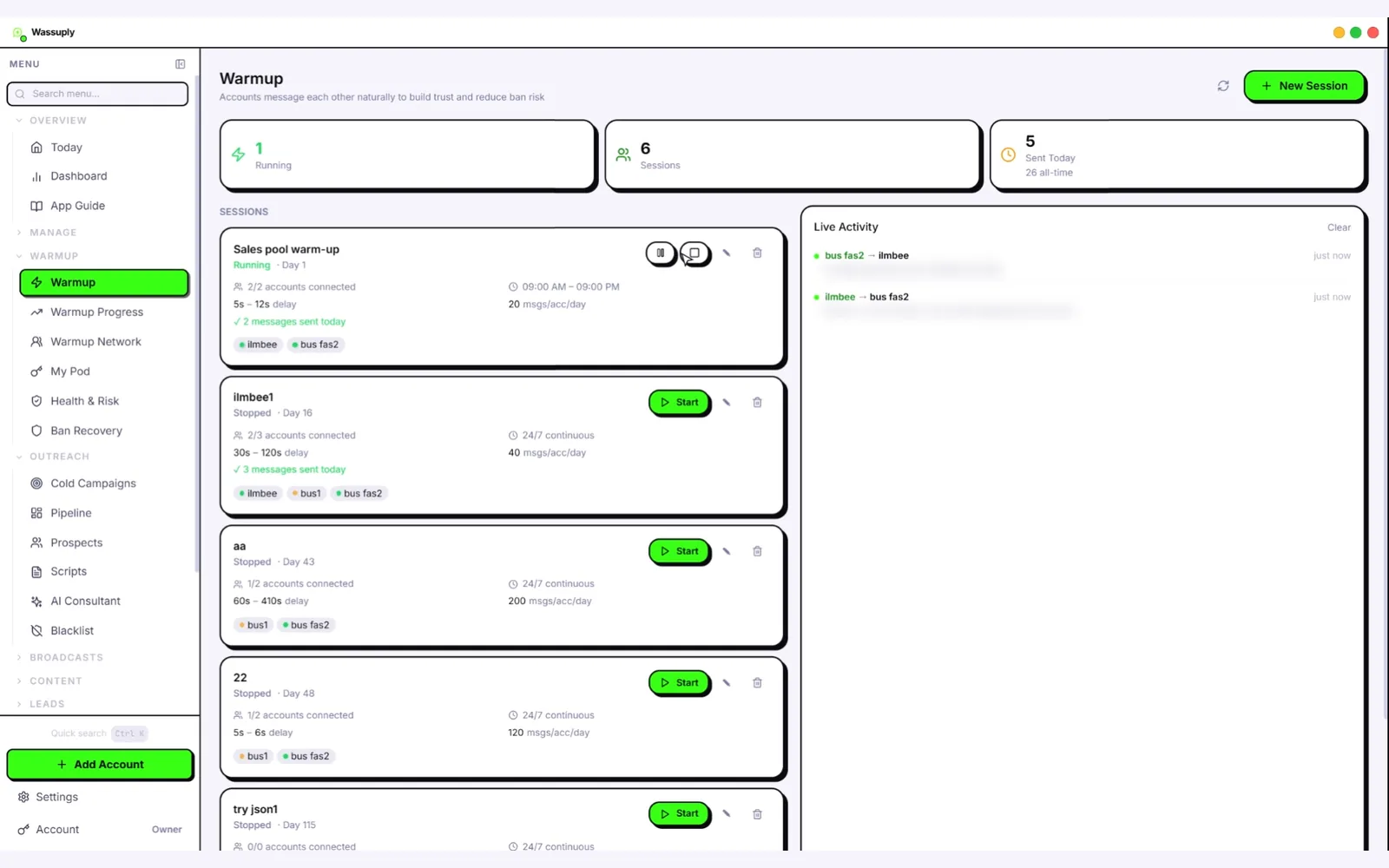
What the licence buys is everything the manual plan can't scale: numbers chatting on autopilot with natural lines from 10 built-in chat packs (or your own), random 30-120 second gaps and only inside your hours; Warm-up Pods that pair your numbers with other Wassuply users' numbers on different IPs and in other countries; an isolated session, fingerprint and optional proxy per number; Health & Risk plans with days to warm, a safe daily limit and a first campaign size; and paced campaigns afterwards. The warm-up chats are not AI-written; AI (your own key) is for outreach messages. Read how to avoid a WhatsApp ban for how those pieces fit together.
Outgrown warming by hand?
Warm unlimited numbers on autopilot with isolated sessions, Warm-up Pods and a plan per number. The download is free; warming needs a licence.
Free account. Windows 10 and 11.
Frequently asked questions
Is there a free WhatsApp warmer?
Not a good automated one that stays free. The truly free option is warming by hand: a real SIM, a full profile, two-way chats with people you know and 15 to 30 days of patience. Free trials, freemium extensions and GitHub scripts exist, but each comes with limits or risks.
Is a WhatsApp warmer from GitHub safe?
The well-known projects are libraries such as whatsapp-web.js and Baileys, not ready-made warmers, and their own documentation says WhatsApp does not allow unofficial clients. Small warmer scripts often have few users and no updates. Read the code before running it, and never use repositories that ship key generators or cracks.
Can I warm up a WhatsApp number without any software?
Yes. Use a real SIM, complete the profile, wait at least a day before linking WhatsApp Web, let people you know message you first, keep chats two-way and add voice notes, calls and groups gradually. Start tiny outreach only after day 15.
How long does manual WhatsApp warm-up take?
At least 15 days for a brand-new number before any outreach, and 30 days is better. Budget roughly 10 to 20 minutes a day per number. Doing it convincingly by hand for more than a few numbers is hard.
Is Wassuply a free WhatsApp warmer?
No. The Wassuply download and account are free, but warming and sending need an active licence. The early-bird lifetime licence is $397 one-time, with unlimited numbers and every feature.